
Why Are People Moving Away from WordPress?
After two decades of dominance, WordPress still powers nearly half the web. However, many teams now find it too slow or hard to scale. Plugin bloat, security risks, and time-consuming maintenance are the top pain points, leading to a search for WordPress alternatives.

According to the State of CMS 2025, 61% of companies use multiple Content Management Systems, and half are trying to escape legacy systems like WordPress due to slow publishing and poor scalability. While that doesn’t mean WordPress is obsolete, it’s no longer a one-size-fits-all solution.

The best alternative depends on your goals, team, and tech stack. Here’s how to choose the best WordPress alternative for your business.
How to Choose the Best WordPress Alternative for Your Business
Switching from WordPress means picking a platform that fits your team’s skills and long-term goals. A wrong choice can lead to migration headaches like broken pages, lost rankings, or SEO setbacks. Our guide on WordPress CMS migration and SEO explains more on how to prevent that by planning your move carefully and keeping your content structure and URLs consistent.
Team Skills
Your CMS should match the technology your team already knows. If you have React or Next.js developers, a headless CMS like Sanity, Strapi, or Contentful will let them build flexible frontends with modern frameworks while managing content through APIs.
If you have to build a website without a developer’s help, website builder like Webflow or Squarespace. With their hosting, templates, and drag-and-drop editors, launching and maintaining sites without coding knowledge is easy. They trade flexibility for simplicity, since customization and integrations are limited compared to developer-oriented CMSs.
Use Case
The best WordPress alternative depends heavily on what type of site you’re building.
Marketing sites and content-heavy blogs will want strong visual editing, SEO tools, and publishing workflows. eCommerce, platforms like Shopify offer built-in product management, checkout systems, and analytics for online stores, which are easier to scale than WordPress with WooCommerce.
Apps, SaaS platforms, or custom portals should look into migrating to a headless CMS. It lets you serve content across multiple devices (web, mobile, IoT) and integrate with modern frontends like Next.js, React Native, or Expo.
Migrating from WordPress?
Hosting & Cost Model
Your budget and technical capacity play a big role in deciding between SaaS and self-hosted platforms.
SaaS CMSs (like Sanity or Storyblok) include hosting, backups, and updates. They’re reliable and fast to deploy, but you’ll pay recurring fees based on usage and storage.
Self-hosted or open source CMSs (like Strapi) require you to arrange your own web hosting environment, which gives more control but adds setup and maintenance tasks.
Hosting, add-ons, developer hours, and performance optimization often cost more than the base subscription, so before deciding, calculate your total cost of ownership. Many businesses moving from WordPress realize that while open-source looks cheaper, SaaS CMSs can lower their maintenance and support costs over time.
Integration Flexibility
Modern websites rarely operate in isolation. Your CMS needs to talk to your CRM, analytics, and marketing automation tools. WordPress relies heavily on plugins for these connections, which adds maintenance risk and can slow down performance.
Look for platforms with strong APIs and native integrations for tools like HubSpot, Google Analytics, or Zapier. Headless CMSs excel here, since they’re built to plug into anything. Switching to a CMS that supports direct API-level integrations can improve security and future-proof your content strategy as new tools appear on the market.
Toolbox by Admiral
Front-end Development for Web App MVP with Sanity & React for the Insurance Company
READ CASE STUDY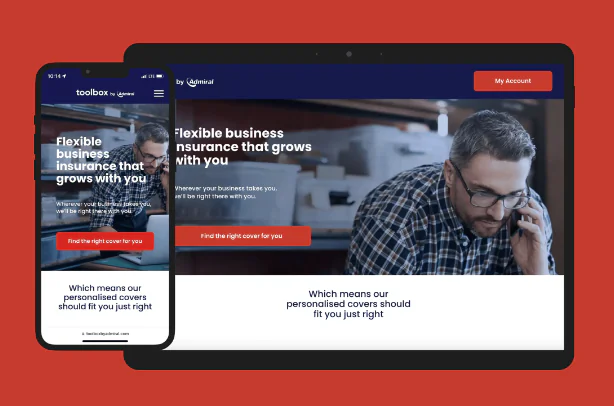
Best WordPress Alternatives of 2025
Traditional Alternatives to WordPress CMS Worth Considering
When people look for a WordPress alternative, they often start with other traditional CMS solutions.
A traditional CMS combines the backend (where you manage content), the database (where it’s stored), and the frontend (what visitors see) into one system. It has a familiar, all-in-one structure, making it easy to set up, but limiting flexibility and performance as your site grows.
If your priority is ease of use, built-in templates, and visual control, traditional CMSs and website builders often work best. You can find a full overview in our comparison of the best CMSs, but here are some of the best options for 2025:
Webflow

Webflow is one of the most popular alternatives to WordPress for small businesses, agencies, and designers. It combines a visual website builder with full control over HTML, CSS, and animations.
It’s a good choice for teams that value design flexibility, SEO-ready templates, and no-code publishing. Keep in mind that large multi-site Webflow projects can get expensive on higher plans.
Squarespace

Squarespace focuses on simplicity and integrated hosting. It excels at beautiful web design, thanks to a wide range of templates and easy to learn visual editor. Projects that require fast setup and minimal maintenance, like personal blogs or portfolios, will have the most use of it.
Unfortunately, you can’t customize it as much as WordPress or Webflow, and it doesn’t support advanced integrations or developer workflows.
Joomla

Joomla is an open-source CMS that’s been around almost as long as WordPress. It requires some technical know-how, but offers full control over content structure and user management.
It’s a solid alternative to WordPress for sites that need multilingual support or complex permissions, though it’s harder to learn and has fewer plugins.
Umbraco

Umbraco is an open-source CMS built on .NET. It’s most often used by enterprise teams and agencies working in Microsoft environments.
It provides strong customization options, secure architecture, and excellent scalability, though it isn’t very beginner-friendly. Its greatest strengths lie in providing for corporate websites and data-heavy projects that require reliability and long-term stability.
Drupal

Drupal is an enterprise-ready CMS that offers advanced user roles, multilingual capabilities, and security, which is why it’s a top choice for government, education, or large corporate websites.
Compared to WordPress, it requires more development expertise, but its performance makes it one of the best WordPress alternatives for high-traffic organizations.
Top Headless CMS Alternatives for WordPress
As we explained in our article on what is a headless CMS, this model allows faster performance and better multi-channel publishing.
For teams that have outgrown the limits of traditional website builders, headless CMSs are a modern, developer-friendly way to build and manage content. Instead of coupling your content and presentation layers, a headless CMS separates them. Because of that, developers have full freedom to build with frameworks like React, Next.js, or Vue, while editors manage content independently through an API.
When Should You Choose Headless CMS?
This type of setup is best for businesses that see their digital presence as more than just a website. It suits SaaS and tech companies managing content across multiple platforms, eCommerce brands that need fast, personalized storefronts, and global organizations maintaining multilingual sites under one system.
You can find a full breakdown of leading options in our ranking of the top 5 headless CMS platforms. Meanwhile, let’s look at this quick overview:
Sanity

Sanity is one of the most popular WordPress alternatives for developers, thanks to its real-time collaboration, structured content schemas, and API-first design. It has a generous free plan and a strong developer community, which makes it one of the best open-source CMS alternatives for growing businesses.
Unlike WordPress, where plugins often handle integrations, Sanity’s data model is completely customizable. It’s an ideal solution for teams using React or Next.js who want to build fast, dynamic frontends and provide marketers with an intuitive editing experience in Sanity Studio.
Contentful

Contentful is an enterprise-grade CMS platform. It’s cloud-based, stable, and offers advanced content modeling with role management, versioning, and multi-language support.
Compared to WordPress, Contentful eliminates plugin dependency and delivers faster performance through its CDN-backed API architecture. However, due to its costs and limitations, it might not be the best choice for a headless CMS migration.
Strapi

Strapi is a leading open-source headless CMS that gives you full control over hosting and customization. Built on Node.js, it’s a great fit for developers who prefer self-hosted CMS platforms and want to extend or modify backend logic.
It includes built-in authentication, GraphQL and REST APIs, and plugin-like extensions without the bloat that slows down traditional WordPress setups.
Storyblok

Storyblok bridges the gap between traditional and headless CMSs. It’s API-driven but includes a visual editor that lets marketers preview and arrange components in real time. The devs can build structured, reusable components while marketers see exactly how content will look.
Hygraph (GraphCMS)

Hygraph, previously known as GraphCMS, is a GraphQL-native CMS that focuses on speed and structured data delivery. It’s often chosen by engineering-led teams for projects that require complex API integrations, dynamic queries, or multi-platform delivery.
Compare the Best Alternatives to WordPress
| Platform | Type | Best For | Ease of Use | Scalability & Flexibility | Pricing |
| Webflow | Traditional | Designers, agencies, and marketing teams | Easy | Moderate | Free Tier; paid starts at $18/mo |
| Squarespace | Traditional | Small business websites and portfolios | Very Easy | Low | Personal $25/mo |
| Joomla | Traditional | Technical users needing advanced structure or multilingual sites | Moderate | High | Free (open source) |
| Umbraco | Traditional | Enterprises and agencies in Microsoft environments | Technical | Very High | Free for core features; paid starts at €42/mo |
| Drupal | Traditional | Enterprise, education, and government sites | Complex | Very High | Free (open source) |
| Sanity | Headless | Developers building scalable content-heavy projects | Moderate | Very High | Free Tier; paid starts at $15/mo |
| Contentful | Headless | Enterprise teams managing global, multi-language content | Moderate | Very High | Free Tier; paid starts at $300/mo |
| Strapi | Headless | Developers wanting full backend control | Technical | High | Free Tier; paid starts at $45/mo |
| Storyblok | Headless | Teams combining developer workflows with marketing flexibility | Easy | High | Free Tier; paid starts at $99/mo |
| Hygraph (GraphCMS) | Headless | API-first SaaS and data-driven projects | Moderate | High | Free Tier; paid starts at $199/mo |
Should You Still Use WordPress?
WordPress still makes sense for many websites. It’s simple to use, supported by a massive plugin library, and is a great blogging platform. It also supports portfolios and small business sites that don’t need complex integrations. You can get a site online quickly and maintain it with minimal technical effort.
But for teams aiming for faster performance, custom workflows, or content that needs to live across web and mobile, WordPress can be a deadweight. Modern CMS platforms like Sanity, Contentful, and Webflow give developers and editors more space to build and experiment without plugin bloat or maintenance issues.
If you’re thinking about switching from WordPress, we can help you migrate safely to Sanity or Next.js-based setups without losing SEO or performance. Let’s plan your migration!
Ready to Migrate from WordPress to Sanity?
Read More
- Contentful Migration in 2025: What are the Alternatives?
- Best Use Cases of Sanity
- Sanity and Nextjs for CI / CD
Sources
FAQ
What is the Best WordPress Alternative?
The best WordPress alternative depends on your goals and technical skills. For no-code websites, Webflow offers design flexibility and built-in hosting. Developers often pick Sanity, a headless CMS platform built for scalability and API-first workflows. Teams preferring an open-source solution can choose Strapi, which provides full backend control.
What Are the Downsides of Using WordPress?
The main downsides of WordPress are plugin dependency, security risks, and maintenance overhead. As sites grow, plugins can slow performance and create vulnerabilities. Frequent updates also increase the risk of compatibility issues. While WordPress remains effective for small projects, larger teams often switch to modern CMSs like Sanity, Webflow, or Contentful for better scalability, security, and editing experience.
Are Headless CMSs Better Than WordPress?
In many cases, yes. A headless CMS separates the content layer from the frontend, improving performance, security, and flexibility. Platforms like Sanity, Contentful, and Storyblok allow developers to use frameworks such as React or Next.js while editors manage content through APIs. Unlike WordPress, headless systems support faster workflows, multi-channel publishing, and easier integration with modern web tools.
Can I Migrate from WordPress Without Losing SEO?
Yes, you can migrate from WordPress without losing SEO if the process is planned properly. The key is to maintain your URL structure, use 301 redirects, and migrate all metadata like titles, descriptions, and alt tags. Moving to a modern CMS such as Sanity or Contentful can even boost site speed and SEO performance. See our WordPress CMS migration and SEO guide for a detailed walkthrough.


