

In a terminal on Mac OS X, you can use [TAB] to autocomplete file names and file paths.
Wouldn’t it be nice if you could do the same with git commands and branch names?
Step 1: Get git-completion script
Get the git-completion.bash script and put it in your home directory:
curl https://raw.githubusercontent.com/git/git/master/contrib/completion/git-completion.bash -o ~/.git-completion.bashStep 2: Update .bash_profile
Make sure that you are in your home directory:
cd ~/Add the following code to your .bash_profile (~/.bash_profile).
if [ -f ~/.git-completion.bash ]; then
  . ~/.git-completion.bash
fi
If you don’t have .bash_profile file just create it and append the code on the end.
Step 3: Apply the changes
The script will work for all new terminal tabs (or windows), to have it running right away you need to execute it:
source ~/.bash_profileStep 4: Check if it’s working
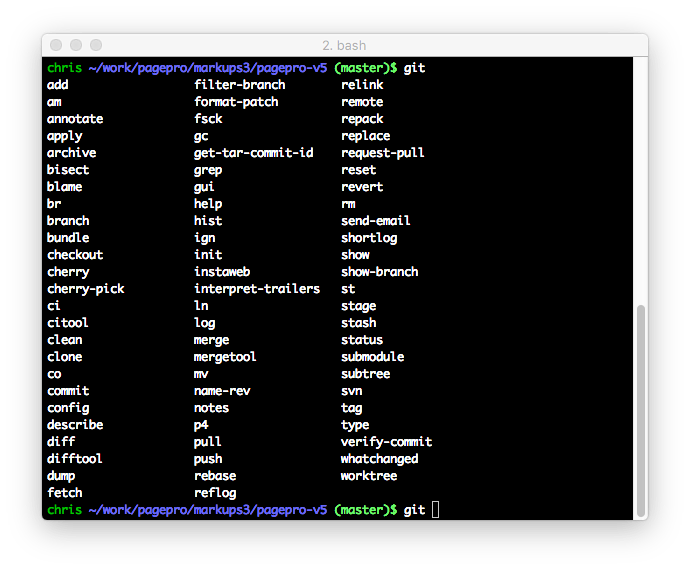
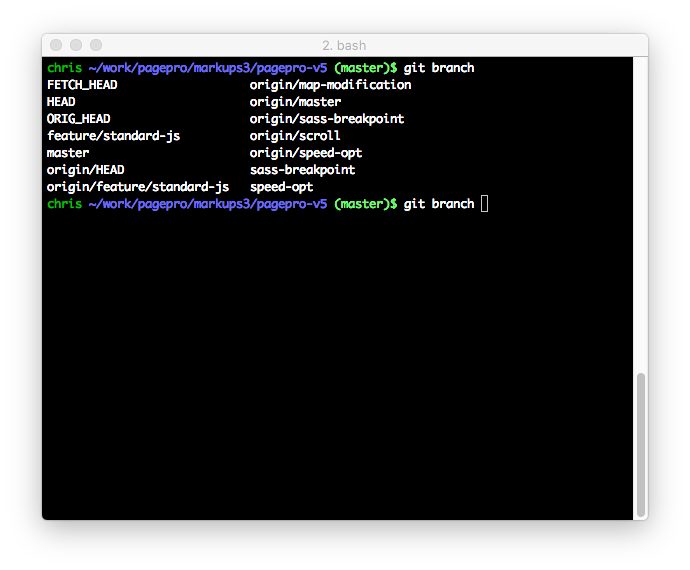
Go to any folder with git repository. You should find that [TAB] now autocompletes commands and branch names.


comments
J
Posted on
This is great! I wish it worked with my git aliases. For instance, instead of typing `git checkout`, I like typing `gco`. Unfortunately I don’t get branch auto-completion this way.
Ruth Morata Gil
Posted on
So simple and still, for some reason, it won’t work for me :/
I get the same as always when I hit tab after “git” in a folder with git repo. Oh well!
Andrey
Posted on
When running the command
source ~/.bash_profile
I get this
ERROR: this script is obsolete, please see git-completion.zsh
Meg G.
Posted on
Worked like a charm, thanks for posting this!
Comments are closed.