Next.js is a full-stack React framework, built and maintained by Vercel, that renders each page on the server, at build time or in the browser from one React codebase.
The current line is Next.js 16: 16.4 shipped on October 6, 2026. Since 16.0, proxy.ts has replaced middleware.ts and Turbopack is the default bundler; 16.4 recommends Cache Components for every app.
Choosing server-side, static or client-side rendering per route, and with Cache Components per component, is what makes it fit SEO-critical sites that mix static and dynamic content.
It works with a headless CMS, external APIs and any host that runs Node.js, with Vercel as its native platform.
Plan for upkeep: Next.js publishes security releases roughly once a month, and 15.x reached the end of maintenance support on October 21, 2026.
What is Next.js?
Next.js is an open-source React framework, built and maintained by Vercel, for building websites and web applications. It adds routing, server and static rendering, caching and backend endpoints to React, so one project serves both the pages and the API behind them.
Next.js has two routers. The App Router, introduced in Next.js 13, is built on React Server Components: components render on the server unless you mark them for the browser. The Pages Router is the original model, which the Next.js docs still support while recommending a move to the App Router. Our App Router vs Pages Router comparison covers the trade-offs.
For each route, Next.js decides how the HTML is produced: at build time (static generation), on each request (server-side rendering), or in the background after a set interval (Incremental Static Regeneration). Client-side React then takes over the interactive parts. Cache Components move that choice down to individual components, as described in Features below. The official Next.js docs describe each mode in detail.
What’s New in Next.js 16
Next.js 16 shipped in October 2025, and Next.js 16.4 is the latest minor release. One breaking change to know first: synchronous access to route params and searchParams, deprecated since Next.js 15, is gone, so components await params. The changes that matter when you start or upgrade a project:
proxy.ts replaces middleware.ts. The file that runs before a request is handled is now proxy.ts, with the same job: redirects, rewrites, headers and lightweight checks.
Turbopack is the default bundler for all apps. The release notes cite up to 5 to 10 times faster Fast Refresh and 2 to 5 times faster builds.
Cache Components. Since 16.4 the Next.js team recommends them for every app; new create-next-app projects have them on by default, and they become the default in Next.js 17.
React 19.2 at 16.0, React 19.3 in 16.4, plus React Compiler support and file system caching for faster restarts.
Instant Navigations (16.3). A set of tools that gives server-rendered Next.js apps the responsiveness of a single-page app on navigation. It is opt-in, behind the cacheComponents and partialPrefetching flags.
Deployment adapters.Next.js 16.2 added a stable Adapter API and a public adapter test suite, so other hosts can run the full feature set.
If you run Next.js 15, note that under the Next.js support policy, 15.x reached the end of Maintenance LTS on October 21, 2026, two years after its release, and no longer gets guaranteed fixes. Moving to 16 means Node.js 20.9 or later, async params and searchParams, renaming middleware.ts to proxy.ts (the old name is deprecated), and running the upgrade codemod (npx @next/codemod@canary upgrade latest). Since 16.4, npx next@canary upgrade --agent=latest hands a coding agent the version-specific migration steps instead.
Next.js 16 took work we used to do by hand and made it the default. Turbopack builds by default, middleware became proxy.ts with one clear job, and Cache Components let us decide what to cache component by component instead of route by route. On a 100,000+ page platform, that means less time tuning caching and more time shipping features.
Rafał Dąbrowski, Next.js Expert at Pagepro
Why Choose Next.js for Web Development?
Choose Next.js if your pages need to rank and load fast, mix static and dynamic content, and your team already works in React. Skip it for an internal tool behind a login, where plain React with a simple build is less to maintain.
There are plenty of options for React application development; Next.js earns its place on public sites, where pre-rendered HTML, routing and image handling come built in. For the full list of trade-offs, see our Next.js pros and cons.
These are the features you get out of the box when you build a web app with Next.js.
Hybrid Rendering
The ability to mix Server-Side Rendering and Static Site Generation, with Client-Side Rendering (CSR) within a single application is a major perk. Developers can choose whether to pre-render content at build time or handle it at runtime, optimizing performance, SEO, and user experience. For example, using SSG for blog posts, SSR for dynamic user dashboards, and CSR for interactive components.
Functions and Proxy
Route code runs as serverless functions on Vercel, where Fluid compute bills by active CPU time, provisioned memory and invocations, or on your own Node.js server. proxy.ts (formerly middleware.ts) runs before a request is handled, for redirects, rewrites, headers and lightweight auth checks.
Incremental Static Regeneration (ISR)
ISR updates static pages without a full rebuild. Without Cache Components, a route sets export const revalidate = 3600: visitors get the cached page, and at most once an hour a request triggers a fresh version in the background. On demand, revalidatePath('/blog') or revalidateTag('posts', 'max') refreshes it from a Server Action, or from a Route Handler that a CMS webhook calls when an editor publishes. With Cache Components, the same job moves to cacheLife and cacheTag, shown below. The ISR guide covers the classic model, and ISR with Cache Components has its own guide.
File-Based Routing
Next.js uses file-system based routing, meaning you can use folders and files to define routes. There is no router configuration file to maintain: the URL structure of your application mirrors your folder structure directly.
How it works in practice:
Create a file inside the app/ directory (App Router) or pages/ directory (Pages Router), and it becomes a route automatically:
app/
├── page.js → /
├── about/
│ └── page.js → /about
└── blog/
└── page.js → /blog
Each page.js file exports a React component that renders at that route:
Co-location: loading states, error boundaries, and page components all live in the same folder
Route Handlers and API Routes
In the App Router, backend endpoints are Route Handlers: a route.ts file that exports GET, POST and other HTTP methods. The Pages Router keeps API Routes under pages/api. Either way, the frontend and the endpoints it calls live in one project and deploy together.
Server Components and Cache Components
Server Components run only on the server: their code is not shipped to the browser, so data fetching and secrets stay off the client. Cache Components, recommended for every app since 16.4 and on by default in new create-next-app projects, decide caching per component or function instead of per route. Caching is opt-in: anything you do not mark with use cache runs at request time, and Next.js sends the cached parts of a page first while the dynamic parts stream in.
A cached data function looks like this. cacheLife sets how long the result stays fresh, and cacheTag lets a Server Action or Route Handler refresh it on demand with revalidateTag('posts', 'max'):
// lib/posts.js

import { cacheLife, cacheTag } from 'next/cache'

import { db } from './db'

async function getPosts() {

  'use cache'

  cacheLife('hours')

  cacheTag('posts')

  return db.posts.findMany()

}
Get the CTO’s Ultimate Guide to Next.js
Discover the full potential of Next.js. Gain insights into advanced methodologies and real-world applications tailored for technology pioneers.
PDF
Thank you for signing up. Check your e-mail for the guide.
How Does Next.js Compare to Other Frameworks?
Choosing the right framework depends on your project’s requirements. Here’s how Next.js stacks up against the most common alternatives.
Next.js vs React
React is a UI library, not a framework. It handles component rendering but leaves routing, data fetching, and performance optimizations entirely to you. Next.js is built on top of React and adds everything React doesn’t include out of the box.
React only handles the “view” layer, meaning you’ll need to integrate additional tools for routing, data management, and more. This can add complexity to your project. Next.js removes that overhead by providing sensible defaults for routing and data fetching.
The rendering difference is the most practically significant one. Plain React ships an empty HTML shell to the browser. The JavaScript bundle downloads, executes, and renders the UI on the client, and the user sees a blank screen or loading spinner until JavaScript finishes. Slow networks mean slow first paints, and crawlers that do not run JavaScript, or run it later, see an empty page first.
Next.js solves this with SSR, SSG, and ISR, meaning pages arrive pre-rendered and ready to index. If you’re building a production application that needs SEO, fast load times, and a scalable architecture, Next.js is the more practical choice. If you’re building an internal tool or a SPA where SEO is irrelevant, plain React gives you that flexibility without the framework overhead.
Gatsby is a static site generator also built on React. It excels at content-heavy sites with data pulled from multiple sources at build time. The key practical difference comes down to how each framework handles content updates at scale.
According to the official Next.js docs, Incremental Static Regeneration (ISR) enables you to use static-generation on a per-page basis, without needing to rebuild the entire site. With ISR, you can retain the benefits of static while scaling to millions of pages.
Gatsby’s answer for large sites is Deferred Static Generation (DSG), which builds a page on its first request. Netlify, which acquired Gatsby in February 2023, announced the end of the Gatsby Cloud hosting product in August 2023; Gatsby itself, DSG included, still runs through adapters such as the Netlify one, and version 5.16.1 shipped in February 2026. With ISR, Next.js keeps serving the existing page while a fresh version regenerates in the background.
For pure content/marketing sites with stable content, Gatsby remains a valid choice. For anything that mixes dynamic and static content at scale, Next.js handles it more gracefully.
Feature
Next.js
Gatsby
Primary approach
Hybrid (SSR, SSG, ISR)
Static-first (SSG)
Content updates
ISR: pages regenerate in the background after a set interval
Full or incremental rebuilds; DSG builds a page on its first request
Nuxt.js is the closest direct equivalent to Next.js, built for Vue instead of React. Both offer file-based routing, SSR, SSG and full-stack capabilities. On July 8, 2025, NuxtLabs, the team behind Nuxt and Nitro, joined Vercel; Nuxt stays MIT-licensed and open source.
The decision between the two rarely comes down to framework capabilities. Moving between them means rewriting Vue single-file components as React components, so the most important factor is your team’s existing expertise.
Community size affects problem-solving speed. React’s massive footprint means Stack Overflow answers appear quickly, becoming a productivity booster for real-world development. Nuxt’s resources grow fast, but niche problems take longer to solve.
If your team works in React, Next.js is the natural choice. If your team works in Vue, Nuxt is.
Feature
Next.js
Nuxt.js
UI library
React
Vue
Rendering
SSR, SSG, ISR, CSR
SSR, SSG, CSR, universal rendering
Backend
Route Handlers, API Routes
Nitro server runtime
Hosting
Optimized for Vercel; adapters for other hosts
Vercel, Netlify, Cloudflare Workers, Node
Ownership
Vercel
Open source; NuxtLabs, the company behind it, joined Vercel in July 2025
Next.js Performance and SEO
Search engines and users both get pre-rendered HTML: static and server-rendered pages arrive with their content, so crawlers do not have to run JavaScript to read them. The built-in Image component resizes images, serves modern formats such as WebP and lazy-loads them, so teams do not build that pipeline themselves, and Server Components and code splitting keep the JavaScript each page ships small.
Next.js is used for public websites and web applications where speed and search visibility matter, such as:
Complex Web Applications
Web Platforms
Multi-Market Solutions
Advanced eCommerce and Retail Platforms
SaaS Products
Interactive User Interfaces
Companies of every size run it. Here are four examples; our October 2026 list of 30 Next.js websites has more.
Spotify
Spotify’s Premium and company pages run on Next.js with the Pages Router. The web player at open.spotify.com is Spotify’s own build, so not every Spotify page you open is a Next.js page.
Proofed
Proofed, a US editing company, runs its order-management platform on Next.js; we built the front end alongside Proofed’s own team. The platform sits behind login; Proofed’s public marketing site runs on WordPress.
Proofed
MVP Development for the Leading Professional Proofreading and Editing Services Company
claude.com, Anthropic’s product site for Claude, ran Next.js 16 on the App Router when we checked in October 2026. The claude.ai app itself showed no Next.js markers.
Nike
Nike’s storefront runs Next.js 15 on the Pages Router, and its category pages come from a separate Next.js app.
EXPERT INSIGHTS, FRICTIONLESSLY DELIVERED!
Curated tech news delivered straight to your inbox every month.
Pros and Cons of Next.js
The short version is below; our Next.js pros and cons article covers each point in detail.
Advantages of Next.js for Business
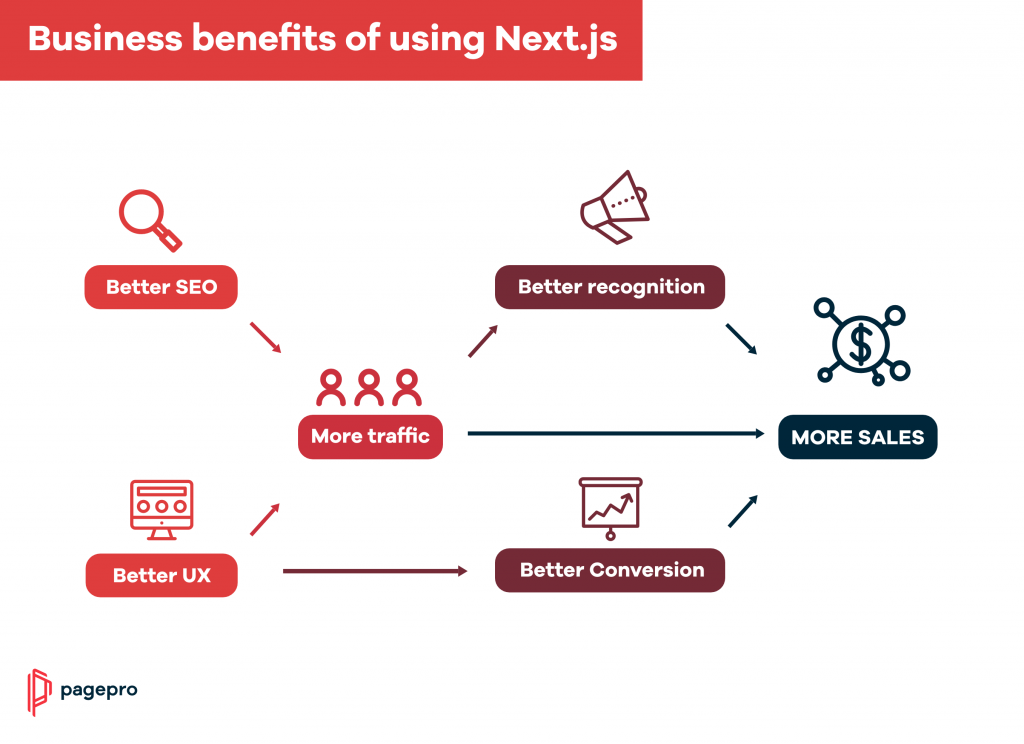
Performance by default: pre-rendering, image optimization and automatic code splitting without extra setup.
One codebase for pages and endpoints: Route Handlers sit next to the pages that call them and deploy together.
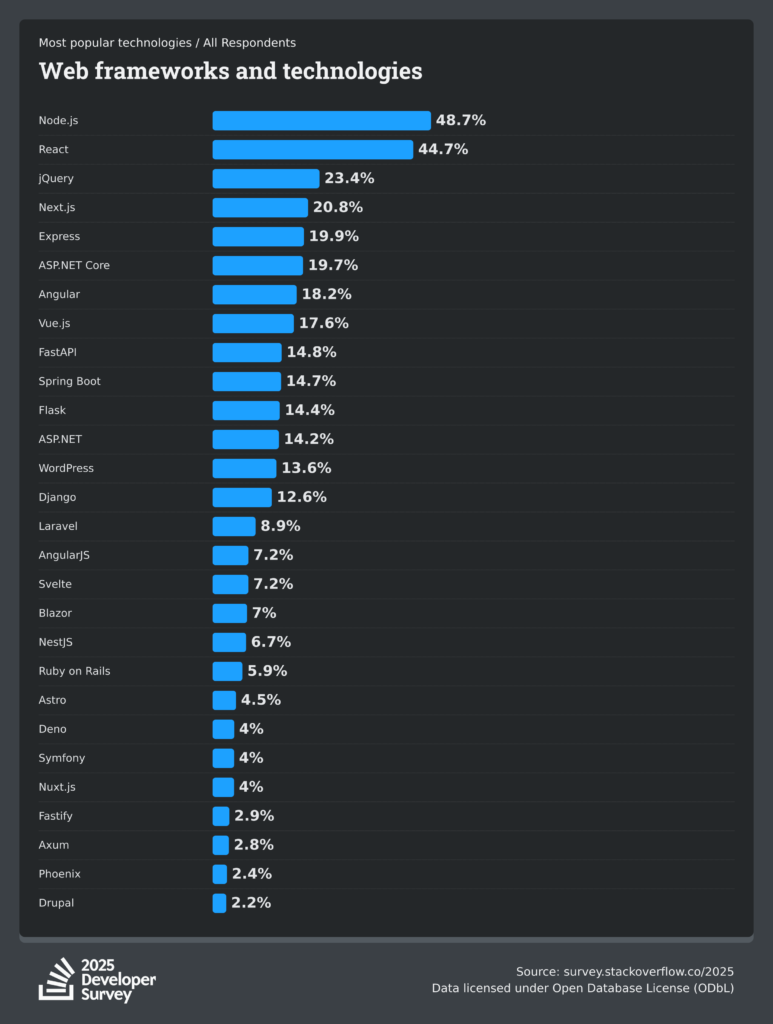
Hiring and ecosystem: React was the second most used web technology in the 2025 Stack Overflow survey (44.7%), and Next.js sits on top of it.
One of our clients, Learn Squared, an e-learning platform with 20,000+ students, moved off Drupal 7 to Next.js, Strapi and headless Shopify with our help. Buying happens on the site, and only payment goes through Shopify. Revenue rose 24.35% in the first 26 days after launch, a period that also included sales and course launches.
Learn Squared
Boosting the Performance of e-Learning Platform with Next.js
Our CTO on what we have seen since adopting Next.js ourselves:
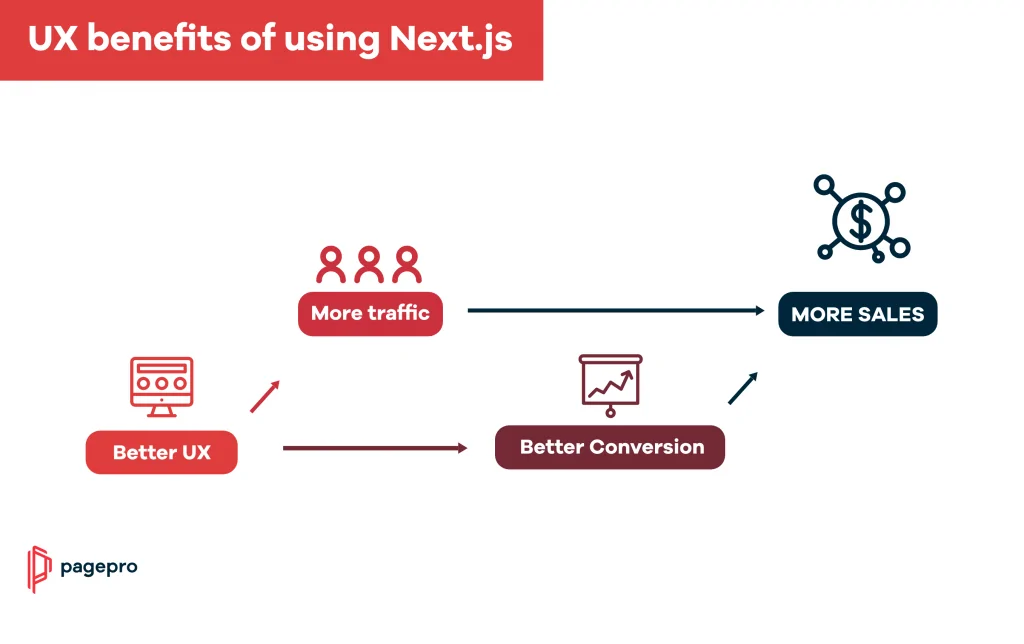
The universal compatibility of Next.js ensures modern web solutions function flawlessly across all devices, broadening customer reach and accessibility. We’ve seen improvements in conversion rates and performance since adopting Next.js.
Jakub Dakowicz, CTO at Pagepro
Hosting Cost
Hosting cost depends on traffic, not on the framework alone. On Vercel, the Pro plan is $20 a month per developer seat with $20 of included usage credit, and usage beyond it is billed, so an unoptimized app can cost far more than the plan price. Since Next.js 16.4, apps on Cache Components can set ensureStatic = 'navigation' on a page or a layout to guarantee that it, or a whole section of a site, stays static: the build fails if someone adds a component that would render on every request. On Vercel, where compute is billed by usage, that is a simple guard against unplanned costs on marketing pages, blogs and storefronts; the Next.js team pitches it for apps that want to “avoid unintentional compute and keep their server costs down”. Our guide to the Vercel hosting platform covers the trade-offs.
Get Next.js Vercel Cost Optimization Guide
Learn real-life techniques to optimize the hosting costs of your Next.js apps.
Thank you for signing up. Check your e-mail for the guide.
What Are the Downsides of Next.js?
The main downsides are upkeep, hosting complexity outside Vercel, and a learning curve around Server Components and caching.
Upkeep: a roughly monthly security release cadence and fixed support windows make upgrades recurring work, best done by a developer who knows the codebase.
Hosting outside Vercel takes setup: caching, regions and security layers that Vercel handles need to be configured yourself (see Enterprise Considerations below).
A learning curve: Server Components, client boundaries and Cache Components change where code runs and what gets cached, and teams coming from plain React need time to get them right.
No built-in state management: you add Redux, Zustand, MobX or React’s Context API yourself.
Enterprise Considerations for Next.js
Next.js is production-ready for enterprise deployments, but teams making a long-term commitment to the framework should understand three areas before architecting their stack: deployment flexibility, vendor dynamics, and security patch management.
Deployment Flexibility
Next.js can be deployed as a Node.js server, Docker container, static export, or adapted to run on different platforms, including any provider that supports Node.js. Since Next.js supports static exports, it can also be deployed and hosted on any web server that serves HTML/CSS/JS static assets, including AWS S3, Nginx, or Apache.
That said, there are practical trade-offs when deploying outside Vercel. Key ones to plan for:
ISR at scale: When self-hosting, ISR runs from a single region by default. Serving cached pages closer to visitors takes a shared cache or a CDN, for example through an adapter.
Reverse proxy: For enterprise teams self-hosting at scale, the official Next.js docs recommend running a reverse proxy like Nginx in front of the Next.js server. A reverse proxy can handle malformed requests, slow connection attacks, payload size limits, rate limiting, and other security concerns, offloading these tasks from the Next.js server and allowing it to dedicate its resources to rendering.
Multi-region and data residency: Teams with strict geographic data requirements will need to configure CDN and caching layers manually. This is achievable but adds infrastructure overhead that Vercel handles automatically.
Vendor Dynamics
Next.js is open source under the MIT license and governed by Vercel. For most organizations this is a non-issue: the framework is mature, widely adopted, and has an enormous community. Three things worth knowing before committing:
Roadmap ownership: Next.js feature prioritization is driven by Vercel as a company. Some features are optimized specifically for Vercel’s own platform.
OpenNext: A community-driven open-source initiative for full Next.js feature parity across deployment targets, with adapters for AWS, Cloudflare and Netlify. It builds on the Adapter API described in What’s New above.
Exit path: The framework is MIT-licensed, self-hostable on any Node.js infrastructure, and has a large enough ecosystem that migration, while significant, is not a lock-in trap. The real switching cost is institutional knowledge, not licensing.
Security Patching
Like any widely adopted open-source framework, Next.js has had critical vulnerabilities, and in autumn 2026 alone fixes shipped on September 22, September 30 and October 14. The latest, an out-of-band release on October 14, 2026 (16.4.1 and 15.5.28), fixed three:
Critical remote code execution in image optimization of SVG files, caused by the upstream sharp library, on glibc-based Linux. It reaches back to Next.js 10, and 14.x and older get no patched release; the advisory’s workaround for them is upgrading sharp to 0.35.5 or later.
Two weeks earlier, the scheduled release on September 30 fixed a high-severity server-side request forgery in image optimization for apps that allow remote images, and a cache-poisoning flaw that hit self-hosted Pages Router apps with static or ISR pages (apps on Vercel were not affected). The same day, another advisory covered a flaw where, with Cache Components enabled, unpublished Draft Mode content from an editor’s preview could leak into a public request that overlapped it, and stay cached until the page was revalidated. It was rated moderate, but it matters for sites that preview CMS drafts on Cache Components, Sanity included.
On September 22, a critical flaw in next/og that could allow remote code execution was fixed in 16.3.6 (it affected 16.2.0 to 16.3.5). Next.js 15.x was not affected; 15.5.26 shipped related hardening only.
The most serious so far was React2Shell, disclosed on December 3, 2025: a CVSS 10.0 flaw in the React Server Components protocol that could allow remote code execution. It is filed as CVE-2025-55182 for React and tracked for Next.js in the CVE-2025-66478 advisory. App Router apps on the 15.x and 16.x lines were affected. Fixes shipped in 15.0.5 to 15.5.7 (one patch per minor line) and 16.0.7. Next.js also advised teams whose apps were online and unpatched on December 4 to rotate their secrets.
In March 2025, CVE-2025-29927, a middleware authorization bypass, affected self-hosted Next.js applications that relied on middleware for auth checks; patches shipped for 12.3.5, 13.5.9, 14.2.25 and 15.2.3.
Three security practices every enterprise Next.js team should have in place:
Stay current: Next.js publishes scheduled security releases roughly once a month, plus out-of-band updates for critical issues. Since 16.4, the experimental.agentUpgrade setting, 'security' by default, reminds you during next dev and next build when an upgrade fixes a known vulnerability in your version. Follow the Next.js security posts and treat version updates as part of your regular release cycle.
Layer your auth: Treat proxy.ts (formerly middleware) as one layer of authentication, not the only one. Critical auth checks should also be validated at the data access layer.
Self-hosting ownership: If you are not on Vercel, security patch management falls entirely on your own team. Build an explicit process for tracking and applying Next.js security updates before you go to production.
Support windows matter too: 16.x is the version in Active LTS, and 15.x and older no longer get guaranteed fixes.
Next.js is the default choice for React teams building sites that must rank and load fast, as long as you plan for upgrades. Start new projects on 16.4.1 or later with the App Router, and move 15.x projects to 16: 15.x reached the end of Maintenance LTS on October 21, 2026, and no longer gets guaranteed fixes. Until you move, keep them on 15.5.28 or later, which carries the October 2026 security fixes for the 15.x line.
New project:npx create-next-app@latest sets up the App Router, TypeScript, Tailwind CSS and, since 16.4, Cache Components.
Existing project, with a coding agent:npx next@canary upgrade --agent=latest gives the agent the version-specific migration steps.
Existing project, by hand:npx @next/codemod@canary upgrade latest applies the mechanical changes.
How long a move from 15 to 16 takes depends on how much of your code reads params, cookies() or headers() synchronously and how much logic sits in middleware. The codemod covers the renames, and the version 16 upgrade guide lists what it cannot migrate.
Next.js is a full-stack React framework, built by Vercel, that adds server-side rendering, static generation, file-based routing and backend endpoints to React. It helps teams build fast, SEO-friendly websites and web applications.
Is Next.js better than React?
React is a library for building UI components; Next.js is a framework built on top of it. Next.js is often the better fit for production sites because routing, rendering options and performance optimizations come built in. Our article Next.js vs React covers the choice in detail.
When should Next.js be used?
Use Next.js for projects where speed, SEO and a mix of static and dynamic pages matter: eCommerce, SaaS marketing sites, content-heavy sites and dashboards with public pages.
Is Next.js a coding language?
No. Next.js is a framework for JavaScript and TypeScript. You still write JavaScript or TypeScript; Next.js provides the structure, rendering and performance features.
Is Next.js frontend or backend?
Both. Next.js is a full-stack framework: it renders the frontend and runs backend code through Route Handlers, API Routes, Server Components and proxy.ts.
Does Next.js require a backend?
Not always. You can build a fully static site with Next.js, or add server-side code when your app needs dynamic data, authentication or a database.
Is Next.js worth learning in 2026?
Yes. Next.js 16.4 shipped on October 6, 2026, with 16.x in Active LTS, and 20.8% of respondents used it in the 2025 Stack Overflow survey, fourth among web frameworks and technologies.
Which Next.js version should I use in 2026?
Use Next.js 16 for new projects. 16.x is in Active LTS; 15.x left Maintenance LTS on October 21, 2026, and 14.x and older are no longer supported.
How does Next.js compare to Gatsby?
Both are React-based, but Next.js supports SSR, SSG, ISR and CSR, while Gatsby is static-first. Next.js updates individual pages in the background with ISR; Gatsby builds pages at build time by default, with Deferred Static Generation and server-side rendering as options. Gatsby still suits stable marketing sites and blogs.
How does Next.js compare to Nuxt.js?
Next.js and Nuxt.js are direct equivalents for React and Vue. Both support file-based routing, SSR, SSG and full-stack development, so the choice usually comes down to your team’s expertise. NuxtLabs joined Vercel in July 2025, and Nuxt remains MIT-licensed and open source.