• Next.js provides several built-in features that help developers build websites optimized for search engines.
• Server-side rendering and static site generation allow Next.js pages to be pre-rendered, improving how search engines crawl and index content.
• Proper SEO in Next.js involves managing metadata, page titles, descriptions, and structured content to make pages more discoverable.
• The framework also supports optimized performance through features like image optimization, fast routing, and efficient asset loading.
• Developers must ensure that dynamic content, routing, and JavaScript behavior do not negatively affect how search engines access page content.
• Understanding Next.js SEO best practices helps teams build websites that are both high-performing and easier for search engines to index.
What Do NextJs, Search Engine Optimisation And Cycling Have In Common?
In 2003, the British Cycling Organization hired Dave Brailsford as its performance director. In the next decade, British cycling teams under his care dominated the sport, turning 110 years of losses into a victory streak. This was achieved thanks to hard work, determination and hundreds if not thousands of small tweaks. You might ask – what does this have to do with Next.js, SEO or your website?
Search Engine Optimisation is also a competition. Your website needs to perform well to get a good position and win potential clients. Getting to that point, however, will require you to make numerous small tweaks.
Introduction to SEO
Search Engine Optimisation (SEO) is a process of optimising a website to improve its search listings ranks, search engine visibility and user satisfaction. The goal of SEO is to attract organic traffic by making your website appeal to real users and search engines.
SEO Best Practices And Strategies
SEO focuses on more than just one avenue. It’s a combination of multiple components, which together create a well-oiled mechanism that keeps your website on the top of search results. Knowing how each of them works will help you devise strategies to avoid problems and make SEO implementation easier.
On-Page SEO involves optimising your website for search engines. Creating high-quality, keyword-rich content, writing compelling title tags and meta descriptions, using structured headings, creating clean URLs, and linking to relevant pages within the site all contribute to it.
Technical SEO is all about backend improvements to site performance and visibility. It’s key elements are ensuring fast loading times, optimising for mobile devices, submitting an XML sitemap, using a robots.txt file to manage crawling, and implementing structured data (schema markup) for better search result appearance.
Off-page SEO is concerned with activities taken outside the website to boost its authority and placing in search engine results. This could be acquiring high-quality backlinks, engaging on social media, or writing guest blogs for exposure and backlinks.
Content marketing is achieved through creating and promoting valuable content to attract and engage the audience. Regularly publishing relevant blog posts and distributing them through social media, email newsletters, and influencer partnerships can drive traffic to the site.
Analytics and monitoring help understand and improve a website’s performance. Using Google Analytics to track traffic and user behavior, and Google Search Console to monitor search performance and identify issues will let you create better strategies for future growth.
Following these common SEO practices allows search engine crawlers understand your site better and ranks your site higher in search engine results.
Get Next.js Vercel Cost Optimization Guide
Learn real-life techniques to optimize the hosting costs of your Next.js apps.
Thank you for signing up. Check your e-mail for the guide.
Why Is SEO Important?
According to the Pareto principle, 80% of our consequences come from 20% of actions. The accuracy of this rule is especially visible in Google search results. The first result on the search page gets almost 40% of all clicks, with the number dropping the lower we move. In other words, SEO is a critical factor for search engines to understand your website and make it visible.
Proper SEO stands to prevent your website from getting lost among many others by helping it rank higher on search engine results pages and leading users directly to you. For those looking for internal improvements, much SEO value can be found in its ability for gaining data, which can be used to improve your current strategy and remain competitive in search engine listings. Considering the fact it can attract traffic without requiring ongoing costs, SEO is one of the best long-term investments for your business.
Optimise Google Search Console Results For Your Website’s Success
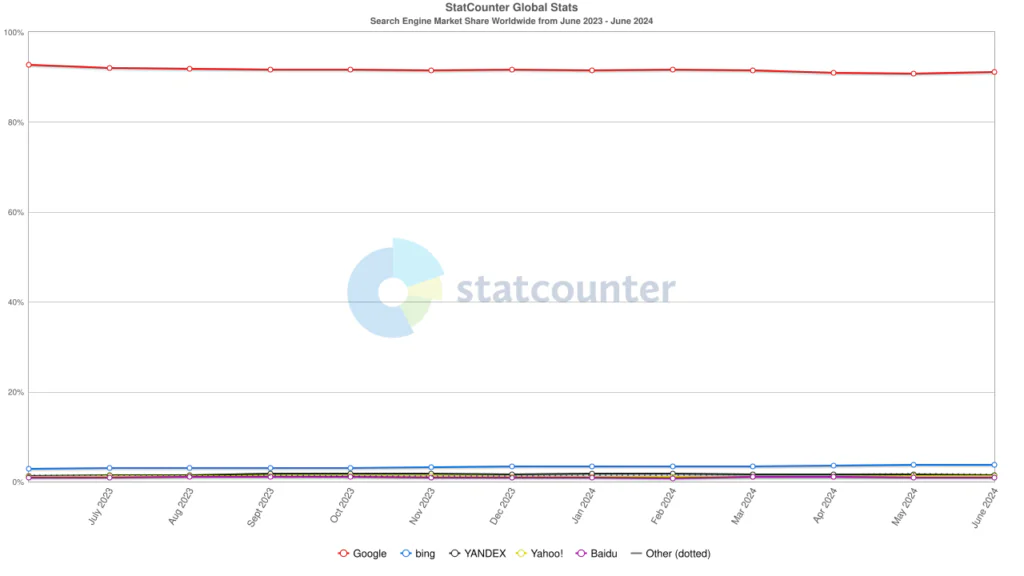
Source: StatCounter
While Bing, Yahoo and Baidu are a popular option in certain regions of the world, Google’s dominance makes it the go-to choice for most SEO strategies. Google and other search engines often take the same factors into account, but a focusing on the most popular search engine offers the broadest reach.
Google’s advantage lies in its algorithm, which prioritizes user experience above all else. This means factors like mobile-friendliness, site speed, and high-quality content heavily influence SEO rankings. In short, optimising for Google becomes crucial for any website aiming for visibility.
Luckily, Google provides a range of tools, which will help improve website performance and visibility:
Google Search Console monitors how Google’s search engine crawlers index your site. Besides providing insights into search performance, it points out issues that might affect your positioning. It works in tandem with Google Analytics. It offers detailed reports on website traffic, user behaviour, and conversion paths, to optimise user experience and your strategy.
Not sure which keywords to target? Google Trends will assist with finding what your audience is looking for through keyword research. It works great with Google Tag Manager, a tool to simplify the management of marketing tags to track user interactions efficiently.
We can’t forget about Google Lighthouse. Anybody struggling with improving the quality of their website can leverage its power to receive performance auditing with recommendations for fixes and improvements.
By employing these tools, you’ll set yourself up for a path of future success and considerably improve your Search Engine Optimisation.
Next.js Improves SEO Results and Rankings
What is Next.js
Next.js is a React framework developed by Vercel. It improves the development of web applications by providing features like server-side rendering, static site generation, and automatic code splitting. Next.js streamlines the development process for React applications by managing the underlying tools and configurations.
If you want to learn Next.js functions and applications be sure to read our blog post.
The built-in support for SEO needs makes Next.js a popular choice for developers. Next.js can boost your page speed, which has a tremendous impact on your user satisfaction. High speed means your website will rank higher in search engines by increasing average session duration.
What are other Next.js applications for search engines? In the words of our CTO:
“Being at the top of Google searches isn’t just an aspiration—it’s a clear indicator of success. As a CTO, I’ve seen how Next.js in web development directly improves the SEO of our customers’ website. It’s an essential tool in our stack, making this achievable through technical excellence and advanced optimisation strategies.”
Jakub Dakowicz, CTO at Pagepro
To prove it’s SEO-friendly, let’s look through the features Next.js provides and how they contribute to it directly.
Next.js SEO-Friendly Features And Results- SSR, SSG And More
Server Side Rendering (SSR) and Static Site Generation (SSG)
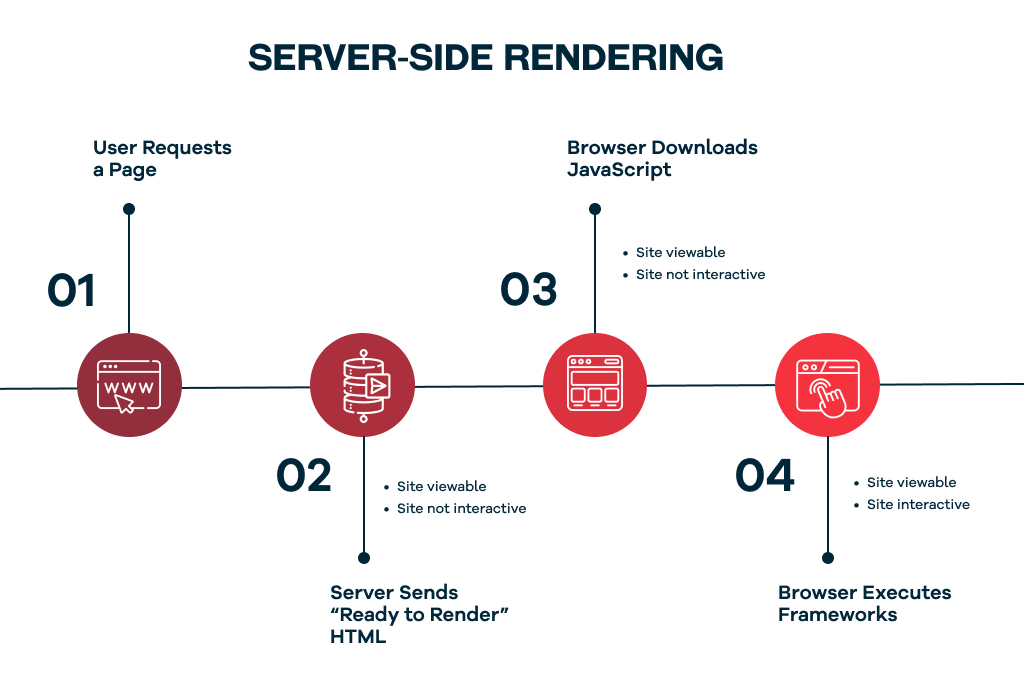
Nextjs SSR and SSG significantly improve SEO by delivering fully rendered HTML file to search engines. This ensures that it’s easy for search engines to crawl and index the content of your Next.js site and page components, leading to better search engine positioning. Pre-rendering pages either at request time (SSR) or build time (SSG) makes the content more accessible and helps search engines understand it.
Incremental Static Regeneration (ISR)
ISR combines the benefits of static generation and server-side rendering by allowing pages to be pre-rendered at build time and updated incrementally, ensuring quick load times and fresh content for better SEO.
Open Graph Customization & Meta Tags
By customising Open Graph meta tags and titles with Next.js, you can control how your content appears when shared on social media, potentially increasing click-through rates and driving more traffic to your website. Metadata tags can indirectly benefit your SEO by sending positive signals to search engines.
Dynamic Meta Tags and Titles Management
Customising metadata dynamically for each page ensures better visibility and click-through rates from search engines. This capability helps tailor the appearance of pages in search results.
App Router vs Pages Router: What Changes for SEO
The shift from Pages Router to App Router in Next.js 13+ is not just a structural change – it fundamentally changes how you handle SEO implementation. If you’re running Next.js 13 or later, the approach you use will determine how metadata is generated, how crawlers read your pages, and how much control you have over dynamic SEO at scale.
The core difference comes down to how metadata is declared.
In the Pages Router, SEO metadata was managed through the <Head> component from next/head, added manually to each page:
// Pages Router (legacy)

import Head from 'next/head';

export default function BlogPost({ post }) {

  return (

    <>

      <Head>

        <title>{post.title} | Pagepro Blog</title>

        <meta name="description" content={post.excerpt} />

      </Head>

      <article>{post.content}</article>

    </>

  );

}
The App Router replaces this with the Metadata API — a dedicated, structured system built directly into Next.js. You export a metadata object or a generateMetadata function from the page file itself:
This matters for SEO for several reasons. The Metadata API ensures metadata is always rendered server-side – no risk of crawlers missing tags that depend on client-side JavaScript. It also enforces the metadataBase setting, which resolves relative URLs in Open Graph images and canonical tags into absolute URLs automatically. Without it, social previews and canonical signals can break silently.
In practice, we find that teams migrating from Pages Router to App Router often underestimate how many metadata-related assumptions need revisiting. Canonical tags that worked fine with next/head may need reconfiguring once metadataBase is introduced – particularly on multi-domain or subdomain setups.
If you’re starting a new Next.js project, App Router is the direction to build toward. If you’re maintaining a Pages Router project, the SEO fundamentals still apply – but be aware that Next.js documentation and community support are increasingly focused on App Router patterns.
Core Web Vitals Optimization in Next.js
Core Web Vitals are Google’s set of performance metrics that directly influence search rankings. Since Google’s 2021 Page Experience update made them an official ranking signal, they’re no longer optional – they’re a baseline requirement for competitive SEO. Next.js is well-positioned to help you meet them, but only if you know which metrics to target and which Next.js features address each one.
The three metrics that matter are LCP (Largest Contentful Paint), INP (Interaction to Next Paint), and CLS (Cumulative Layout Shift). Each measures a different dimension of user experience, and each has specific Next.js optimisation techniques attached to it.
LCP: Largest Contentful Paint
LCP measures how long it takes for the largest visible element on the page — typically a hero image or above-the-fold heading — to render. Google’s threshold for a “good” LCP is under 2.5 seconds. In Next.js, the most common LCP culprit is an unoptimised hero image.
The fix is straightforward: use the Next.js <Image> component with the priority prop on your above-the-fold image. This tells Next.js to preload it rather than lazy-load it, which is the default behaviour for all other images:
import Image from 'next/image';

export default function Hero() {

  return (

    <Image

      src="/hero.jpg"

      alt="Next.js development agency"

      width={1200}

      height={600}

      priority // preloads the image — critical for LCP

    />

  );

}
Font loading also affects LCP. Using next/font with display: swap prevents invisible text during load, which contributes to a faster perceived render:
import { Inter } from 'next/font/google';

const inter = Inter({

  subsets: ['latin'],

  display: 'swap',

});
INP: Interaction to Next Paint
INP replaced FID (First Input Delay) as a Core Web Vital in March 2024. It measures the time between a user interaction — a click, tap, or keyboard input — and the next visual response from the page. A good INP score is under 200ms.
In Next.js, INP issues most commonly come from large JavaScript bundles blocking the main thread. Next.js handles automatic code splitting per route, but you can go further by dynamically importing heavy components that aren’t needed on initial load:
This defers the component’s JavaScript until it’s actually needed, keeping the main thread free for user interactions.
CLS: Cumulative Layout Shift
CLS measures visual stability — how much page elements shift around during load. A score above 0.1 is considered poor. The most common cause in Next.js projects is images and embeds rendered without explicit dimensions, causing the layout to reflow once they load.
Always define width and height on your <Image> component. For dynamic content where dimensions aren’t known in advance, use the fill prop combined with a sized wrapper:
Reserving space for ads, embeds, or dynamically injected content with CSS min-height before the content loads is equally important — and something we consistently flag in performance audits.
Measuring your Core Web Vitals
Optimising blindly is counterproductive. Use these tools to measure before and after any changes:
Google Search Console — the Core Web Vitals report shows field data (real user measurements) aggregated by URL group, giving you a site-wide view of where issues are concentrated
Google Lighthouse — run it in Chrome DevTools or via CI to get lab data and specific recommendations per page
PageSpeed Insights — combines Lighthouse lab data with CrUX field data for a single URL, useful for spot-checking individual pages before and after changes
In our experience, tackling LCP first delivers the fastest ranking improvement — it’s the metric most Next.js projects fail on by default, and the fixes are surgical rather than architectural.
JSON-LD Structured Data: Telling Search Engines What Your Content Means
Meta tags tell search engines what your page is called and what it’s about. JSON-LD goes further — it tells search engines what type of content they’re looking at, who created it, and how it relates to other entities on the web. That distinction is what unlocks rich results: star ratings, FAQ dropdowns, breadcrumbs, and article bylines directly in search results, all of which improve click-through rates without changing your ranking position alone.
Next.js makes JSON-LD implementation clean and straightforward. Rather than managing script tags manually, you inject structured data as a <script> tag with type=”application/ld+json” directly in your page or layout component.
Implementing JSON-LD in the App Router
In the App Router, add your structured data inside the page component using a <script> tag. This ensures it’s rendered server-side and immediately available to crawlers:
For organisation-level structured data that applies across the entire site — your company name, logo, and social profiles — add it to your root layout.tsx instead of individual pages. This avoids duplication and keeps global schema in one maintainable place.
Common schema types and when to use them
Different page types call for different schema. These are the ones we implement most frequently in Next.js projects:
Article — blog posts and editorial content; enables byline and date display in search results
Organization — homepage and global layout; establishes your brand entity with Google
BreadcrumbList — any page within a navigational hierarchy; improves sitelink appearance in results
FAQPage — pages with question-and-answer content; can trigger FAQ rich results directly in the SERP
WebPage / TechArticle — documentation or technical guides; signals content type to search engines
Implementing JSON-LD in the Pages Router
If you’re still on the Pages Router, the approach is slightly different — use next/head to inject the script tag:
Implementation without validation is incomplete. Before pushing structured data to production, run it through Google’s Rich Results Test – paste your URL or code directly and it will tell you exactly which rich result types your schema qualifies for, and flag any missing required fields. Google Search Console also has a dedicated rich results report that shows impressions and errors for validated schema in production.
In our experience, the single most common mistake teams make with JSON-LD in Next.js is adding it only to static pages and forgetting dynamic routes – blog posts, product pages, case studies – where the SEO value is highest. Template your schema with dynamic data from the start.
Dynamic Sitemap Generation in Next.js
A sitemap tells search engines which pages exist on your site, how often they change, and which ones matter most. For small sites with a handful of static pages, a manually maintained sitemap is manageable. For Next.js projects with dynamic routes – blog posts fetched from a CMS, product pages pulled from an API, case studies generated from a database — a static sitemap becomes a liability the moment a new page is published and the file isn’t updated.
Next.js 13+ solves this with the sitemap.ts file convention. Place a sitemap.ts file in your app directory and export a function that returns your URLs – Next.js handles the XML generation and serves it automatically at /sitemap.xml.
Basic static sitemap
For sites with fixed pages, a simple sitemap looks like this:
The real value of sitemap.ts comes when you fetch URLs dynamically from your data source. This ensures every published post, page, or product is automatically included without manual intervention:
// app/sitemap.ts

import { MetadataRoute } from 'next';

async function getBlogPosts() {

  const res = await fetch('https://your-cms.io/api/posts');

  return res.json();

}

export default async function sitemap(): MetadataRoute.Sitemap {

  const posts = await getBlogPosts();

  const blogUrls = posts.map((post) => ({

    url: `https://pagepro.co/blog/${post.slug}`,

    lastModified: new Date(post.updatedAt),

    changeFrequency: 'weekly' as const,

    priority: 0.8,

  }));

  const staticUrls = [

    {

      url: 'https://pagepro.co',

      lastModified: new Date(),

      changeFrequency: 'monthly' as const,

      priority: 1,

    },

  ];

  return [...staticUrls, ...blogUrls];

}
This approach works seamlessly with Sanity, WordPress, or any headless CMS – fetch your published content, map slugs to absolute URLs, and Next.js takes care of the rest.
Priority and changeFrequency: use them deliberately
Both priority and changeFrequency are hints to search engines, not instructions – Google is explicit that it may ignore them. That said, setting them thoughtfully still signals content hierarchy. Use priority: 1 exclusively for your homepage, scale down through category pages (0.8), and individual posts (0.6–0.7). For changeFrequency, match it to reality: a blog post that’s updated once after publication doesn’t warrant daily.
Submitting and monitoring your sitemap
Once deployed, submit your sitemap URL directly in Google Search Console under the Sitemaps report. This accelerates initial indexing and gives you visibility into how many submitted URLs Google has actually indexed – a gap between submitted and indexed URLs is often the first sign of a crawlability or content quality issue worth investigating.
In our experience working with content-heavy Next.js sites, automated dynamic sitemaps consistently reduce the time between publishing new content and seeing it appear in search results – particularly on sites publishing multiple pieces per week.
SEO Testing and Monitoring for Next.js Sites
Building technically sound SEO into a Next.js project is only half the work. Without a consistent testing and monitoring setup, regressions go unnoticed — a metadata change breaks canonical tags, a new component tanks LCP, or a deployment removes pages from the sitemap. In our experience, the teams that maintain strong search rankings long-term are the ones that treat SEO like any other quality standard: tested before deployment, monitored after it.
Lighthouse CI: catching SEO regressions before they reach production
Google Lighthouse audits your pages across performance, accessibility, best practices, and SEO. Running it manually in Chrome DevTools is useful for spot-checks, but integrating it into your CI pipeline is what makes it reliable. Lighthouse CI flags issues automatically on every pull request — before a single line reaches production.
To add Lighthouse CI to a Next.js project, install the package and create a configuration file:
This configuration runs Lighthouse against your homepage and blog index on every build, fails the pipeline if the SEO score drops below 90, and warns if performance falls below 80. Adjust the URLs and thresholds to match your project’s critical pages.
ESLint SEO rules: catching issues at the code level
Next.js ships with eslint-plugin-next out of the box, which includes rules that directly affect SEO — flagging missing altattributes on images, incorrect usage of the <a> tag inside <Link> components, and improper <Head> usage in the Pages Router. These run at development time, making them the earliest possible catch in your workflow.
Ensure your .eslintrc extends the recommended Next.js config:
{

  "extends": ["next/core-web-vitals"]

}
The next/core-web-vitals ruleset is stricter than the default next config — it promotes rules that affect Core Web Vitals scores from warnings to errors, which is the right standard for any project where SEO matters.
Google Search Console: production monitoring
Lighthouse and ESLint cover pre-production quality gates. Google Search Console is your production monitoring layer — it shows you what Google actually sees, not what your local environment produces. The reports to check on a regular cadence are:
Coverage report — identifies URLs that are indexed, excluded, or erroring; a sudden drop in indexed pages is often the first sign of a technical SEO problem
Core Web Vitals report — field data from real users, grouped by URL pattern; more reliable than lab data for diagnosing issues at scale
Rich results report — tracks which pages have valid structured data and flags schema errors introduced by recent deployments
Sitemaps report — confirms how many submitted URLs are indexed; a persistent gap here points to crawlability or content quality issues
Set a weekly review cadence for these reports as a minimum. For high-publishing sites, daily checks on the Coverage report are worth the five minutes they take.
In practice, the combination of Lighthouse CI in your pipeline and Google Search Console in production gives you full visibility across the SEO lifecycle — from code review to live search performance. Neither tool alone is sufficient; together they close the loop.
Website Loading Optimisation With Code Splitting And Image Optimization
Next.js optimises websites through automatic code splitting, image optimisation, and other performance enhancements. Faster, well-optimised sites rank higher on search engines because quick page load and rendering contribute to a positive user experience and better SEO performance.
Internationalisation and Localization
Next.js supports creating localised versions of your site, enhancing user experience, and improving regional search rankings. Localised content can attract a broader audience and cater to specific language and cultural preferences.
EXPERT INSIGHTS, FRICTIONLESSLY DELIVERED!
Curated tech news delivered straight to your inbox every month.
Next.js SEO Considerations From Our CTO
Considering the amount of tools Next.js offers, it can be difficult to know which ones will be the most beneficial for your SEO. Our CTO, Jakub Dakowicz, has prepared an SEO guide to make the choice much easier for you:
Use the automatic code-splitting and image optimisation offered by Next.js, as they improve your website’s load time, which is important for great SEO.
For content that doesn’t change too often, like blog posts or product pages, implement SSG to pre-render HTML at build time and let search engines easily access and index your content.
When it comes to pages updated more often, for example, user profiles or e-commerce carts, consider SSR. This renders content on the server for each request, providing a better user experience while maintaining SEO benefits.
Using Next.js allows you to easily integrate JSON-LD, a structured data format, into your web pages. Provide search engines with richer information about your content by using structured data markup and fetching the necessary content. This can improve the appearance of your search results (through rich snippets) and increase click-through rates.
While it’s not a direct Next.js feature, link building remains crucial for SEO. Use Next.js’s clean URL structure to create interesting content and attract backlinks from high-authority websites.
FAQ
Is Next.js good for SEO?
Yes — Next.js is one of the most SEO-friendly React frameworks available. Its built-in support for server-side rendering and static site generation ensures pages are delivered as fully rendered HTML, which search engines can crawl and index reliably. Features like the Metadata API, automatic code splitting, image optimisation, and the sitemap.ts file convention give development teams precise control over the technical factors that influence search rankings.
What is the difference between App Router and Pages Router for SEO?
The main difference is how metadata is managed. The Pages Router uses the next/head component to add meta tags manually to each page. The App Router replaces this with the Metadata API — a structured system where you export a metadata object or a generateMetadata function directly from your page file. The App Router approach guarantees server-side rendering of metadata, which eliminates the risk of crawlers missing tags that depend on client-side JavaScript.
Does Next.js handle meta tags automatically?
Next.js provides the tools to manage meta tags, but does not generate them automatically from your content. In the App Router, you define metadata explicitly using the metadata export or generateMetadata function in each page file. For site-wide defaults — such as a fallback title or Open Graph image — you define a root metadata object in your layout.tsx file, which individual pages can then override.
How do I implement structured data in Next.js?
In the App Router, add a <script> tag with type=”application/ld+json” directly inside your page component, populated with a JSON object that follows schema.org vocabulary. For page-specific schema such as Article or FAQPage, add it to the relevant page component. For site-wide schema such as Organization, add it to your root layout.tsx so it applies globally without duplication. Validate your implementation using Google’s Rich Results Test before publishing.
How do I create a sitemap in Next.js?
Next.js 13+ supports automatic sitemap generation through the sitemap.ts file convention. Place a sitemap.ts file in your app directory and export a function — synchronous for static sites, asynchronous for CMS-driven content — that returns an array of URL objects. Next.js generates the XML automatically and serves it at /sitemap.xml. For dynamic routes such as blog posts or product pages, fetch your slugs from your data source inside the function and map them to absolute URLs.
How do Core Web Vitals affect Next.js SEO?
Core Web Vitals — LCP, INP, and CLS — are official Google ranking signals that measure page speed and visual stability. Next.js addresses all three directly: the <Image> component with the priority prop improves LCP by preloading above-the-fold images; dynamic imports reduce JavaScript bundle size to improve INP; and defining explicit image dimensions prevents layout shifts that hurt CLS. Measure your scores using Google Search Console’s Core Web Vitals report for real-user field data, and Lighthouse for page-level diagnostics.
How do I test SEO in a Next.js project?
The most effective approach combines pre-production and production testing. Before deployment, run Lighthouse CI in your pipeline to catch SEO score regressions on every pull request, and use eslint-plugin-next with the next/core-web-vitalsruleset to flag issues at the code level. In production, monitor Google Search Console regularly — the Coverage, Core Web Vitals, Rich Results, and Sitemaps reports together give you a complete picture of how Google is crawling, indexing, and rendering your site.
Does migrating from Pages Router to App Router affect my existing SEO?
It can, if the migration is not handled carefully. URL structure, canonical tags, and metadata all need to be verified and reconfigured for the App Router’s conventions. The most common issues we see are metadata that was working correctly with next/head but breaks after migration due to missing metadataBase configuration, and Open Graph images that stop resolving because relative URLs are no longer automatically converted to absolute ones. Plan your migration with an SEO audit before and after to catch regressions early.
Better SEO With Next.js Sites
Just like the training regiment that propelled British cycling to victory, achieving top search engine rankings requires ongoing effort and strategy. This is why, when creating or migrating your website, take Next.js under your SEO considerations.
By integrating with SEO best practices and using features like pre-rendered content and automatic performance enhancements, Next.js helps you build websites that search engines love and users enjoy.
Remember, SEO improvement is a race with no finish line in sight. Stay informed about the latest trends and continuously optimise your strategy. Make sure your SEO efforts don’t go to waste.