

TL;DR
• Next.js middleware allows developers to run logic before a request reaches a route, enabling advanced request handling and routing control.
• Middleware executes at the edge and can modify requests, responses, or redirects based on conditions such as authentication, localization, or user session data.
• This feature is commonly used for implementing access control, A/B testing, geolocation-based behavior, and request rewriting.
• Because middleware runs before the application logic, it can improve performance by handling certain checks or redirects earlier in the request lifecycle.
• Developers must design middleware carefully to avoid unnecessary complexity or performance overhead in large applications.
• Understanding when to use middleware helps teams build more flexible routing and request-processing logic in modern Next.js applications.
What’s Middleware?
Next.js middleware is a function that runs before a request is processed, allowing you to modify requests, responses, redirects, and headers at the edge.
When working with Next.js Middleware, you can use this capability to handle various tasks at the edge of your application, before the request reaches your React components or API routes. It can help you build performant and secure applications with minimal overhead.
Today, we’ll look into what Nextjs Middleware is, how it works, and when to use it effectively in your Next.js applications.
Understanding Middleware
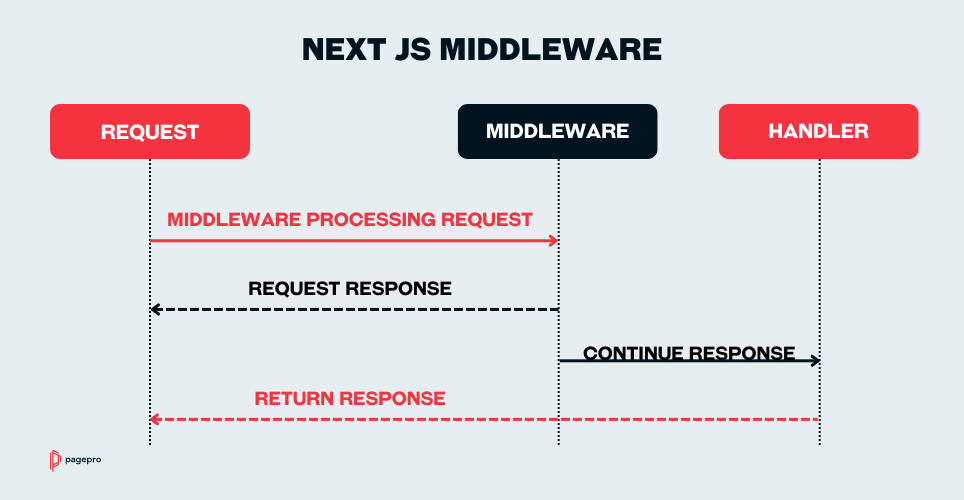
Middleware processes incoming requests by either passing the request forward, modifying it, or returning an early response.
It acts as a chain where each piece of middleware performs its task before handing over the request to the next component. It’s commonly used across frameworks to perform repetitive tasks like validation, session management, or request logging.
Custom Middleware built with Next.js extends these capabilities with the power of edge computing, enabling faster responses and greater control over the request-response lifecycle.
Next.js Middleware Basics
Important Note: In Next.js, only one middleware.ts file is supported per project. You can still use multiple source files, but only a single entry file is allowed. The middleware code is executed whenever a user requests any route within the Next.js application scope.
At this point, you can choose to modify the request or pass it through unchanged. All operations are executed on the server side, in the Edge runtime, to be precise.
Only APIs compatible with the Edge runtime can be used, so be careful not to include any Node.js-specific APIs.
Planning to use Next.js Middleware?
Advantages of Using Middleware in Next.js Apps
Higher Performance of Your Web Application
Middleware allows you to execute code as soon as a request is received. You can filter out unnecessary calls, like blocking unauthenticated users from certain routes.
Running the code on the edge ensures that requests are processed with minimal latency, guaranteeing a faster request and response time.
While middleware can improve request handling at the edge, overall user-perceived performance still depends on how your app is rendered and structured. Issues like overusing middleware or misconfiguring rendering strategies often overlap with common Next.js mistakes that hurt Core Web Vitals.
Better Security with Middleware Function
Middleware is ideal for handling authenticate actions, validation, and other security measures before a request reaches your main application logic.
It prevents unauthorized access to sensitive routes and makes sure all security checks happen consistently and early in the request lifecycle.
Centralized Code
Implement middleware to enable a unified approach for handling tasks like setting custom headers or enforcing security policies.
Instead of repeating code across multiple components, you can manage these rules in a single location, making the application easier to maintain and reducing potential errors caused by code duplication.
Best Use Cases for Middleware in Next.js Project
Basic Next.js Middleware syntax
In Next.js, middleware is defined as a function that runs before a request is completed. It allows you to inspect, modify, redirect, or block requests before rendering happens.
import { NextResponse } from 'next/server' import type { NextRequest } from 'next/server' export function middleware(request: NextRequest) { return NextResponse.next() }This middleware runs on every incoming request that matches the configured routes. By default, it does not change the request or response — it simply allows the request to continue.
How Next.js middleware works
- Middleware executes before route handlers and page rendering
- It runs at the Edge Runtime, not on the Node.js server
- It can:
- Redirect users
- Rewrite URLs
- Modify request headers
- Block access based on conditions
Middleware logic is applied only to routes defined in the matcher configuration.
Limiting middleware to specific routes
You can control where middleware runs using the matcher option:
export const config = { matcher: ['/dashboard/:path*'] }This ensures the middleware runs only for selected routes, improving performance and avoiding unnecessary execution.
Initial Authentication and Authorization
Middleware works great for initial authorization checks before users access protected content.
Verifying a valid token or simply checking for an authentication cookie ensures that only authorized users can reach sensitive routes. Unauthorized visitors can be redirected to a login page or shown a custom error message.
Request Logging and Analytics
Using middleware for logging allows smooth integration with third-party monitoring or analytics tools.
All incoming requests can be captured, processed, and shaped before reaching your core application logic. Actions like filtering of data, monitoring user interactions, and the extraction of insights for performance optimization and anomaly detection become much simpler with middleware.
SEO-Friendly Redirects
Handling redirects efficiently is another strong use case for middleware. It’s possible to redirect users from outdated URLs to new ones or implement location-based redirects based on the user’s region.
Using middleware for redirects improves the user experience by guiding visitors to the correct content. It also maintains SEO health by setting the proper status codes and avoiding broken links.
Maintenance Mode
Middleware simplifies implementing maintenance modes during scheduled updates or unexpected outages.
Incoming traffic can be redirected to a dedicated maintenance page or served a user-friendly message. This prevents users from encountering broken pages or errors, leaving their experience uninterrupted, even during critical updates.
AMPLIENCE – GET STARTED GUIDE
Next.js in Action: Building an Interactive Guide Demystifying CMS’s Capabilities
READ CASE STUDY
When to Use Next.js Middleware
I think it’s worth using middleware whenever you can. Middleware can improve performance and eliminate code duplication. It does so by handling cross-cutting concerns like authentication tokens, localization, and redirects in one centralized location.
Most applications require user authentication, support multiple locales, or need URL redirects due to legacy links on forums or third-party sites. If you have tools that can handle that in a single place, why not use them?
While middleware might add a bit of complexity, the streamlined logic and better application structure are worth it.
Next.js Middleware Best Practices
Here’s how to make the most out of middleware in your Next.js app.
Modularize Your Middleware
Since only a single middleware.ts file is allowed per project, organize your logic by splitting it into smaller, modular functions. Import these functions into the main middleware file to maintain clean and manageable code.
Optimize Code Execution with Conditionals
When handling multiple actions within middleware, use conditionals to ensure that only necessary logic is executed for specific paths or requests. This helps reduce the runtime of the code execution and keeps the middleware efficient.
Leverage matcher Configuration
Use the matcher configuration option to define which routes the middleware logic should apply to. Specifying targeted routes prevents unnecessary executions and makes the middleware run only when required, reducing performance overhead.
Keep Middleware Lightweight
Avoid heavy computations or complex logic within middleware. Instead, focus on quick, non-blocking actions like authentication, logging, or basic redirects. Rely on synchronous actions where possible. It will help you prevent adding latency or delays to requests.
Handle Errors and Edge Cases Gracefully
Middleware should include good error handling to manage unexpected scenarios like token validation failures. Your middleware should return appropriate responses, redirects, or error messages to guide users through, preventing any interruptions in the app’s flow.
How to Set Up and Configure NExt.js Middleware
To start working with middleware, you just need to create a single file middleware.ts (or .js) in the root of your project.
You can start with the sample code from the documentation and check if it’s triggering with a single console.log. Make sure to include yours in the config.matcher!
import { NextResponse } from 'next/server'

import type { NextRequest } from 'next/server'


export function middleware(request: NextRequest) {
  console.log(request);

  return NextResponse.redirect(new URL('/home', request.url))

}


export const config = {

  matcher:["/((?!api|_next|public|static|.*\\..*).*)"]

}
NextJS Middleware Code Examples
I’ve prepared a few code examples for different middlewares you can implement in your apps. Feel free to use them!
NextJS Middleware for Authentication
This middleware checks if a user has a valid authentication token before allowing access to protected routes like /dashboard or /profile.
If no token is found, the user is redirected to the login page. You can use it to secure private areas of your app, enforce role-based access, or control entry to subscription-only content.
// middleware.ts

import { NextResponse } from "next/server";

import type { NextRequest } from "next/server";

export function middleware(request: NextRequest) {

  const { pathname } = request.nextUrl;

  const protectedRoutes = ["/dashboard", "/profile"];

  if (protectedRoutes.some(route => pathname.startsWith(route))) {

    const token = request.cookies.get("token");

    if (!token) {

      return NextResponse.redirect(new URL("/login", request.url));

    }

  }

  return NextResponse.next();

}

// Apply middleware to all routes

export const config = {

  matcher: ["/:path*"],

};
Redirects/Rewrites Middleware
Forget about problems with redirects. In this example, the middleware handles them in your Next.js app.
It automatically sends users from outdated routes like /old-page or /legacy-route to their new locations, and reducing the risk of broken links.
// middleware.ts

import { NextResponse } from 'next/server';

import type { NextRequest } from 'next/server';

export function middleware(request: NextRequest) {

  const { pathname } = request.nextUrl;

  if (pathname === '/old-page') {

    return NextResponse.redirect(new URL('/new-page', request.url));

  }

  if (pathname === '/legacy-route') {

    return NextResponse.redirect(new URL('/modern-route', request.url));

  }

  return NextResponse.next();

}

export const config = {

  matcher: ['/:path*'],

};
Localization Check/Set Middleware
To make localization easier, middleware can detect the user’s preferred language from their browser settings. It then automatically redirects them to the right localized version of your site. If there’s no preference, it defaults to English (en-GB).
It’s perfect for serving region-specific content, and improves user experience since they don’t have to deal with manual language switching.
/ middleware.ts

import { NextResponse } from "next/server";

import type { NextRequest } from "next/server";

const supportedLocales = ["en-GB", "pl-PL", "fr-FR"] as const;

const getUserLocale = (request: NextRequest): string => {

  const acceptLanguage = request.headers.get("accept-language");

  if (!acceptLanguage) return supportedLocales[0];

  const preferredLocale = acceptLanguage.split(",")[0];

  return preferredLocale && supportedLocales.includes(preferredLocale)

    ? preferredLocale

    : "en-GB";

};

export function middleware(request: NextRequest) {

  const { pathname } = request.nextUrl;

  if (supportedLocales.some(locale => pathname.startsWith(`/${locale}`))) {

    return NextResponse.next();

  }

  const locale = getUserLocale(request);

  return NextResponse.redirect(

    new URL(`/${locale}${pathname}`, request.url),

  );

}

export const config = {

  matcher: ["/:path*"],

};
Logging Middleware
You don’t have to add logging code to every route. Monitoring traffic, debugging issues, auditing user activity, or collecting analytics can be made easier with middleware.
This middleware logs every incoming request to your Next.js app, capturing details like the HTTP method, URL, and user’s IP address.
import { NextResponse } from "next/server";

import type { NextRequest } from "next/server";

export function middleware(request: NextRequest) {

  const { method, url, ip } = request;

  logRequest(method, url, ip); // here is your logging function

  return NextResponse.next();

}

export const config = {

  matcher: ["/((?!_next|public|static|.*\\..*).*)"],

};
Middleware in Your Next.js Project
Middleware offers a lot of benefits at a low cost. Now that you know what it is, its common use cases and sample code, you’re ready to go!
Give middleware a try in your next project or check if you can fit them somewhere within your current one!
Are you ready to use Next.js for your next project?
Frequently Asked Questions
Yes. Middleware can be async and you can await edge-compatible operations like fetch(). Just make sure you return a NextResponse (e.g., NextResponse.next(), redirect, or rewrite) and avoid Node-only APIs (fs, net, etc.).
Middleware runs before a request reaches your route. It inspects the incoming request (URL, headers, cookies), and decides what to do after. It can:
1. Continue (NextResponse.next())
2. Redirect the user
3. Rewrite to a different route
4. Modify headers/cookies
You have one middleware.ts (or .js) at the app root. To handle different concerns, compose smaller functions inside that file and control execution with matcher or conditional logic.
Middleware always runs in the Edge Runtime, not the traditional Node.js server or the browser. Even when you self-host with next start, it still executes in the Edge Runtime (simulated locally).
Start by creating middleware.ts in the project root (or src/). Then export middleware(req: NextRequest) and return a NextResponse. Optionally, you can also export config = { matcher: [...] } to target specific paths.
Redirect changes the URL in the browser (HTTP 3xx) and triggers a new request. You can use it for moves/login flows.
Meanwhile, Rewrite keeps the URL the same but serves content from a different route internally. It works great for vanity URLs, A/B tests, or localization without changing the visible URL.
If your Next.js middleware is failing, here are some things you should check to fix it:
1. File & location: middleware.ts at project root (or src/).
2. Matcher: Verify patterns; exclude static assets if needed (e.g., /_next, files with extensions).
3. Edge compatibility: Remove Node-only APIs; use Web/Edge APIs only.
4. URLs: Build absolute URLs with new URL('/path', req.url) to avoid host issues.
5. Return paths: Always return a NextResponse; avoid missing return or infinite loops.
6. Conflicts: Check next.config.js redirects/rewrites that might clash.
7. Cookies/headers: Read via req.cookies.get() / req.headers.get().
8. Limit scope: Add a precise matcher to prevent unexpected triggers.
If you still have issues, log in middleware (headers, pathname) and reproduce locally, then test on your hosting platform (e.g., Vercel) to spot environment differences.
Read More
- Node.js vs Next.js
- Next.js as a Static Site Generator
- Next.js Performance Optimization in 9 Simple Steps
- Benefits of Using Next JS for Building Websites and Apps