
Sanity
Flexible Content Operating System with real-time collaboration and customizable content structures.
- 2017Created in
- Real-time collaboration
- Customizable content schemas
- Open-source React-based Studio

WordPress
Traditional CMS with themes, plugins, and an easy-to-use dashboard for quick website creation.
- 2003Created in
- Extensive plugin ecosystem
- Customizable themes
- User-friendly dashboard

TL;DR
- WordPress is free to start but not free to run — once you factor in managed hosting ($30–35/month minimum), performance plugins, image optimisation tools, and maintenance, the total cost of ownership adds up fast, especially as your site scales
- Sanity’s headless architecture gives you a performance advantage by default — when paired with Next.js, content is served via API and rendered statically or server-side, which means stronger Core Web Vitals, no plugin bloat, and no theme overhead slowing down mobile users
- The real cost of WordPress is maintenance, not licensing — every plugin you add is a dependency that needs updating, can conflict with others, and can introduce security vulnerabilities; Sanity’s managed backend eliminates this entire category of overhead
- If you need content across multiple channels — website, app, digital display, or third-party platform — WordPress will fight you every step of the way, while Sanity’s API-first Content Lake is built for exactly this; brands like Puma and Cloudflare run global multi-channel content operations on Sanity for this reason
- Migrating from WordPress to Sanity is a real project, not a weekend task — it requires content schema design, a new frontend build, redirect mapping, and editor onboarding; but teams that complete it typically report faster page loads, lower maintenance burden, and better editorial workflows — see Pagepro’s WordPress to Sanity migration guide for a full breakdown of what’s involved
Sanity and WordPress for Content Management
When building a new website or app, picking a CMS can affect your site’s current and future performance. For many teams, the decision comes down to Sanity vs WordPress, and their two very different approaches to content management.
WordPress offers familiarity, a huge plugin ecosystem, and community support. Sanity has a structured, API-first approach, real-time collaboration, and integration with frameworks like Next.js.
Today, we’ll compare Sanity and WordPress side by side. This article will cover performance, workflows, costs, ease of use, and security, all to help with choosing the right content management for your project.

Headless CMS vs Traditional CMS
Before comparing Sanity and WordPress directly, we need to understand the difference between a headless and traditional CMS platforms.
A traditional CMS like WordPress bundles everything together: content storage, editing interface, design templates, and the frontend that displays your site. With that, launching your site is very easy. However, since your content is coupled to one presentation layer (the website), delivering the same content to an app or a digital display can be tricky.
A headless CMS separates content management from presentation. Content is stored in a structured way and delivered via APIs, so developers can connect it to any frontend. It allows for more control, but requires expert knowledge for set up and maintenance.
Overview of Sanity and WordPress
What is Sanity CMS?

Sanity is a headless content operating system launched in 2017. Unlike WordPress, which is monolithic, Sanity separates content from presentation, letting you deliver content to any frontend via APIs. It’s built for developers who want structured content models, modern workflows, and easy collaboration in content editing.
Who Owns Sanity CMS?
Sanity was founded in Oslo, Norway, by Even Westvang, Simen Svale Skogsrud, and Magnus Hillestad. The company, Sanity.io, continues to maintain and develop the platform, which has attracted global clients and investors, including notable brands like Puma, Morning Brew, Cloudflare, and AT&T.
Use Cases of Sanity
Sanity is often chosen when teams need a developer-first CMS that’s easy to scale, but it also has its uses for:
- Content-rich websites and apps.
- E-commerce solutions.
- Multi-channel publishing.
- Enterprise content hubs.
- Design-driven websites.
What is WordPress?

WordPress is a traditional CMS that allows you to create, publish, and manage websites without building everything from scratch. It powers more than 40% of all websites worldwide and holds around 60% of the CMS market share. Its popularity comes from accessibility: with over tens of thousands of free themes and 65,000+ plugins, it offers options to extend features and get a website up and running quickly.
Who Developed WordPress?
WordPress was created by Matt Mullenweg and Mike Little in 2003 as a fork of a blogging tool called b2/cafelog. Today, it is an open-source project maintained by a large community of contributors and backed commercially by Automattic.
Use Cases of WordPress
WordPress is used for everything from personal blogs to enterprise websites, and its most common uses include:
- Blogging and publishing.
- Business sites.
- Online stores.
- Membership and community sites.
- Enterprise websites.
Need Help Deciding Between Sanity vs WordPress?
Sanity vs WordPress: 10-Point Comparison for Developers
Choosing between Sanity and WordPress depends on how you want to build and scale your site over time. Here’s how the two compare across 10 areas that matter most.
| Feature | WordPress | Sanity |
| Content Modeling | Pages, posts, custom post types; rigid for advanced needs | Schema-based, structured, reusable content |
| Pricing | Free core; costs for hosting, themes, plugins, or VIP | Free tier; usage-based pricing as projects grow |
| Performance | Depends on hosting, caching, and plugins | API-first; fast with frameworks like Next.js |
| Integrations | 59k+ plugins and 11k+ themes | API-driven; integrates with Vercel, Shopify, Algolia |
| DevEx & UX | Easy for beginners; limited flexibility for devs | Developer-first; code-defined models, customizable Studio |
| Workflows | Basic publishing; advanced workflows need plugins | Real-time collaboration, versioning, structured flows |
| Security | Relies on hosting and plugin updates; vulnerable if outdated | Managed backend; API-based security, smaller attack surface |
| Hosting | Requires separate hosting (shared, managed, or VIP) | CMS is fully managed; only host the frontend |
| Mobile Performance | Depends on theme and plugin configuration | API-delivered; fast with Next.js, strong Core Web Vitals |
| Team Management | Basic roles built in; advanced workflows need plugins | Up to 50 seats, 5 roles, real-time collaboration built in |
1. Content Modeling
WordPress: Since it’s a traditional CMS, it uses the classic model of pages and posts. It allows for the customization of post types, fields, or plugins. However, its structure is relatively rigid, which can lead to complex workarounds for more advanced needs.
Sanity: Its structure is built around schemas, which are sets of rules defining how your content is structured. You can specify exactly what types of content you need, and Sanity enforces that structure. Thanks to that, reusing content across different platforms becomes much easier.
2. Pricing
WordPress: The core CMS is free and open source. You still need to factor in hosting, premium themes, and paid plugins. The final costs can vary widely depending on whether you run a small site on shared hosting or an enterprise setup on WordPress VIP.
Sanity: Has a free plan with limited API requests and users, plus paid plans that scale based on usage (API calls, storage, seats). It can be cost-effective for small projects, but as your traffic or content needs grow, so do the costs.
Sanity vs WordPress Pricing: Full Cost Breakdown
The headline difference is simple: WordPress core is free, Sanity has a free tier. But neither platform is truly “free” once you account for everything a real project needs. Here’s what you’ll actually pay.
Sanity Pricing Plans
Source: sanity.io/pricing
| Plan | Price | Seats | Documents | API CDN Requests | Bandwidth | Best For |
| Free | $0/forever | 20 (Admin + Viewer only) | 10k | 1M/month | 100GB/month | Personal projects, prototypes |
| Growth | $15/seat/month | Up to 50 (all roles) | 25k | 1M/month | 100GB/month | Teams actively publishing content |
| Enterprise | Custom | Custom | Custom | Custom | Custom | Large orgs with security & SLA needs |
A few things worth knowing about Sanity’s pricing model:
- Viewer roles are free and don’t count toward your seat costs on any plan — useful for stakeholders who only need read access.
- Growth plan overages are billed at $1 per 250k additional API CDN requests, $0.30/GB extra bandwidth, and $0.50/GB extra assets. Monitor usage as your project grows.
- The frontend is not included. You host that separately — typically on Vercel or Netlify.
WordPress Pricing
WordPress.org itself is free and open source. Your real costs come from what surrounds it.
Managed WordPress hosting — Kinsta (annual billing, single site plans)
Source: kinsta.com/pricing
| Plan | Annual Price | Pay Upfront | First Month Free | Best For |
| Single 20GB | $30/month | $350/year | Yes | Single small-to-mid site |
| Single 40GB | $42/month | $500/year | — | Single growing site |
| Single 65GB | $75/month | $900/year | — | Higher traffic single site |
| Single 125GB | $142/month | $1,700/year | — | Large single site |
| Single 250GB | $242/month | $2,900/year | — | High-demand site |
| Single 500GB | $313/month | $3,750/year | — | Enterprise-level single site |
Monthly billing available at a higher rate (e.g. Single 20GB = $35/month). Multiple-site and Agency plans also available.
Managed WordPress hosting — WP Engine (Essential plans, first-year pricing for new customers)
Source: wpengine.com/plans
| Plan | Starting Price | Sites | Visits/month | Storage | Best For |
| Startup | $30/month* | 1 | 25,000 | 10GB | Small sites & blogs |
| Professional | $55/month* | 3 | 75,000 | 15GB | Growing brands |
| Growth | $109/month* | 10 | 100,000 | 20GB | Growing businesses |
| Scale | $276/month* | 30 | 400,000 | 50GB | High-capacity sites |
| Core | From $400/month | Custom | Custom | Custom | Isolated resources, 99.99% SLA |
| Enterprise | Custom | Custom | Custom | Custom | Mission-critical sites |
First-year promotional pricing for new customers on annual billing. Renewal pricing may differ.
Shared hosting (budget option for personal sites and blogs):
| Option | Intro Price | Important Note |
| Bluehost, SiteGround, and similar | From ~$3–$5/month | Introductory rates only — renewal prices are significantly higher. Not recommended for business-critical sites. |
Additional WordPress costs to budget for:
| Cost Category | Notes |
| Premium themes | Typically $40–$100 one-time, or $200+/year for theme club access |
| Plugins (SEO, security, performance, forms) | Varies widely — free options exist but paid plugins are often needed for production-ready sites |
| Developer maintenance | Regular core, theme, and plugin updates required; budget for developer time if not handled in-house |
Which Is More Cost-Effective?
WordPress wins on upfront cost for small sites and non-technical teams. A shared hosting plan plus free plugins can get you live for very little per month — but costs accumulate over time through plugin licensing, hosting upgrades, and maintenance overhead.
Sanity often wins on long-term total cost for teams with developers already in place. No plugin licensing pile-up, fully managed backend infrastructure, and an architecture that scales without the performance firefighting that often accompanies WordPress at scale.
For enterprise, both platforms require a direct conversation with sales — WordPress VIP and Sanity Enterprise both operate on custom pricing.
3. Performance
WordPress: Runs on PHP and MySQL. Its performance depends heavily on hosting quality, caching plugins, and CDN setup. The right configuration can handle large traffic, but out of the box, WordPress is less optimized.
Sanity: Headless by design, it serves content via APIs. When paired with modern frameworks like Next.js, sites can be pre-rendered for fast load times and excellent Core Web Vitals. Scaling is handled by Sanity’s managed infrastructure, so heavy traffic is less of a problem.
4. Integrations
WordPress: Famous for its plugin ecosystem, and for good reason. WordPress offers thousands of plugins and themes, and you can add SEO tools, payment gateways, and more without custom coding.
Sanity: Its flexibility comes from APIs, not prebuilt add-ons. Doesn’t use plugins in the same way. Instead, it integrates with developer tools and modern platforms like Vercel, Shopify, or Algolia.
5. DevEx & UX
WordPress: Non-developers find WordPress easy to pick up, thanks to a visual dashboard, What You See Is What You Get (WYSIWYG) editing, and prebuilt templates. Developers, however, might find customizing beyond themes and plugins cumbersome.
Sanity: Geared towards developers. Content models are code-first, and frontends are built with frameworks like React and Next.js. For editors, Sanity Studio offers a smooth experience and a customizable UI. Its initial setup does require some technical expertise.
6. Workflows
WordPress: Content creation is pretty straightforward, but advanced workflows (approval chains, editorial review, versioning) often require extra plugins. Collaboration features are limited compared to modern tools.
Sanity: Focuses a lot on the workflows. Real-time collaboration, version history, and structured editing make it a great choice for larger teams.
Lyngen North
Building a Super-Fast Sanity Website for the Extraordinary Hotel at the Edge of the World
READ CASE STUDY
7. Security
WordPress: The security of your WordPress site depends largely on hosting and regular updates. Vulnerabilities often come from outdated plugins.
Sanity: Security is centralized rather than plugin-driven. Its headless architecture reduces the attack surface since the CMS doesn’t directly serve the website. Content is delivered through secure APIs, and infrastructure is managed by Sanity.
8. Hosting
WordPress: Requires hosting to run. Since its performance and security can vary depending on your provider, enterprise users often opt for WordPress VIP.
Sanity: A fully managed, cloud-based platform, letting you scale as you please. You don’t need to worry about hosting the CMS itself; you only host your frontend (e.g., on Vercel or Netlify).
9. Mobile Responsiveness & Performance
WordPress: Mobile responsiveness depends almost entirely on the theme you choose and the plugins you install. Most modern themes are mobile-first by default, but page speed on mobile varies widely. Achieving strong Core Web Vitals scores typically requires additional configuration — caching plugins, image optimisation tools, and a CDN setup — which adds cost and maintenance overhead.
Sanity: Since Sanity is headless, mobile performance is determined by your frontend, not the CMS. When paired with Next.js, sites can be statically generated or server-rendered, delivering fast load times and strong Core Web Vitals scores out of the box. Sanity itself doesn’t serve a single byte to end users — all delivery goes through your optimised frontend and CDN.
Winner for mobile performance: Sanity + Next.js, when a developer team is in place. WordPress can get there too, but it requires more configuration effort.
10. Team Management & Collaboration
WordPress: Basic user roles are built in (Administrator, Editor, Author, Contributor, Subscriber), which covers most small team needs. For more granular permissions, approval workflows, or editorial review chains, you’ll need third-party plugins. Real-time collaboration — multiple editors working on the same content simultaneously — is not natively supported.
Sanity: Team management is a core part of the platform. The Growth plan supports up to 50 seats with five distinct roles (Administrator, Editor, Developer, Contributor, Viewer). Viewer seats are free, making it easy to give stakeholders read access without paying for a full seat. Real-time multiplayer editing, comments, task management, and scheduled drafts are all built in — no plugins required. For enterprise teams, custom roles and SSO are available.
Source name: Sanity pricing
Winner for larger teams: Sanity, particularly for content teams that need structured workflows and simultaneous editing without relying on plugins.
Sanity: Pros and Cons
What Are the Benefits of Using Sanity?
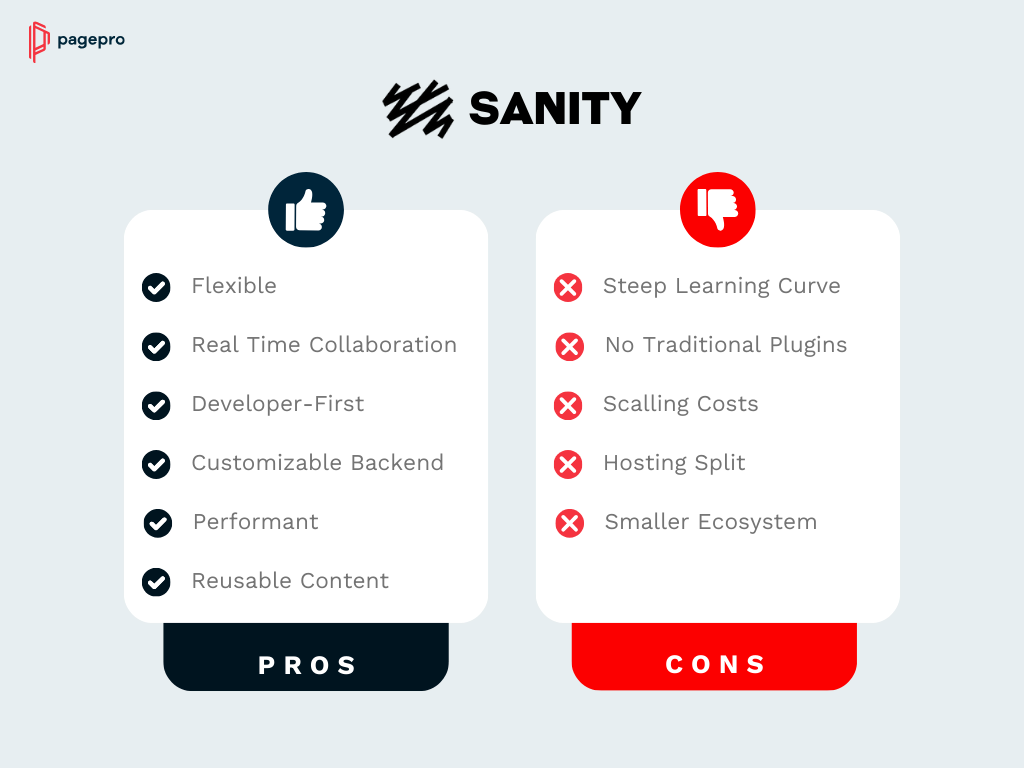
Sanity stands out from other CMS options as a modern, headless CMS built for flexibility and performance. Its main advantages include:
- Flexible content modeling. Define custom schemas to structure your content just the way your project requires.
- Real-time collaboration. Multiple team members can edit content at the same time in Sanity Studio, with updates appearing instantly.
- Developer-first approach. Sanity allows a seamless integration with third-party tools.
- Customizable editor. You can tailor the editing environment to match your content needs.
- Performant and scalable. Content is delivered through Sanity’s managed Content Lake, optimized for speed and large-scale usage.
- Reusable content. Write once, publish anywhere: websites, mobile apps, IoT, or digital displays.
What are the Cons of Sanity CMS?
Teams without technical resources can find some aspects of Sanity challenging:
- Steep learning curve. Setting up schemas and connecting a frontend requires coding knowledge, unlike WordPress’s plug-and-play approach.
- No traditional themes or plugins. You can’t just install a theme or plugin to get started. You’ll need a developer to build and integrate the feature you want.
- Scaling costs. Sanity’s free plan is a great value for small projects, but heavy API usage, large datasets, or many team members can increase monthly costs.
- Hosting split. While Sanity hosts the CMS, you must host your frontend separately (e.g., on Vercel or Netlify), which adds an extra step for setup.
- Smaller ecosystem. Sanity has strong community support, but its ecosystem of third-party integrations is much smaller compared to WordPress.
WordPress: Pros and Cons
What Are the Benefits of Using WordPress?
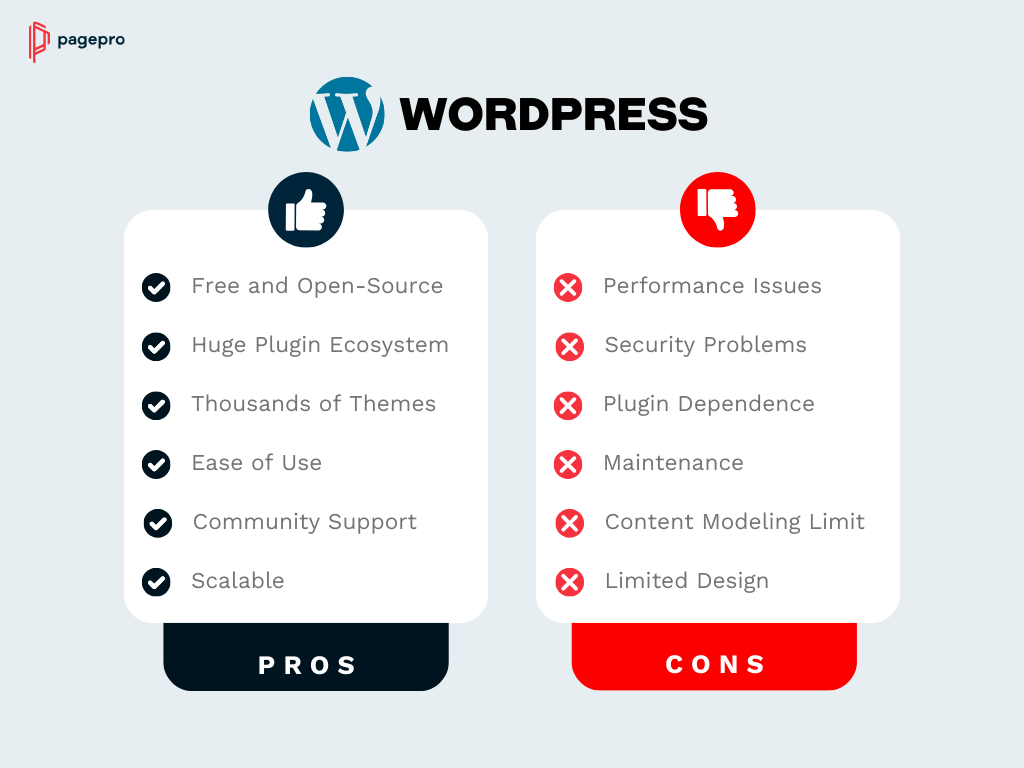
WordPress is one of the most popular content management solutions for modern web development for several reasons:
- Free and open-source CMS. Anyone can install and use WordPress at no cost, making it accessible or individuals and businesses both.
- Huge plugin ecosystem. With nearly 60,000 plugins, you can add features like SEO optimization, e-commerce (WooCommerce), contact forms, and analytics to your site without custom code.
- Thousands of themes. Free and premium WordPress themes allow you to get your website running quickly with no experience needed!
- Ease of use. The dashboard and WYSIWYG editor make content management approachable even for non-developers.
- Community support. WordPress has a massive global community that shares tutorials and support, lowering the barrier for learning.
- Scalability. With the right hosting and setup, WordPress can handle all types of websites, personal blogs, and high-traffic enterprise sites alike.
Disadvantages of a WordPress Site
While WordPress offers plenty of strengths, it also comes with limitations and risks:
- Performance issues. Out of the box, WordPress might be slow. Performance metrics often rely on caching plugins, CDNs, and optimized hosting.
- Security vulnerabilities. Its popularity makes it a frequent target for hackers. Many breaches come from outdated themes or plugins.
- Plugin dependence. Extending functionality often means installing multiple plugins, which can lead to compatibility issues and heavier sites.
- Maintenance overhead. Regular updates for plugins, themes, and WordPress core are necessary to keep a site secure and stable.
- Limited content modeling. The post/page/custom post type structure is less flexible compared to modern headless CMS platforms.
- Design limitations without coding. While themes help, customizing them deeply often requires PHP, HTML, or CSS knowledge.
Sanity vs WordPress for Enterprise: Key Considerations
For smaller sites and non-technical teams, the standard feature comparison is usually enough to make a decision. But for larger organisations — multiple teams, strict security requirements, high traffic volumes, and content at scale — the enterprise picture looks quite different. Here’s how Sanity and WordPress compare when the stakes are higher.
Enterprise Security
WordPress: Standard WordPress security depends heavily on hosting quality, plugin hygiene, and how diligently updates are applied. For enterprise use, the gap is addressed by WordPress VIP — the platform’s enterprise tier. WordPress VIP offers multi-layered DDoS mitigation, network and host-based firewalls, automated code scanning for third-party plugins, full audit trails, SSO with multi-factor authentication, and compliance with GDPR, CCPA, SSAE 18 SOC 1 and SOC 2 certifications. It is also the only WordPress platform to have achieved FedRAMP Moderate Authorization, making it suitable for US government agencies.
Sanity: Security is centrally managed rather than reliant on plugins or hosting choices. Sanity is SOC 2 Type 2 certified and fully GDPR-compliant. Enterprise customers additionally get SAML-based single sign-on (SSO), custom access control, a full audit trail and History API, and a dedicated support SLA. The headless architecture itself reduces the attack surface — the CMS never directly serves your website, so vulnerabilities in the presentation layer don’t expose the content backend.
| Security Feature | WordPress (self-hosted) | WordPress VIP | Sanity Enterprise |
| SSO / MFA | Plugin-dependent | ✅ Built in | ✅ Built in |
| SOC 2 | Hosting-dependent | ✅ SSAE 18 SOC 1 & 2 | ✅ SOC 2 Type 2 |
| FedRAMP authorization | ❌ | ✅ | ❌ |
| GDPR compliance | Plugin-dependent | ✅ | ✅ |
| Audit trail | Plugin-dependent | ✅ | ✅ Enterprise |
| Automated code scanning | Plugin-dependent | ✅ | N/A (managed infra) |
| Uptime SLA | Hosting-dependent | ✅ | ✅ Enterprise |
Enterprise Scalability
WordPress: Standard WordPress on shared or managed hosting can struggle under heavy sustained traffic without significant configuration — caching layers, CDN setup, and database optimisation all need to be actively managed. WordPress VIP addresses this with application containerisation and built-in auto-scaling, a global CDN across 28 data centres, and infrastructure battle-tested at extreme scale — TIME.com handled Taylor Swift ticket demand at over 100,000 requests per second without downtime.
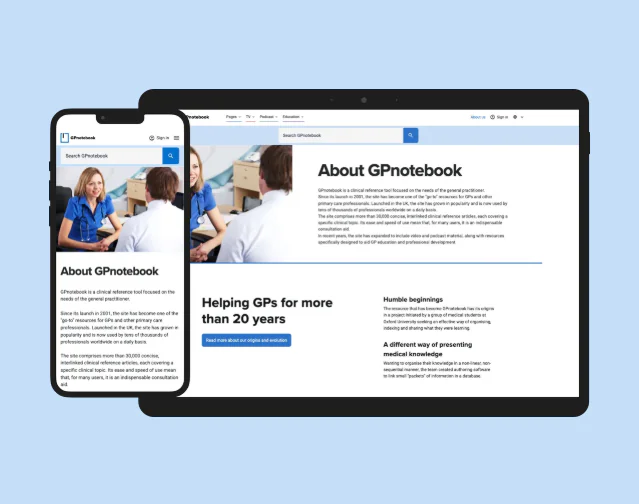
Sanity: Scalability is built into Sanity’s architecture by default. Content is served via the Content Lake — Sanity’s managed, cloud-hosted content database — through a globally distributed CDN. Because the CMS infrastructure is fully managed, there is no server configuration to optimise as traffic grows. Brands like Puma, Cloudflare, and AT&T run production content operations on Sanity at scale. For a real-world example, Pagepro built a 100K+ page medical platform for GPnotebook using Next.js and Sanity.
Enterprise Content Operations
WordPress: Enterprise teams on WordPress VIP benefit from multisite management — running multiple independently managed sites from a single installation — alongside a GitHub-integrated deployment pipeline, granular user permissions, and content analytics via Parse.ly. Editorial workflows beyond basic revision history still depend on plugins for approval chains and versioning.
Sanity: Content operations are a core design principle of the platform. Enterprise teams get custom roles and access control, Content Releases for managing overlapping campaigns, a full audit trail via the History API, cross-dataset references for content shared across multiple brands or sites, and a customisable Sanity Studio tailored to each team’s editorial workflow. Real-time multiplayer editing and task management are built in without additional plugins.
Enterprise Pricing
Both platforms operate on custom enterprise pricing with no published rate card at this level.
- WordPress VIP starts at $25,000/year, with pricing scaling based on monthly unique visitors and the support package chosen (Standard, Enhanced, or Signature).
- Sanity Enterprise is custom-quoted — contact sanity.io/contact/sales for a proposal.
Sanity vs WordPress: Enterprise Features Compared
| Feature | WordPress (self-hosted) | WordPress VIP | Sanity Enterprise |
| Security | |||
| SSO / MFA | Plugin-dependent | ✅ Built in | ✅ Built in (SAML) |
| SOC 2 | Hosting-dependent | ✅ SOC 2 | ✅ SOC 2 Type 2 |
| FedRAMP authorization | ❌ | ✅ Moderate ATO | ❌ |
| GDPR compliance | Plugin-dependent | ✅ | ✅ |
| Automated code / plugin scanning | Plugin-dependent | ✅ | N/A (managed infra) |
| Audit trail | Plugin-dependent | ✅ Full | ✅ Full (History API, Enterprise) |
| DDoS protection | Hosting-dependent | ✅ Network-wide | ✅ Via Google Cloud Platform |
| Scalability | |||
| Auto-scaling infrastructure | ❌ Manual config | ✅ Built in | ✅ Managed |
| Global CDN | Plugin / hosting add-on | ✅ 28 data centres | ✅ Global delivery |
| Uptime SLA | Hosting-dependent | ✅ | ✅ Enterprise only |
| Traffic spike handling | Requires pre-configuration | ✅ Proven at 100k+ req/s | ✅ API-native |
| Content Operations | |||
| User roles | 5 default roles | Custom roles | Custom roles |
| Multi-site management | ✅ WordPress Multisite | ✅ Enterprise Multisite | ✅ Cross-dataset references |
| Real-time collaboration | ❌ Plugin-dependent | ❌ Plugin-dependent | ✅ Built in |
| Editorial workflows & approvals | ❌ Plugin-dependent | ❌ Plugin-dependent | ✅ Built in |
| Scheduled publishing | ✅ Basic | ✅ | ✅ Scheduled drafts |
| Content across multiple channels | Limited (coupled architecture) | ✅ Headless option available | ✅ API-first, any frontend |
| Version history | Basic revisions | ✅ Full | ✅ Full History API (Enterprise) |
| Developer Experience | |||
| Headless / API-first support | ✅ REST API + WPGraphQL | ✅ Full headless option | ✅ Native |
| GitHub integration | ❌ Not built in | ✅ Built in | ✅ Via CI/CD |
| Self-hosted option | ✅ Full | ❌ Fully managed | Partial (Studio only) |
| Open source | ✅ Full | Partial (core is open source) | Partial (Studio is open source) |
| Support | |||
| Dedicated support | Community only | ✅ 24/7 WordPress experts | ✅ Enterprise tier |
| Onboarding programme | ❌ | ✅ | ✅ |
| Pricing | |||
| Starting price | Free (hosting extra) | From $25,000/year | Custom — contact sales |
WordPress VIP is the stronger choice when your organisation is deeply invested in the WordPress ecosystem, needs FedRAMP compliance, or has non-technical content teams that can’t afford a steep onboarding curve.
Sanity Enterprise is the stronger choice when your architecture is API-first or headless, when you need structured content delivered across multiple channels or brands, or when developer-led workflows and real-time collaboration are a priority.
Sanity vs WordPress: Mobile Responsiveness & Performance
With mobile devices accounting for the majority of global web traffic, how a CMS handles mobile performance has a direct impact on user experience, Core Web Vitals, and search rankings. Here’s how Sanity and WordPress compare.
Mobile Responsiveness
WordPress: Mobile responsiveness in WordPress is primarily determined by the theme you choose. Most modern themes — such as Astra, GeneratePress, and Kadence — are built with responsive, mobile-first principles and will render correctly across screen sizes out of the box. However, responsiveness alone doesn’t equal performance. A site can be visually responsive on mobile while still loading slowly, particularly because of:
- Heavy plugins adding extra scripts and stylesheets
- Large unoptimised images consuming mobile bandwidth
- Render-blocking JavaScript delaying page display
- Theme bloat from unused features and CSS
Sanity: Because Sanity is headless, it doesn’t ship a theme or control the frontend in any way. Mobile responsiveness is entirely the responsibility of the frontend you build — typically with Next.js. This means more control but also more responsibility. The upside is that there are no plugin conflicts, no theme bloat, and no legacy CSS to work around. A well-built Next.js frontend will be:
- Fully responsive across all screen sizes
- Free from plugin overhead and style conflicts
- Built with mobile-first principles from the ground up
- Easy to audit and optimise because there is no third-party code in the critical path
Mobile Performance & Core Web Vitals
WordPress: Out of the box, WordPress performance on mobile is heavily dependent on hosting quality, caching configuration, image optimisation, and plugin load. A typical production WordPress site with 20–30 active plugins can generate over 100 HTTP requests per page load, with images and scripts accounting for the majority of page weight. Achieving strong Core Web Vitals scores — particularly LCP (Largest Contentful Paint) and CLS (Cumulative Layout Shift) — requires active work:
- A caching plugin (e.g. WP Rocket, FlyingPress)
- Image compression and modern format conversion (e.g. ShortPixel, Imagify)
- CDN setup for global asset delivery
- JavaScript deferral to unblock rendering
- Ongoing maintenance as plugins update and conflict with each other
Sanity + Next.js: The combination of Sanity’s API-delivered content and Next.js static generation or server-side rendering produces pages that are optimised for performance by default. Content is fetched at build time or on the server, meaning the browser receives a fully rendered HTML page rather than waiting for client-side JavaScript to execute. Next.js includes several built-in performance features that directly improve Core Web Vitals on mobile:
- Automatic image optimisation via the Next.js Image component
- Automatic code splitting — only the JavaScript needed for the current page is loaded
- Built-in font loading optimisation to reduce layout shift
- Static generation serving pre-built HTML with no server processing delay
- No plugin stack to maintain and no theme overhead to strip out
Side-by-Side Comparison
| Performance Factor | WordPress | Sanity + Next.js |
| Mobile-responsive out of the box | ✅ Theme-dependent | ✅ Frontend-dependent |
| Image optimisation | Plugin-required (e.g. ShortPixel, Imagify) | ✅ Built into Next.js Image component |
| Caching | Plugin-required (e.g. WP Rocket) | ✅ Static generation or CDN by default |
| JavaScript deferral / code splitting | Plugin-required | ✅ Built into Next.js |
| Core Web Vitals out of the box | Requires configuration | ✅ Optimised by default |
| Plugin/theme bloat impact on mobile | High risk with many plugins | None — no plugins |
| Ongoing performance maintenance | Regular (plugin updates, conflicts) | Low — managed infrastructure |
What This Means in Practice
For teams running WordPress, strong mobile performance is achievable but requires deliberate investment:
- Choosing a lightweight, mobile-first theme
- Adding a performance plugin for caching and JavaScript deferral
- Setting up image compression and CDN delivery
- Monitoring and maintaining plugin compatibility as updates roll out
For teams building with Sanity and Next.js, the performance baseline is higher from the start — but reaching it requires a developer who knows what they are doing. A poorly architected Next.js frontend can still score badly on Core Web Vitals.
The key question is whether you have the technical resource to build and maintain a headless frontend. If you do, Sanity + Next.js gives you a performance ceiling that is very difficult to match with WordPress. If you don’t, a well-configured WordPress setup on managed hosting is still a solid choice for most content-focused sites.
When to Choose Sanity vs WordPress
| Use Case | Choose Sanity if… | Choose WordPress if… |
| Project Type | Multi-channel platforms, apps, and scalable sites | Blogs, portfolios, small business sites |
| Content Needs | Structured content, reusable across channels | Simple pages and posts managed in one place |
| Team | Developer-led teams who can define schemas and build frontends | Non-technical teams managing content via dashboard |
| Performance | High performance, Core Web Vitals, and scalability are priorities | “Good enough” performance with plugins and decent hosting |
| Setup | You’re okay with a steeper setup for long-term flexibility | Non-technical teams managing content via a dashboard |
| Workflows | You need a fast, out-of-the-box setup with themes/plugins | Basic content publishing without complex workflows |
| Budget | Prepared for usage-based pricing as you scale | Relying on free core + low-cost hosting and plugins |
| Future Goals | Long-term growth, custom experiences, future-proof architecture | Quick launch, affordable maintenance, and community support |
Sanity works best for projects that need flexibility and plan to scale in the future, though it requires some technical expertise. A structured content model, headless architecture, and integrations with frameworks like Next.js make it a great choice for high performance and developer-driven workflows.
WordPress is a practical choice for blogs, small businesses, and content-focused sites where ease of use matters more than technical flexibility. Free at its core with affordable hosting, WordPress allows for a quick site launch, thanks to the numerous themes and plugins. Non-technical teams can manage sites through their dashboard, with add-ons like WooCommerce or Yoast extending core functionality.
Sanity vs WordPress in the Real World: Brand Examples & Case Studies
The best way to understand how each CMS performs under real conditions is to look at who uses it and why. Here are verified examples from official first-party sources only.
Brands Using Sanity
Puma — Global e-commerce & multi-channel content
Puma is one of the world’s leading sports brands, and their content challenge was significant: delivering consistent, on-brand content across web, mobile web, and native iOS and Android apps, in every global market. Before Sanity, content was distributed across local servers that were difficult to sync. With Sanity as a single source of truth, Puma now pushes content once and it distributes everywhere in full synchronisation. The results: over 500 category landing pages, 4,000+ hero banners, 100+ campaigns staged, and 55,000+ pieces of reusable content — all managed through a single Content Lake integrated with Salesforce.
“Sanity is the connective tissue for all of our digital properties, syncing content for all of PUMA’s global markets.” — Bettina Donmez, Senior Manager of E-commerce Platform Development, Puma
Morning Brew — Media at scale with a lean engineering team
Morning Brew runs a $50M+ media business across 13 brands, sends over 2 billion emails per year, and manages 30,000+ documents serving 11 million API requests a month — with just six engineers. Using Sanity’s Content Operating System, they built two purpose-built content apps: Astra for editorial and Meteor for ad operations. Both run on a shared Content Lake, keeping content consistent across teams without manual coordination. Before Sanity, only engineers had access to the content schema. Now editorial teams publish independently without looping in developers.
Cloudflare — Fast content modelling for a complex technical product
Cloudflare serves over 26 million internet properties. Their challenge was assembling custom page layouts without sacrificing content structure, while keeping performance scores strong. Using Sanity with a Gatsby and Cloudflare Workers frontend, their team provisioned a fully functional content model and editing interface in under two weeks.
Brands Using WordPress VIP
The following examples are taken directly from WordPress VIP’s official customer pages, which name these organisations as verified customers.
ADWEEK — 100% uptime during the Super Bowl
ADWEEK migrated to WordPress VIP and achieved 100% site uptime during the 2025 Super Bowl — a peak-traffic event for media brands. After migration they also tripled content creation speed and saw an 82% surge in site traffic.
Al Jazeera — 70+ worldwide bureaus on one platform
Al Jazeera built their entire digital experience for 70+ bureaus worldwide on WordPress VIP, consolidating a complex multinational publishing operation into a single managed platform.
News Corp — Multi-continent content operations
News Corp publishes content across dozens of digital properties and three continents, reducing production time significantly after moving to WordPress VIP. Their teams now operate with streamlined workflows across multiple publications.
Salesforce — 2,000 marketers on one content platform
Salesforce pivoted 2,000 marketers to digital content tools almost overnight using WordPress VIP, consolidating their content operations without disrupting marketing velocity.
HelloFresh — 122% increase in search traffic
HelloFresh’s new content strategy on WordPress VIP resulted in a 122% increase in search traffic, demonstrating the platform’s capability for content-driven growth at scale.
WordPress and Sanity: Which CMS is Best for You?
So, which one is the best CMS? Both Sanity and WordPress are powerful platforms, but they serve different needs.
WordPress is a tried-and-true choice for quick setup, affordability, and ease of use, especially for smaller websites, blogs, or businesses that rely on plugins to extend functionality.
Sanity, by contrast, offers a modern, developer-first approach and performance built for the future of the web.
Already on WordPress but feel limited by its performance or extensive plugin setup? At Pagepro, we specialize in helping teams migrate from WordPress to modern stacks like Sanity and Next.js to provide your website with the best performance.
Ready to Develop Your Website with Sanity?
FAQ
Sanity offers both options. It has a free plan with generous limits on users, content, and API calls. For larger projects, users can purchase usage-based paid plans that scale with their traffic, storage, and team needs.
Yes. WordPress powers about 43% of all websites and holds over 60% of the CMS market share. Its huge ecosystem of plugins, themes, and community support keeps it the most widely adopted CMS in the world.
It depends on your needs. WordPress is quick to set up and affordable, making it the favorite of blogs, small businesses, and content-driven sites. Headless CMS platforms like Sanity, Contentful, or Strapi can be better for projects that need multi-channel publishing and modern developer workflows.
Sanity is better if you need flexibility and developer-first workflows. It also holds a 4.7/5 rating on G2, compared to WordPress’s 4.4/5.
WordPress is better if you want simplicity and speed. It’s free at its core, easy for non-technical users, and backed by a massive plugin ecosystem.
Sanity Studio is self-hostable, which means you can customize and deploy the editing environment on your own servers or domain. However, its backend, Sanity Content Lake, where all your content is stored and delivered, cannot be self-hosted.
Sanity is a proprietary platform, but some of its parts are open source. The Sanity Studio framework is open source and customizable, and the core content infrastructure (Sanity Content Lake) is hosted and managed by Sanity.io.
The core WordPress software is free, but running a production site adds costs: hosting starts at $30/month with providers like Kinsta or WP Engine, plus ongoing costs for premium plugins, themes, and maintenance.
Sanity has a free plan that covers personal projects and prototypes — up to 20 seats, 10k documents, and 1M API CDN requests per month. Paid plans start at $15 per seat/month on the Growth plan. The key difference is that Sanity’s costs are more predictable at scale: there is no plugin licensing pile-up or maintenance overhead, but you do need to separately host your frontend (typically on Vercel or Netlify).
For a detailed breakdown with tables, see the Sanity vs WordPress pricing section above.
WordPress itself is free, but the real costs appear quickly once you build a production site. Beyond hosting ($30–$100+/month for managed hosting), most serious WordPress sites require paid plugins for SEO, security, performance, backups, and forms. These can add up to several hundred dollars per year. Factor in developer time for regular core, theme, and plugin updates — or a maintenance retainer if you outsource it — and the total cost of ownership is often significantly higher than the initial free price tag suggests.
It depends on the size and complexity of your site. For a straightforward content-focused site, the migration process involves exporting your WordPress content, transforming it to fit Sanity’s content schemas, and building a new frontend — typically with Next.js. The technical work is real, but it is manageable with the right expertise.
The bigger risks are SEO preservation during the transition and ensuring content editors are comfortable with the new workflow. A well-planned migration addresses both — with proper redirect mapping, staged rollouts, and editor onboarding. For a full breakdown of what the process involves, see Pagepro’s WordPress to Sanity migration guide.
Both have strong enterprise options, but they serve different organisational needs. WordPress VIP is the enterprise tier of WordPress — it adds FedRAMP authorization, SOC 2, auto-scaling infrastructure, and dedicated support, starting at $25,000/year. It is the stronger choice when your teams are already fluent in WordPress or when government-level compliance is required.
Sanity Enterprise is the better fit when your architecture is API-first or headless, when content needs to be delivered across multiple channels or brands simultaneously, and when developer-led workflows and real-time collaboration are a priority. Custom pricing — contact Sanity’s sales team for a proposal.
For a full side-by-side breakdown, see the enterprise features comparison above.
Read More
- Sanity and Nextjs for CI / CD
- Why Sanity is the Best CMS for the Healthcare Industry
- Contentful Migration in 2026: What are the Alternatives?
- Headless CMS Guide: Sanity vs Contentful
- 5 Best Headless CMS Platforms in 2026


