

TL;DR
- CMS migration is a high-risk SEO event because simultaneous changes to platform, URL structure, design, and content make it impossible to isolate the cause of any ranking drop.
- A 1:1 redirect map using 301 permanent redirects must be completed before launch, not after, to preserve the link equity built into every indexed URL on the old site.
- Money pages — solution pages, case studies, pricing pages, and integrations — must be migrated at full depth, as conversion rate drops frequently occur even when organic traffic and rankings appear stable.
- Core Web Vitals field data must be exported from CrUX before migration to establish a measurable baseline, since post-launch performance improvements cannot be proven without pre-migration reference data.
- Internal linking during migration should be treated as a structural rebuild rather than a copy exercise, with commercial pages wired to case studies, integrations, and FAQs to reinforce topical authority.
- AI Overviews, Perplexity, and ChatGPT now surface across a growing share of B2B queries, making migration the most efficient moment to implement answer-first formatting, question-based headings, and FAQ sections at scale.
If you prefer video or audio format, you can find a video on this topic on our YouTube channel.

Mistake 1: Changing Everything at Once
The most common cause of post-migration traffic drops isn’t a technical error – it’s scope. Teams change the CMS, redesign the front end, restructure the URL architecture, rewrite the content, and sometimes add a new language version, all in a single release. When traffic drops, nobody knows what caused it, because everything changed at the same time.
Google’s own guidance recommends changing one major variable at a time and testing on a section before rolling it out site-wide. When you change CMS, design, URLs, and content structure simultaneously, Google has to re-rank your entire site from scratch – and that re-ranking process rarely goes in your favour. It also makes recovery nearly impossible to diagnose, because you have no baseline to compare against.
The practical rule is straightforward: if you’re doing a CMS swap, keep everything else unchanged where possible. You can improve all of the following in subsequent releases, once Google has confirmed that the new site is the same trustworthy source it knew before:
- URL structure
- Content architecture
- Navigation and internal linking
- Design and front-end framework
- Language versions or localisation
At Pagepro, every migration starts with a content audit – crawling the existing site, categorising every URL by content quality and traffic value, and deciding what to do with each one:
| Content decision | When to apply |
|---|---|
| Migrate as-is | Pages with strong traffic, backlinks, or conversion value |
| Improve in next phase | Pages that need updates but shouldn’t block the migration |
| Consolidate | Thin or duplicate pages providing little SEO or business value |
That sequencing is what keeps the migration signal clean for Google.
What should you change first in a CMS migration?
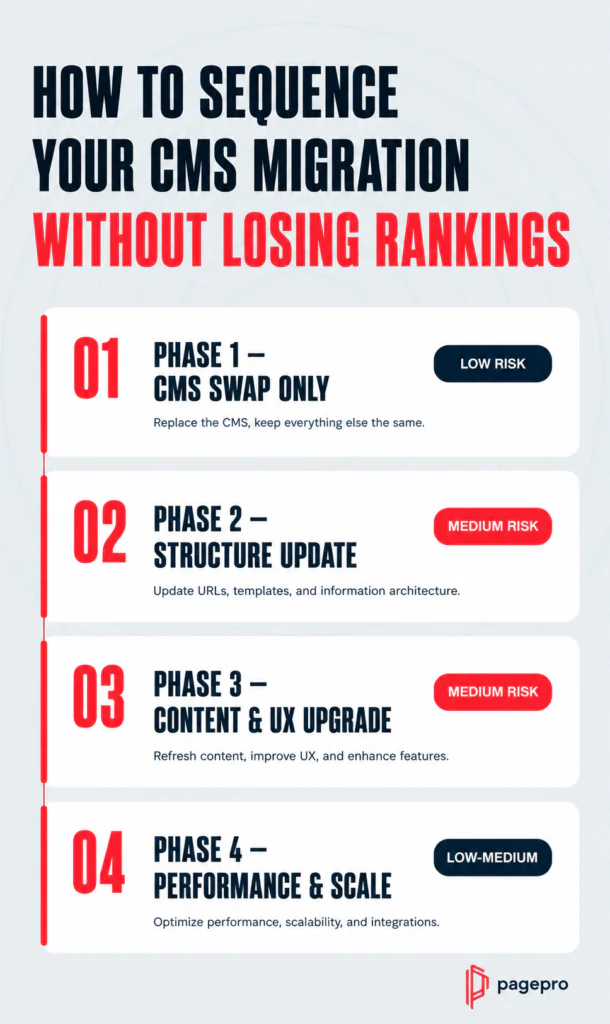
Start with the CMS swap alone, keeping URL structure and content architecture unchanged. Once rankings have stabilised – typically within 30 days – address URL changes as a separate release, followed by content restructuring in a third phase:
| Phase | Change | Risk level | Why |
|---|---|---|---|
| Phase 1 | CMS swap only | Low | Google sees the same URLs, same content, same structure – just a cleaner platform underneath. Minimal re-ranking triggered. |
| Phase 2 | URL structure changes | Medium | New URLs require a complete redirect map. Any missed or incorrect redirect means lost link equity and potential 404s. |
| Phase 3 | Content restructure + design | Medium | Changing content depth or page architecture can alter how Google evaluates relevance and authority for key pages. |
| Phase 4 | New language versions | Low – Medium | Hreflang implementation errors are common and can cause indexing conflicts between language versions if done alongside other changes. |
Each change in isolation gives you a clean signal and a recoverable position if something goes wrong. Doing all four phases at once means a single traffic drop could have four possible causes – and fixing the wrong one first costs weeks.
Mistake 2: Building Your Redirect Map After Launch
A redirect map is not a post-launch cleanup task – it is a launch requirement. Every old URL needs to point to its exact new equivalent before the new site goes live, not after traffic has already started dropping.
The damage from missing this step compounds fast. Backlinks you’ve built over years lose their equity the moment they resolve to 404s. Google drops those pages from its index. Users who click old links in external articles, email campaigns, or social posts land on error pages.
Some of that recovers slowly. Some of it doesn’t recover at all.
When building a redirect map, two technical details matter more than most teams realise:
- Use 301 redirects (permanent), not 302s (temporary) – 301s transfer link equity to the new URL; 302s signal that the move is temporary and equity transfer is not guaranteed
- Avoid redirect chains longer than 2 hops – each additional hop reduces the equity passed and slows crawl speed
- Keep all redirects live for a minimum of 12 months – search engines and external sites need time to re-crawl and update their references
Migrate to modern stack just in 4 weeks
At Pagepro, we handle redirect mapping with our own tool called Discovery. It crawls the entire site, scores each URL by content quality and traffic value, and outputs a prioritised redirect map – deciding which URLs to migrate, which to consolidate, and which to improve in later phases. The same workflow is achievable with Screaming Frog if you cross-reference the crawl output with GSC click data and Ahrefs backlink counts.
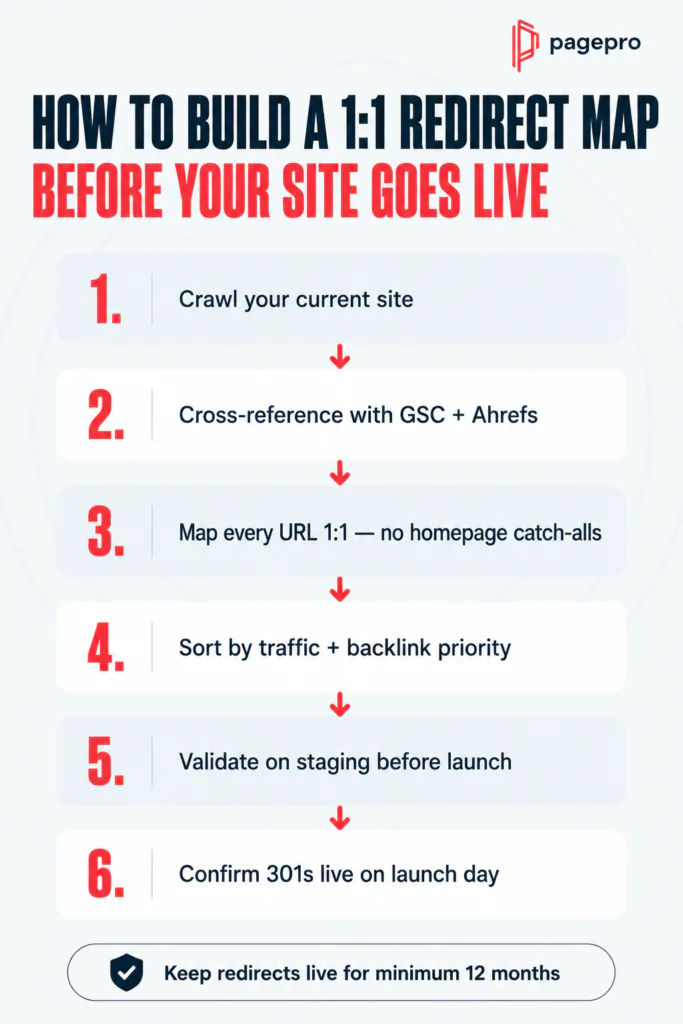
How do you create a 1:1 redirect map for a CMS migration?
| Step | Action |
|---|---|
| 1 | Crawl your current site with Screaming Frog or Discovery to export all indexed URLs |
| 2 | Cross-reference with GSC clicks and Ahrefs backlink data to prioritise by value |
| 3 | Map every indexed URL to its exact new equivalent – no homepage catch-alls |
| 4 | Sort by priority: highest traffic and most backlinks first |
| 5 | Validate the full redirect map on staging before launch |
| 6 | Confirm all redirects are live and returning 301s on launch day |
One final check worth building into your launch process: after go-live, run a crawl specifically looking for redirect chains and any URLs still returning 404s. Fixing these in the first 48 hours prevents the damage from compounding.
Mistake 3: Migrating Without Protecting Your Money Pages
Most migration checklists focus on traffic pages. The pages that actually need protecting are the ones that convert.
Money pages are not your highest-traffic pages – they are the pages buyers read before they contact you or make a purchase decision. For a B2B tech provider, that means solution pages, integration pages, case studies, the pricing page, and comparison pages. These are also the pages that Google, ChatGPT, and Perplexity use to decide whether you’re a credible source worth surfacing to their users.
The pattern we see repeatedly: a company launches a beautifully designed new site, rankings hold steady, and then conversion rate drops 30-60% over the following quarter. The culprit is almost always the same – solution pages migrated with half the original use cases, case studies cut to save development time, pricing pages stripped of their ROI context. The design looks modern. The traffic data looks fine. But the buying depth that made those pages work is gone.
Before migration, audit every commercial-value page against three criteria:
| Criteria | What to check |
|---|---|
| Depth | Does the new version cover the same use cases, objections, and specifics as the original? |
| Social proof | Are testimonials, case studies, and client logos fully migrated – not placeholders? |
| Conversion elements | Are CTAs, ROI signals, and trust indicators present and functional? |
Which pages should you prioritise in a CMS migration?
Prioritise in this order – traffic volume alone is not a reliable guide:
- Pages that convert – any page a buyer reads before contacting you or purchasing
- Pages with backlink equity – high-authority inbound links that took years to earn
- Pages with consistent organic traffic – especially those ranking for commercial-intent keywords
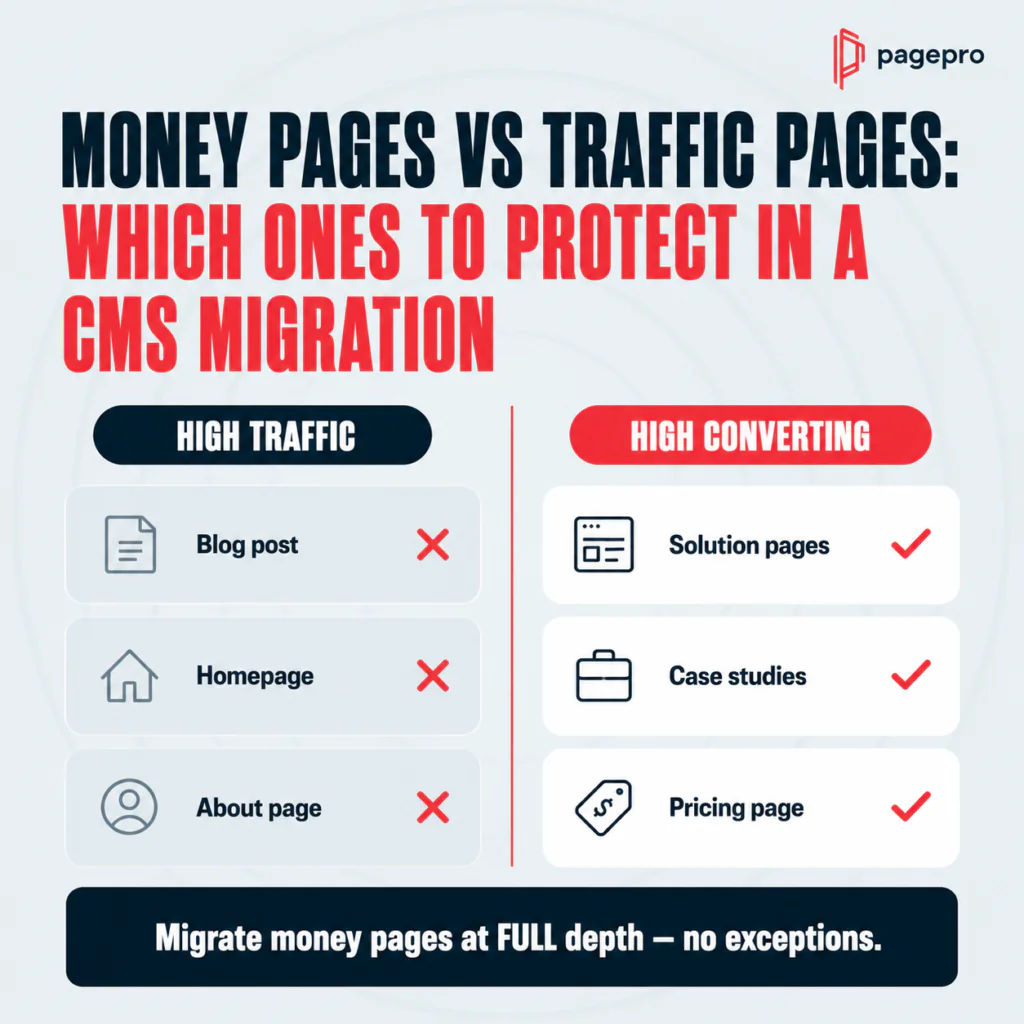
Some of your most important pages have very little traffic today but are critical to revenue. A solution page targeting a specific integration or use case might receive 50 visits a month and generate 30% of your qualified leads. Migrate it fully – do not simplify it.
Localcoin
Migrating WordPress Website to Jamstack for the financial technology company.
READ CASE STUDY
Mistake 4: Launching Without Clean Technical SEO Signals
On launch day, your site needs to send Google one clear message: this is a trustworthy, well-structured site worth crawling and ranking. Every technical error present at go-live delays that signal – and some errors, if left undetected, suppress rankings for months.
The non-negotiable checklist before any migration goes live:
| Item | What to verify |
|---|---|
| Canonical tags | Every page has a self-referencing canonical pointing to its final URL |
| XML sitemap | Contains only canonical, indexable URLs – no staging pages, no noindexed URLs |
| Robots.txt | Staging blocks removed; nothing critical is disallowed |
| Meta tags | Correct titles and descriptions on all key page templates |
| Hreflang | Pointing to new URLs if the site has language versions |
| Internal links | All pointing to final URLs – not through redirect chains |
| Analytics | GA4 and GSC tracking confirmed before launch, not after |
The mistake most teams make isn’t ignoring these entirely – it’s forgetting to establish a baseline before migration. Without pre-migration data, you cannot prove the new site is faster or better performing. You’re flying blind.
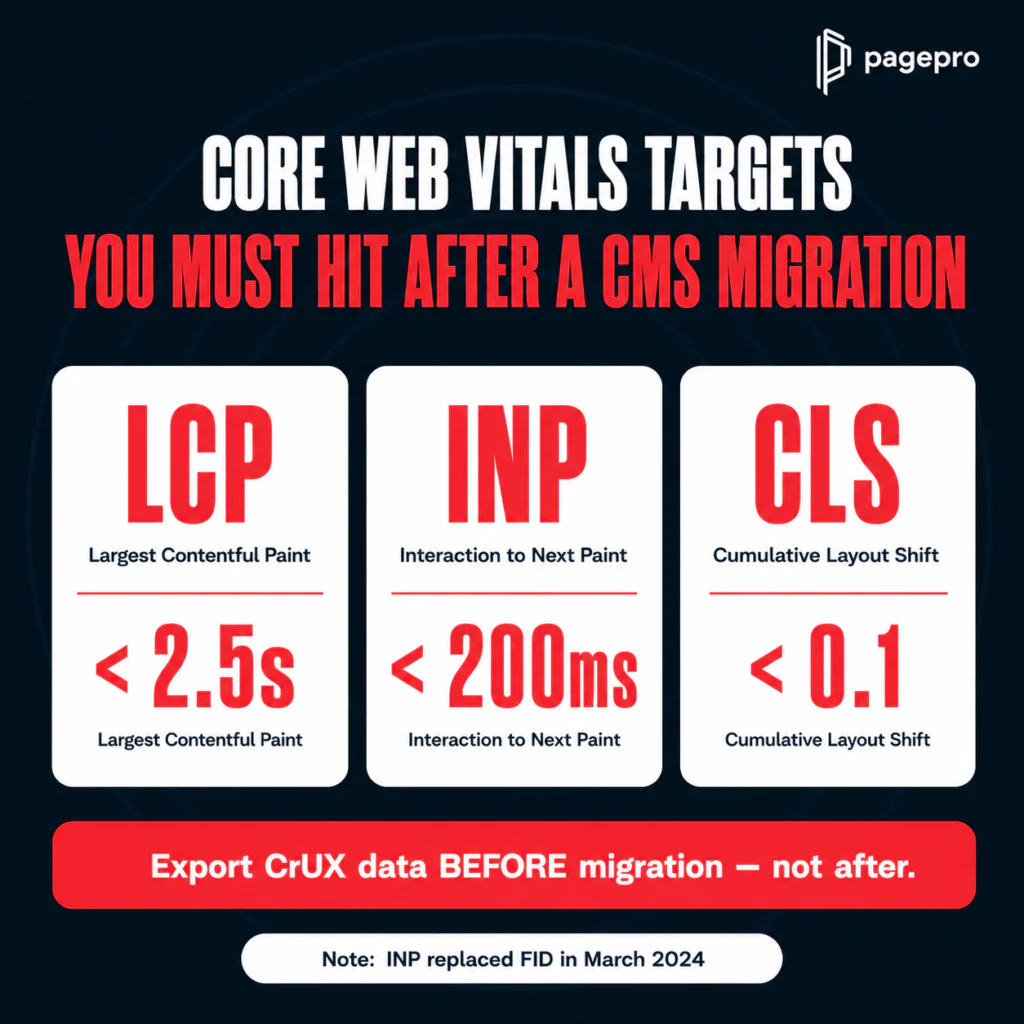
Export your Core Web Vitals field data from CrUX before launch. Your targets on the new site should be:
- LCP (Largest Contentful Paint) – under 2.5 seconds
- INP (Interaction to Next Paint) – under 200 milliseconds
- CLS (Cumulative Layout Shift) – under 0.1
One important note: INP replaced FID (First Input Delay) as a Core Web Vitals metric in March 2024. If your migration checklist still references FID, it’s outdated. On Nexity migrations, we start from a 100/100 Lighthouse score by default – meaning the performance improvement is measurable from day one, not something you chase after launch.
What technical SEO checks should you run before a CMS migration launch?
Run this sequence in order – on staging first, then again immediately after go-live:
- Validate canonical tags on all key page templates
- Check hreflang tags point to new URLs (if multilingual)
- Confirm XML sitemap contains only canonical, indexable URLs
- Validate robots.txt – staging noindex rules must be removed
- Test 301 redirects are deployed and returning correct status codes
- Confirm GA4 and GSC tracking is firing correctly
- Export CrUX baseline data before the site switches over
Mistake 5: Treating Internal Links as a Preservation Task
Most teams copy their internal links from the old site to the new one and consider it done. That’s the floor, not the ceiling – and migration is the single best opportunity you’ll have to rebuild your link architecture from scratch. Don’t waste it on preservation alone.
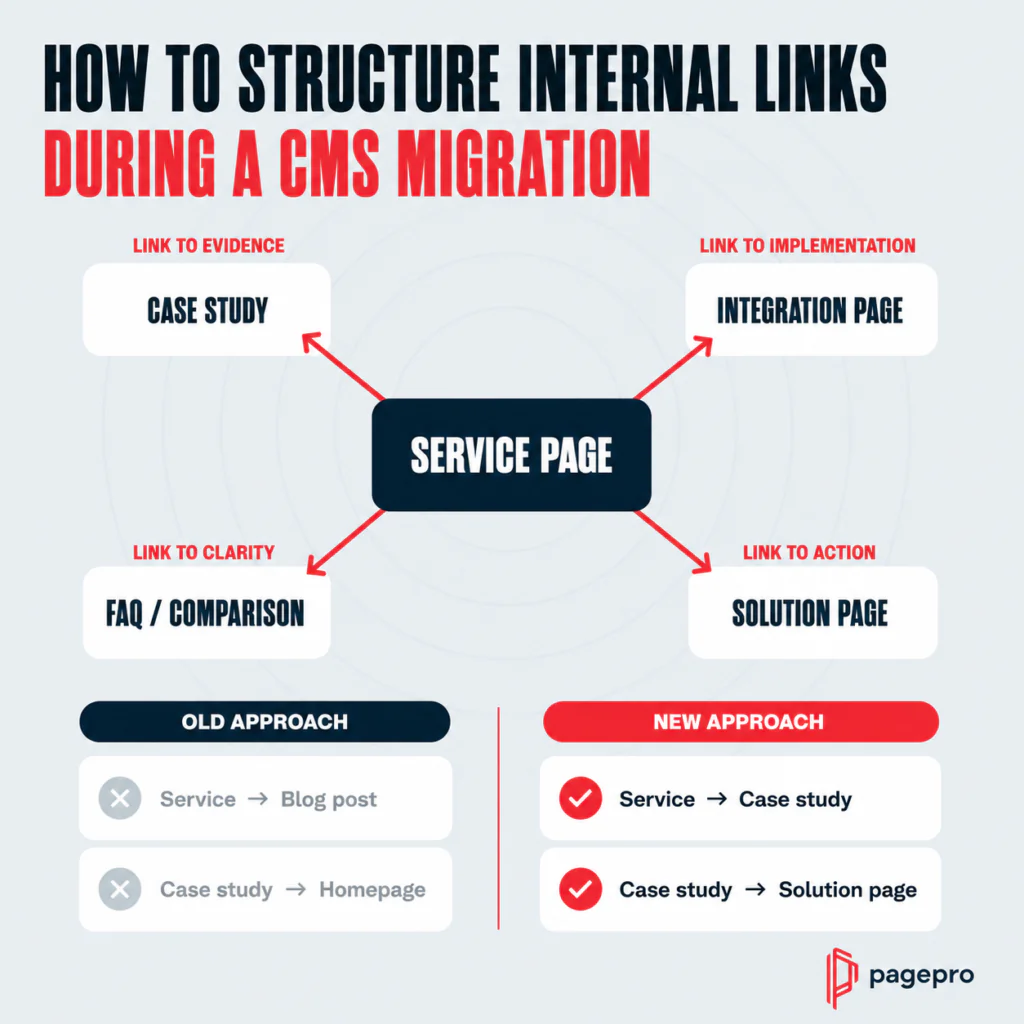
Internal linking is how you tell Google which pages are important and how they relate to each other. A site that links its service pages to relevant case studies, its case studies to solution pages, and its solution pages to integration and FAQ content builds a structure that reinforces topical authority across the whole site. A site that copies its old links preserves whatever was working – and whatever wasn’t.
The upgrade worth making during migration:
| From | To |
|---|---|
| Service page -> generic blog post | Service page -> relevant case study |
| Case study -> homepage | Case study -> solution page |
| Solution page -> contact page only | Solution page -> integration page + FAQ |
| Blog post -> unrelated content | Blog post -> supporting service or solution page |
Beyond improving the structure, there’s a specific risk to watch for: orphan pages. When you rebuild navigation in a new CMS, pages that were previously linked through menus or sidebars can lose all their internal links overnight. Google deprioritises pages with no internal links pointing to them – and in headless CMS migrations, where navigation is often rebuilt from scratch, orphan pages are one of the most common silent killers of post-migration rankings.
Run a Screaming Frog or Ahrefs inlinks report before migration and again after launch. Compare the two. Any page that had internal links before and has none after is a problem to fix before Google notices it first.
How do you fix internal linking during a CMS migration?
- Run an inlinks report on the current site to map your existing link structure
- Design your commercial hub architecture – service pages linking to case studies, case studies to solution pages, solution pages to integrations and FAQs
- Update every internal link to point to final new URLs – not through redirects
- Run the inlinks report again on the new site post-launch
- Compare results – identify any pages that lost all internal links
- Fix orphan pages before or immediately after launch
Mistake 6: Ignoring AI Search Optimisation During Migration
This is the mistake that separates 2026 migrations from every checklist written before it.
AI Overviews, Perplexity citations, and ChatGPT search results now appear across a growing share of B2B queries – and that share has roughly doubled in the past twelve months. Most companies are not structuring their content to be selected as a source by these systems, and migration is the cheapest moment to fix that across your entire site at once.
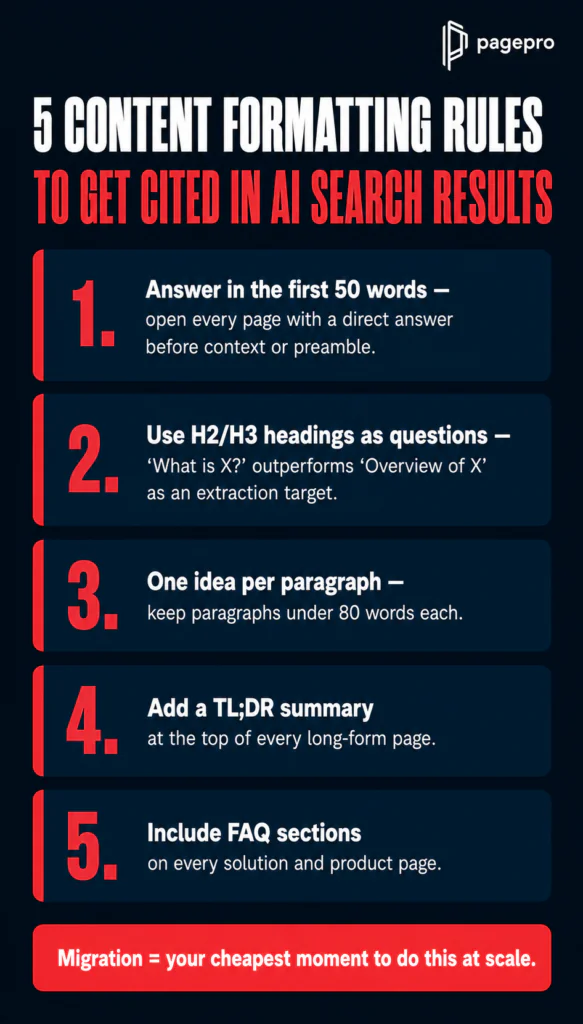
AI tools don’t reward the most beautifully designed pages. They reward the most clearly structured ones. What that means in practice:
- Answer in the first 50 words – every page should open with a direct answer to the question it targets, before any context or preamble
- H2 and H3 headings written as questions – “What is X?” performs better as an extraction target than “Overview of X”
- Short paragraphs – one idea per paragraph, under 80 words each
- TL;DR summaries at the top of long-form pages – a 3-5 bullet summary of the key takeaways
- FAQ sections on every solution and product page – not just blog posts
The reason migration is the right moment to implement this is scale. Retrofitting AI-optimised formatting page by page after launch is slow and expensive. During a Sanity migration, you can build custom prompts directly into the content model that auto-generate TL;DR summaries and FAQ blocks for every page on migration. You do it once in the schema – and it applies everywhere, automatically.
If you’re migrating in 2026 and not structuring for AI search, you’re leaving one of the fastest-growing discovery channels untouched.
How do you optimise content for AI Overviews after a CMS migration?
Structure each page so the most important answer appears in the first 50 words, use H2/H3 headings as questions, keep paragraphs under 80 words with one idea each, add a TL;DR summary at the top of long-form pages, and include FAQ sections on every solution page. FAQ schema and HowTo schema markup reinforces these signals for both Google and AI retrieval systems – making your content easier to extract, recompose, and cite.
Want to migrate to a new CMS without losing SEO?
How Long Does SEO Recovery Take After a CMS Migration?
The honest answer depends entirely on how well the migration was executed – and the gap between best and worst case is wider than most teams expect.
A 2024 Search Engine Journal study of 892 site migrations found an average recovery time of 523 days. That’s not a worst-case figure – that’s the average across nearly 900 real migrations. The same study found that 17% of sites never recovered their pre-migration traffic levels, even after 1,000 days.
The fastest recoveries in the dataset – 19, 22, and 33 days – had one thing in common: meticulous preparation before launch, not aggressive fixes after it.
For a well-executed migration, the realistic timeline looks like this:
| Timeframe | What to expect |
|---|---|
| Days 1-7 | Temporary ranking fluctuations as Google re-crawls the new site – normal and expected |
| Weeks 2-4 | Rankings begin to stabilise for well-redirected, content-preserved pages |
| Day 30 | First meaningful CWV field data comparison available via CrUX (28-day rolling window) |
| Day 60 | Non-branded organic traffic gives you the first reliable signal of ranking preservation |
| Day 90 | Full picture emerges – YoY comparison, structured data performance, content gap analysis |
The critical distinction is between branded and non-branded traffic. Branded traffic recovers quickly regardless of migration quality – users search your company name and find you. Non-branded organic traffic is the real test. If that holds, the migration worked. If it doesn’t, you have a problem that branded recovery is masking.
Across Pagepro’s 50+ migrations, ranking stabilisation has consistently happened within the first 30 days – because every factor covered in this guide is addressed before a single URL goes live, not after.
The 90-Day Post-Migration Monitoring Runbook
No migration is done at launch. The first 90 days determine whether your preparation paid off – and catching problems early is the difference between a two-day fix and a three-month recovery.
Most teams do a round of checks on launch day and then move on. What’s needed instead is a structured monitoring protocol that runs in phases, with specific actions and alert thresholds at each stage.
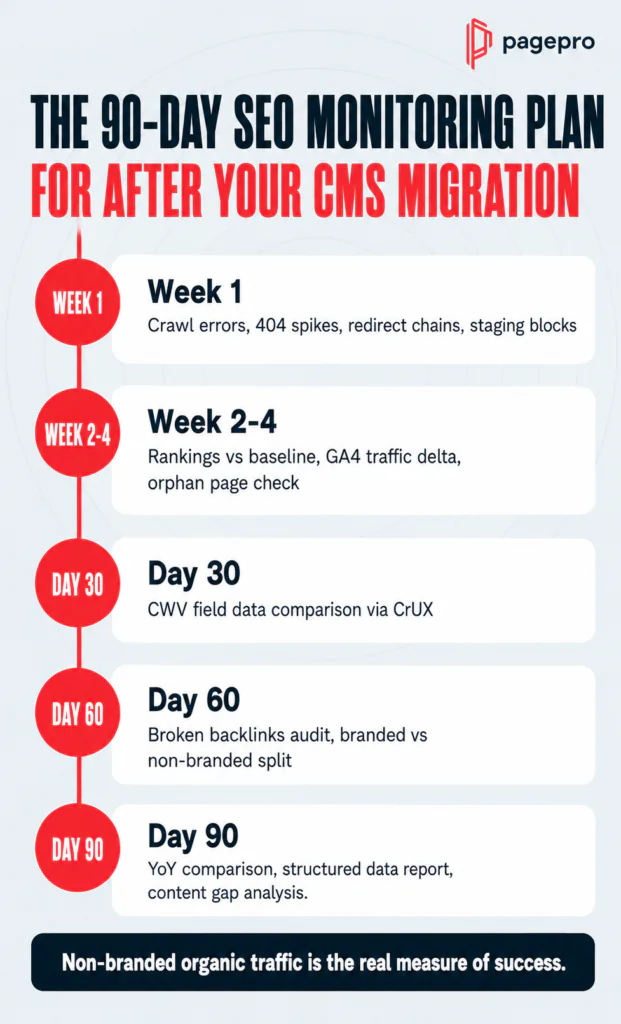
| Phase | Actions | What you’re watching for |
|---|---|---|
| Week 1 | Crawl for errors and redirect chains; monitor 404 spike (alert threshold: +20% vs pre-launch baseline); verify GSC coverage report; confirm staging noindex rules are removed | Any technical issue that went live undetected – these are fastest to fix the earlier they’re caught |
| Week 2-4 | Track rankings vs pre-migration baseline for top 50 non-branded keywords; monitor traffic delta in GA4; check internal links for any orphan pages introduced by navigation changes | Early ranking signals – stabilisation here means the migration is processing cleanly |
| Day 30 | Export CWV field data from CrUX and compare against pre-migration baseline – this is the earliest valid comparison point given CrUX’s 28-day rolling window | Whether the new site is genuinely faster – without the baseline you captured before launch, this comparison is impossible |
| Day 60 | Run broken backlinks audit in Ahrefs; annotate migration date in GSC for future reference; separate branded vs non-branded traffic in GA4 reporting | Non-branded traffic is the real signal – branded recovery happens fast and can mask ranking problems |
| Day 90 | Year-on-year organic traffic comparison; structured data performance report in GSC; content gap analysis for any pages that dropped more than 5 positions | Full picture of migration success – this is the report you take to stakeholders |
One metric worth tracking from day one that most runbooks miss: non-branded organic traffic as a percentage of total organic traffic. If that percentage drops post-migration, branded recovery is masking a real problem. If it holds or grows, the migration preserved what mattered.
At Pagepro, we run this monitoring protocol on every migration as standard – not as an optional post-launch checklist, but as a built-in phase of the project. The migrations that avoid long recovery windows are the ones where problems are caught in week one, not month three.
FAQ
SEO migration is any change to a website – CMS switch, URL restructure, domain change, or site redesign – that affects how search engines crawl, index, or rank your pages. The term refers specifically to the process of managing those changes to preserve or improve organic visibility. Not every website migration triggers an SEO migration, but any change that touches URLs, content structure, or technical signals does.
Yes, changing your CMS can affect SEO if it alters URL structure, page speed, internal linking, or how search engines crawl your site. Done correctly – with a complete redirect map, preserved content depth, clean technical signals on launch day, and a Core Web Vitals baseline – a CMS change can be SEO-neutral or even improve rankings over time. Done incorrectly, it can cause traffic losses that take months or years to recover from.
The six factors that determine whether you keep your rankings: change one major variable at a time rather than everything simultaneously; build a 1:1 redirect map before launch; preserve the depth and social proof of your money pages; launch with correct canonicals, a clean sitemap, and verified tracking; use migration to improve internal linking rather than just copy it; and structure content for AI search citation. Addressing all six before go-live is what separates migrations that hold rankings from those that don’t.
A 1:1 redirect map is a document that pairs every old URL on your site with its exact new equivalent. It matters because 301 permanent redirects transfer link equity from old pages to new ones – without them, backlinks earned over years point to 404 pages and that equity is lost. Every indexed URL needs a mapped destination before launch, and those redirects should remain live for a minimum of 12 months.
301 redirects should remain live for a minimum of 12 months after migration. During this window, search engines consolidate ranking signals to the new URLs and external sites re-crawl and update their links. Removing redirects before this period closes risks losing link equity and causing 404 errors for pages still being discovered via old links.
A website redesign changes visual design and user experience. An SEO migration is any change – including a redesign – that affects search engine visibility through URL changes, content restructuring, platform switches, or domain changes. A redesign can happen without triggering a full SEO migration if URLs, content, and technical signals remain unchanged. When redesign and CMS migration happen simultaneously, migration risk increases significantly because multiple variables change at once.
Money pages are the pages buyers read before they contact you or make a purchase decision – not necessarily your highest-traffic pages. For a B2B company, these typically include solution pages, integration pages, case studies, the pricing page, and comparison pages. These pages require full migration with no simplification of use cases, social proof, or conversion elements. They are also the pages AI tools use to evaluate whether your company is a credible source worth surfacing.
Ready for a CMS Migration?
Ready to Migrate Without Losing Your Rankings?
If you’re planning a CMS migration this year, the difference between a migration that holds rankings and one that triggers months of recovery comes down to preparation – not luck, not budget, and not the CMS you’re moving to.
At Pagepro, we’ve run 50+ migrations and built everything we learned into Nexity – our proprietary system for migrating unmaintainable, slow, or outgrown tech stacks to Next.js + Sanity on Vercel. De-risked. Predictable. Fixed price.
The first step is a free migration assessment and a live demo built with your real content – delivered in 48 hours, no commitment required.


