TL;DR
- Sanity is a headless CMS: content lives as structured JSON in a hosted database (the Content Lake) and reaches any front end through APIs.
- Its schemas are code. You define content types in JavaScript or TypeScript, keep them in version control, and change them with a deployment rather than a click.
- You query with GROQ, Sanity’s own query language, and rich text arrives as Portable Text, structured JSON rather than a blob of HTML.
- The free plan is genuinely usable: 20 seats, 2 public datasets, 10k documents, 250k API requests and 1m CDN requests a month. Growth is $15 per seat/month and takes permission roles from two to five, adds the option to make its two datasets private, comments, tasks and scheduled drafts.
- Sanity now calls itself a Content Operating System: Canvas for AI-assisted writing, Content Agent for bulk edits and audits, and an MCP Server so coding agents can work against your schema.
- What 2026 added is aimed at developers and administrators rather than at editors: Sanity Context (February 2026) lets any AI agent query your content through one MCP endpoint, Studio 6 (June 2026) is a platform upgrade rather than a new editing experience, and an organization on Enterprise, where SSO lives, can now refuse to admit users without SAML at all.
- The trade-off: the Studio is configured in code rather than assembled in a settings screen, so a developer sets it up before anyone publishes, and GROQ is one more thing for a team to learn.
Content Management with Sanity.io
Have you been wondering why Sanity is becoming so popular with modern development teams? You’re in the right place.
Sanity is a headless CMS, and since 2025 its vendor has positioned the wider platform as a Content Operating System: the same structured content and APIs, plus the tooling built on top of them for multi-channel publishing, real-time collaboration and customizable editorial workflows.
As long-time fans of Sanity.io, we’ve decided to prepare an introduction to this content management platform, what it does well, where it gets awkward, and when it is the right choice for your next project.
We’ve also prepared a video on why we think Sanity is a great choice for most projects – give it a watch!
But before we explore what sets it apart from other platforms, we should start by answering the question what is Sanity.
What Is Sanity?

Sanity is a headless CMS built around structured content. Your content lives as JSON documents in a hosted database Sanity calls the Content Lake, the editing interface (Sanity Studio) is a React application you configure in code, and every front end reads the same content through an API. That core is what this guide is about; Sanity itself now markets the wider platform as a Content Operating System, which adds Canvas, Content Agent and an MCP Server on top of that core.
Sanity is a content management system, just not the kind that also builds your pages. In traditional CMS platforms like WordPress or Joomla, the content and its presentation are tightly joined, which can be very limiting when you need to deliver content across different platforms. A headless CMS, on the other hand, treats content as structured data and delivers it via APIs.
Sanity also fits into the broader composable CMS category and can be integrated with other services in your tech stack, like frontend frameworks (Next.js, React), eCommerce platforms (Shopify), or analytics tools.
Curious what Sanity can do for you?
How Sanity Works
Sanity’s architecture is built around three main components that work together to deliver a developer-first content platform.
Content Lake
At the heart of Sanity is the Content Lake. It’s a fully managed backend where content is stored as structured data, not HTML, which makes it reusable across any frontend.
Content Lake supports real-time updates. That means changes made in the Studio are instantly reflected in apps and websites. Rich text is stored as Portable Text, an open JSON format rather than a blob of HTML, so the same paragraph can be rendered by a React site, a native app or handed to a model without anyone parsing markup. It also scales automatically with content versioning and document-level access. With that, you’re able to build once and distribute your content anywhere – no need to rewrite logic for each platform.
Sanity Studio
Sanity Studio is an editing environment in which users can create, manage, and organize content. It’s open source, written in React, and fully customizable. Instead of rigid templates, Sanity Studio lets you define your content model in JavaScript or TypeScript.
What’s more, it includes plugin support for adding things like AI assistants, visual previews, or third-party integrations. The themeable interface that matches your brand or client needs and custom content types makes Sanity Studio one of the few platforms that adapts to your team.

// schemaTypes/post.ts
import {defineField, defineType} from 'sanity'

export default defineType({
  name: 'post',
  title: 'Post',
  type: 'document',
  fields: [
    defineField({name: 'title', type: 'string'}),
    defineField({name: 'slug', type: 'slug', options: {source: 'title'}}),
    defineField({name: 'publishedAt', type: 'datetime'}),
    defineField({name: 'body', type: 'array', of: [{type: 'block'}]}),
  ],
})
The Studio builds the editing interface from that file. Adding a field is a commit and a deploy, not a click in an admin panel, which is the part teams either want or do not.
GROQ and APIs
Sanity uses GROQ (Graph-Relational Object Queries), a language designed for structured content. GROQ was built from the ground up to handle deeply nested structures and fetch exactly the shape of data you need in a single query.
*[_type == "post" && defined(publishedAt)]
  | order(publishedAt desc)[0...10]{
    title,
    "slug": slug.current,
    publishedAt
  }
One request, and the response has exactly those three keys: the query names the shape of the JSON it wants rather than fetching documents and discarding most of them.
In addition to GROQ, Sanity provides APIs that support different development styles. You can use the auto-generated GraphQL API or tap into the REST API for simple integrations with third-party services like Zapier or Netlify. Real-time listeners are also available, so your application can instantly respond to content changes.

Getting Started with Sanity
npm create sanity@latestThe CLI walks you through signing into an account or creating one, and choosing a Studio template, whether you want TypeScript, and a package manager, then writes a Studio into a new folder with its configuration. What it cannot choose for you is the part that matters: what your document types are. Some templates arrive with a starting schema and the clean one does not, and either way the post type above is the shape of what you end up writing yourself, because every query and every editor screen is built from it. The other early decision is visibility: new datasets are public by default, and a private one needs the Growth plan or above.
What Sanity Shipped in 2025
In May 2025, the Sanity team unveiled the Spring Release 2025, the point at which the platform started being marketed as a Content Operating System rather than a CMS alone. This change came in with completely new tools, which greatly improved the workflows of content creation, management, and distribution:
- Sanity Dashboard: A central hub that provides quick access to Studios, Canvas, Media Library, and custom apps. It offers a complete view of content operations across teams and apps.
- Canvas: Previously named Sanity Create, Canvas is an AI-assisted, free-form writing environment. It allows for preparing content with non-intrusive AI support.
- Media Library (an add-on on Enterprise plans, not a feature of the lower tiers): An asset management system that organizes media across teams and datasets. It supports role-based access, versioning, and automation.
- App SDK: Developers can build custom applications within Sanity, tailored to specific workflows.
- Functions: Spring release introduced serverless functions, enabling complex backend logic, such as data synchronization and integration, directly within Sanity.
- Agent Actions: AI content operations you call from your own code. Generate, Transform, Translate, Prompt and Patch are schema-aware, so the instruction you write is about your content model rather than about raw JSON.
- Insights: Offers visibility into content performance and workflow bottlenecks.
Two capabilities that arrived just before that release matter more to most teams than anything in it. Content Releases (February 2025) groups a set of changes into one release you preview together and publish at a chosen moment, with releases stacking instead of colliding, which is the answer to a campaign launch that used to mean publishing a stack of documents in the right order at 9am. Check the plan before you count on it: since November 2025 it is an add-on on Enterprise plans only. The Live Content API (generally available March 2025) is the other one: content is cached at the edge, a stale entry is refreshed in the background, and Sync Tags tell the CDN exactly which part of the cache a change touches.
What Changed in Sanity in 2026
Most of what this article describes was in place by the middle of 2025. Three things have landed in 2026, and the pattern in them is worth more than the list: Sanity is spending its engineering on the parts developers and administrators touch rather than on the editing screen.
- Sanity Context, February 2026. An MCP endpoint for the agents that answer your users, rather than for the coding assistants Sanity’s MCP Server serves. It hands an agent your schema and GROQ through one endpoint and runs hard filters, keyword matching and semantic ranking in a single query, so “Comfy hiking boots under $200, size 10?” is one request against your live dataset instead of a retrieval pipeline you build and keep. If you are choosing a CMS partly because an AI assistant will have to answer questions from its content, this is the most consequential thing on this list, and it is cheap to try: the pricing page lists it as Agent Context, included on every plan including the free one, with semantic search and embeddings generation alongside it. What is metered is the querying: 500 embeddings reads a month on Free, 1,000 on Growth and $1.50 per thousand above that. Note the name: the pricing page still says Agent Context, which is what the product was called before it was renamed, and version 2.0.0 (3 September 2026) replaced its Studio plugin interface with a notice pointing at the Context app, so a project still running that plugin has a small migration ahead of it.
- Sanity Studio 6, 11 June 2026. Minor releases land most weeks, so check the changelog for where 6.x is today. The major itself is a platform upgrade rather than a new editing experience: it drops Node 20, moves to Vite 8, upgrades the Portable Text editor to v7, turns React strict mode on by default, makes the
groq2024search strategy the default and removes the oldenableLegacySearchoption and the deprecatedauth.modeconfig. Studio 5, from 16 December 2025, is the one that raised the floor to React 19.2 and changed what TypeGen emits, and it came with an assurance worth quoting: “Your schemas, plugins, and Studio customizations work exactly as before.” Studio 6 makes no such promise, so budget for that hop whatever you are coming from: a project on 5 meets that list with nothing in between, and a project still on 3 or 4 meets it after everything else. - Organization-level governance, September 2026. An organization can now refuse to let non-SAML users join it at all, rather than inviting them and hoping. Read the plan before you lean on it: single sign-on is an Enterprise feature, so this is a change for Enterprise buyers rather than for everyone. If Sanity has to clear a security review at your company, it is the kind of changelog entry that decides it.
What has not changed is the part this article spends most of its words on. The Content Lake, GROQ, Portable Text and the structured-content model work the way they did in 2024, and so does configuring the Studio in code; what moved underneath is the toolchain, not the model. If you evaluated Sanity then and turned it down, the reasons you turned it down are probably still there.
Pros and Cons of Sanity Content Management System
While it can be a good fit for most organizations and businesses, Sanity has real strengths and real drawbacks, and both belong in the decision. Here they are in turn:
Pros of Sanity
- Developer-First: Since the content model in Sanity is defined in the code (JavaScript or TypeScript), it can live in version control, evolve with your project, and adapt to edge cases that more traditional CMS platforms can struggle with.
- Portable Content: Because it’s JSON-based and delivered via APIs, content in this CMS can be reused across different platforms, even between web and mobile.
- Real-Time Collaboration: In Sanity, editors can collaborate on the same document and see updates as they happen, a very helpful feature for distributed teams chasing deadlines.
- Custom Editorial Interfaces: If your content team has unique needs, Sanity gives you the option to build your own editorial interfaces, which can be great for brands managing multiple markets. It stretches further than editorial: on Toolbox by Admiral we used Sanity as the form builder and product configuration behind an insurance platform, and the marketing site it fed launched on a 100/100 PageSpeed Insights desktop score.
- Powerful Ecosystem: The Canvas editor and the App SDK let you build whole workflows inside Sanity, with the Media Library on top of them if you are on Enterprise. The May 2025 release added an AI layer on top, and it has kept growing since: Content Agent for bulk edits, content audits and gap analysis, and an MCP Server that lets a coding agent run GROQ queries, patch documents and search your content against a deployed schema instead of guessing at it.
Cons of Sanity
- Learning GROQ: GROQ is powerful, but it’s not as well-known as GraphQL or SQL. It may take time for new developers to get comfortable with its syntax.
- Complex Initial Setup: Sanity Studio is very customizable, but has no templating system like you’d find in WordPress or Webflow. Non-developers will likely need expert help to define schemas and configure Studio.
- Maintenance Responsibility: Because you can customize so much, you’re also responsible for maintaining those customizations. While it’s manageable, you should keep it in mind if your team has limited frontend resources.
Now that you have a better understanding of Sanity’s capabilities, we can move on to analyze who benefits most from it.
Who is Sanity for?
Sanity fits teams that have someone to set it up and then want to be left alone by it: developers who would rather define content in code than in an admin panel, and editors who want an interface shaped around their content rather than a page builder. The split matters most when you decide who builds the site and who keeps it running afterwards. If the answer to the first is “not us”, that is what our Sanity development services cover.
Developers
Developers have full control over Sanity’s content architecture, frontend integration, and editorial workflows. The schema definitions are easy to maintain and version with the rest of your project, since they live in code. Additionally, the App SDK and serverless Functions allow for building fully custom content tools within the Sanity ecosystem.
Content Teams and Marketers
Sanity is full of features meant to make the work of editors smoother, such as real-time collaboration, live previews, and structured content. The Canvas interface with AI-assisted drafting helps content specialists move faster without needing devs to implement every change, and on Enterprise the centralized Media Library does the same for assets.
Startups and Growing Teams
The generous free tier and modular setup make Sanity a great fit for early-stage startups. You can start small with a simple Studio, and then scale content delivery as your needs grow.
Enterprise Teams
For companies managing large content operations, Sanity supports a variety of functions: role-based access control, dataset partitioning, and complex integrations with CDNs, eCommerce platforms, and analytics tools. Insights and Content Agent earn their keep at this size: the first surfaces where workflows stall, and the second runs bulk edits, audits and gap analysis across a dataset through conversation rather than through a script.
Non-technical users
Although the initial setup usually calls for developer input, once the Studio is set up, even non-technical users can work with the content. Editors don’t need to understand how the frontend works to work inside a custom interface designed around their tasks.
Sanity Pricing
Sanity’s seat-based pricing with pay-as-you-go overages scales from solo developers to enterprise teams, making it accessible for a wide range of content needs.
Free Plan: For Individual Developers or Small Teams
Ideal for personal projects, MVPs, or learning Sanity. You get 20 seats, 2 public datasets and two permission roles. Real-time collaboration, the media browser and Content Agent are included, the last with 1,000 AI credits a month, and you get 100GB of assets and 100GB of bandwidth, the same allowance Growth has. Comments, tasks, scheduled drafts and AI Assist are not included, and the Media Library is an Enterprise add-on rather than a free feature. The ceiling most teams reach first is the document limit of 10k, not the two-dataset limit.
Growth Plan: For scaling teams
At $15 per seat/month, this plan suits startups and growing teams: up to 50 seats, five permission roles, the option to make its two datasets private, comments, tasks, scheduled drafts, AI Assist, 25k documents, and pay-as-you-go overages. Usage above the included quotas is billed per unit as you go, and SSO and custom roles start at Enterprise (pricing page, read September 2026).
Enterprise Plan: For large organizations with complex needs
This custom-priced tier is tailored for companies that need enterprise-grade support, SAML SSO, uptime SLAs, advanced access control, and high usage quotas. It includes onboarding, custom retention, audit trails, and premium dataset features.
What it costs once the team is real
Plan tables are easy to read and hard to price. Here is the arithmetic for a team of twelve with 40,000 documents, from the rows above: twelve seats on Growth is $180 a month, and 40,000 documents is past the 25,000 that plan includes, so you add the documents add-on at $299, which takes you to 50,000 in total. Call it $479 a month before any bandwidth or API overage, on a page that lists its prices per month.
The number that actually moves the bill is not seats, though. It is whether anything on your list is Enterprise-only. Single sign-on is, and so are custom roles and Content Releases. If your security review requires SSO, the seat price stops being the figure that matters and you are in a conversation about custom pricing before you have modelled a single document. Worth finding out in week one rather than week twenty.
Sanity Use Cases
To prove Sanity’s flexibility, here are a few real-world examples showing how different teams use Sanity to solve practical content challenges:
Ecommerce
Modern eCommerce sites require speed, high personalization, and integration with product data to perform well. Sanity fits right in, giving teams a structured content layer they can shape around customer journeys.

Siella Beauty runs exactly this split, and you can see it from outside: the storefront serves its product media from Shopify’s CDN and its editorial imagery from Sanity’s, on the same pages. Shopify keeps the catalogue and the transactions; the content around them lives somewhere built for content. That is the shape most retailers end up wanting, and the reason a headless CMS beside a storefront is ordinary rather than exotic.
Marketing Websites
Marketing teams often need to update copy, swap visuals, or launch landing pages with no time to wait for a developer. Sanity Studio makes that possible by offering a CMS custom-made for their workflow.
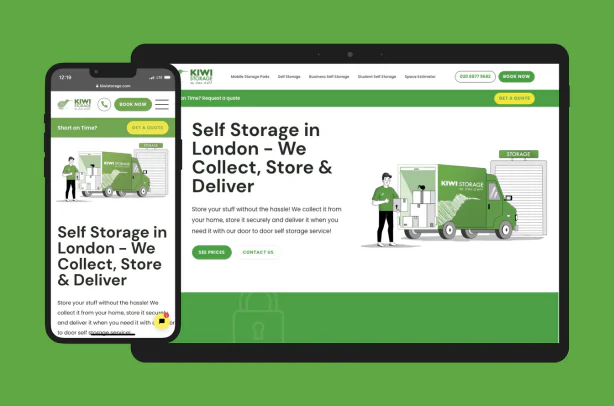
When Kiwi Movers, a London removals company trading since 2007, launched a separate storage brand, the website had to be the new brand’s main source of leads from day one. We built Kiwi Storage on Next.js and Sanity in three months, with a Studio the team uses to run the site themselves and a component library that carries the new brand identity. It launched at GTmetrix grade A; the parent company’s older WordPress site, measured the same day in May 2022, scored a D. Different sites rather than a before and after, but the gap is the point: a marketing site that is built rather than themed does not have to be slow.
Documentation & Knowledge Bases
Structured documentation is where Sanity shows its full potential. It allows for building scalable docs with ease thanks to rich text support, nested references, and real-time updates.

Causal built their entire documentation system using Sanity and Next.js. They structured everything in portable blocks of content, which link related topics, let them add code snippets, and serve docs between different platforms.
At the other end of the size range, we rebuilt GP Notebook on Next.js and Sanity: a medical reference used by UK GPs, 100,000+ subpages and roughly 30,000 interlinked clinical articles, in a context with real compliance requirements around what changed and when. Organic traffic doubled within two years of the relaunch.
More of our work on Sanity: Sanity case studies.
What a CTO Asks Before Committing
Three questions come up in every evaluation and none of them is about features. They are about getting out, getting through a security review, and whether something else would have been the better call.
Getting your content back out
The Content Lake is Sanity’s own service, and that is the trade you make for not running a database. The way out is documented rather than improvised: npx sanity@latest datasets export production production.tar.gz writes every document and every asset binary into a local gzipped tarball (Export a dataset). Because content is JSON and rich text is Portable Text, what comes out is readable without Sanity, and the Studio you built is your own React code either way. Budget a move off Sanity as the same shape of work as the move onto it, a script rather than a button, but the content is not held hostage to the decision.
Security and compliance
Sanity is a SOC 2 Type 2 certified provider, with the examination covering the Security principle of the Trust Services Criteria, and describes itself as fully GDPR-compliant, with GROQ for data retrieval, custom retention policies and APIs for permanent deletion, which are the three things a data request actually needs. Data is encrypted in transit and at rest.
The detail worth knowing before a review board asks: the backend runs across three data centres in a single EU region, in Belgium, with a stated recovery to another region inside 12 to 24 hours and customer-controlled data placement described as planned rather than available. If your answer to “where does the data live” has to be a country, that is the sentence to read carefully (Sanity security, read September 2026). Audit trails, SAML SSO and custom access control sit on Enterprise.
Sanity against the alternatives
The axis that decides this is not features, it is who runs the datastore. Strapi and Payload are open source and you host them yourself, on your own database and your own infrastructure; Payload is MIT-licensed and built around Next.js. Sanity and Contentful are services you buy, and the Content Lake is not something you run. If your requirement is that the database sits inside your own perimeter, Sanity is the wrong shape and the question you are really asking is Strapi or Payload.
For the rest, the comparison we can speak to first-hand: on GP Notebook, a medical reference platform of 100,000+ subpages and around 30,000 interlinked clinical articles, we evaluated Sanity against Contentful, Storyblok and Prismic and chose Sanity. Two things decided it: content that is genuinely structured rather than page-shaped at that scale, and a document history long enough for a regulated client to answer questions about what changed and when. Organic traffic doubled within two years of the relaunch, and the replatformed site passes Core Web Vitals on mobile where the legacy one never did.
What a Sanity Build Involves, and Who Does It
Choosing Sanity is the easy half. The work that follows is the same on every project, and it is worth knowing before you commit:
- Content modelling. Schemas are code, so someone has to decide what a page, an author and a product actually are. This is the part that decides whether editors like the result.
- Migration. Content coming from WordPress or another CMS arrives as HTML and has to become Portable Text, with images uploaded as assets and internal links rewritten. That is a script, not a copy and paste.
- The front end. Sanity renders nothing. Something has to consume the API, usually Next.js, and handle previews, revalidation and SEO fields.
- Editor onboarding. Studio is configurable rather than templated, so the first week with a content team decides how much of it they use.
How long it takes depends on the first item far more than the last. A fixed-scope rebuild can land quickly: a WordPress and WooCommerce lighting catalogue went live on Next.js and Sanity in four weeks. What that four weeks buys is a working foundation, not a finished product – the advanced features arrive in later sprints, and content modelling for a large or messy site is what moves the date.
That is the work we do. Pagepro is a Sanity partner and runs migrations on Nexity, our Next.js and Sanity framework, built from 20+ real projects with zero Google ranking drops as of September 2026. If you want the build rather than the background, our Sanity development services page sets out the scope, the process and how an engagement runs.
Need help setting up Sanity?
Is Sanity Right for You?
If your team needs a CMS that adapts to your tech stack, supports custom workflows, and scales with your content operations, Sanity is one of the most capable options out there. It’s especially well-suited for teams that value developer control, structured content, and multi-channel delivery. It is the wrong choice when nobody on the team writes code: the Studio and the front end are configured in code, so both have to be built before anyone publishes a word.
At Pagepro, we’ve helped companies implement Sanity to streamline marketing workflows, migrate from legacy CMSs, and build scalable, content-driven products. If you’re considering Sanity for your next project, get in touch with us or check out our case studies to see what’s possible.
Frequently Asked Questions About Sanity
Yes. Sanity is a headless CMS: content lives as structured data in the Content Lake and is delivered over an API, with no front end attached, which is what makes it work for multi-platform publishing. Sanity now markets the wider platform as a Content Operating System, which adds Canvas, Content Agent and an MCP Server on top of that core.
Sanity offers a free tier with basic features and usage limits. The free plan covers 20 seats, 2 public datasets, 10k documents, 250k API requests and 1m CDN requests a month. Growth, at $15 per seat/month, adds the option to make its two datasets private, plus comments, tasks and scheduled drafts, rather than a larger API quota; custom roles and SSO come with Enterprise.
Sanity Studio is an open-source editing environment built with React. It’s fully customizable, letting you design and edit project workflows.
Sanity uses JavaScript and React for its Studio, and its query language is called GROQ (Graph-Relational Object Queries), which is designed specifically for querying structured content.
Some key benefits include real-time collaboration, content modeling, portable APIs, and developer freedom. It’s a great fit for content-rich, scalable applications.
Sanity is used by companies ranging from startups to enterprises. Notable users include PUMA, Braze, Mejuri and Tecovas. It’s especially popular among teams building eCommerce, marketing websites, and digital experiences.
Alternatives include traditional CMSs like WordPress and Webflow, or other headless CMSs like Strapi, Contentful, and Prismic. Sanity stands out for its real-time editing and Studio customization.