Selecting the right Headless CMS for your tech stack is a critical decision. A Headless CMS, unlike traditional CMS, offers a decoupled architecture with APIs for greater control over content delivery and presentation.
This article will evaluate some of the top Headless CMS options: Sanity, Strapi, Storyblok, Prismic, and Contentful. Each provides unique customization, integration capabilities, and scalability advantages.
Understanding these popular platforms’ strengths will help you choose the best option to meet your business needs and technical requirements.
TL;DR
• Headless CMS platforms separate content management from the frontend, allowing developers to deliver content through APIs to websites, apps, and other digital channels.
• Popular headless CMS solutions such as Contentful and Sanity provide flexible content models and integrations with modern frontend frameworks.
• These platforms help teams manage structured content more efficiently while supporting scalable, multi-channel digital experiences.
• Choosing the right headless CMS depends on factors such as customization needs, editorial workflows, developer experience, and infrastructure requirements.
• Many organizations adopt headless CMS architectures to improve performance, scalability, and flexibility in modern web development.
• Comparing leading headless CMS platforms helps teams identify which solution best fits their technology stack and long-term content strategy.
What is a Headless CMS?
A headless CMS is a content management system that separates the backend content management functionality from the frontend presentation layer.
What’s the Difference Between CMS and a Headless CMS?
In traditional CMSs, the content and the design are tightly coupled. A headless content management system focuses on storing and managing content, providing it via APIs (like RESTful or GraphQL) to any frontend framework or device.
Why Use Headless CMS?
Headless architecture offers improved scalability, higher security, and wider flexibility in choosing front-end technologies.
CMS developers can fetch and manipulate content programmatically by using APIs. This improves integration with various third-party applications and platforms and supports a microservices architecture.
For CTOs, this means a few things: Easier integration with existing systems, faster deployment of new services, and consistent content delivered across multiple channels and devices.
As a result, you optimize both development workflows and user experiences.
When to Use a Headless CMS?
A headless CMS works best in projects that need to deliver content across multiple channels or devices, not just a single website. It’s the right choice when you want:
Omnichannel Delivery: Serving the same content to websites, mobile apps, smart devices, and other platforms.
Custom Font-End Frameworks: Building with tools like React, Next.js, or Vue instead of using prebuilt templates.
Future Scalability: Handling high traffic and large content libraries without slowing down.Integration Flexibility: Connecting easily with e-commerce platforms, CRMs, analytics, or other APIs.
LYNGEN NORTH
Migrating a Luxury Arctic Hotel from WordPress to Sanity
When selecting a headless CM,S you need to ensure that the platform aligns with both current and future needs. Here’s a detailed breakdown of the key criteria:
1. Flexibility and Customization:
The ability to tailor the CMS to specific project requirements is critical. A Headless CMS should offer high levels of customization, enabling developers to build unique content structures, workflows, and user experiences.
2. API Integration:
The CMS must provide robust support for RESTful and GraphQL APIs to facilitate efficient data fetching and manipulation. It should allow developers to easily connect the CMS with React applications.
Aside from that, it has to utilize the full power of client-side rendering and dynamic content delivery. The quality of the API documentation and developer support is also crucial in this context.
3. Content Management Features:
The headless CMS should support a wide set of content management features that cater to the diverse needs of businesses and content creators.
This includes dynamic content updating, localization for multi-language support, content previews for real-time editing feedback, and version control. They improve the ability of content teams to manage and deliver engaging and relevant content consistently across all channels.
4. Pricing Models:
A variety of pricing models are available across different popular Headless CMS platforms. Choose one that aligns with your project’s budget and scale.
Consider how pricing scales with increased usage, storage, and traffic. For startups or smaller projects, a cost-effective solution with a flexible pricing plan may be preferable. Enterprise-level projects might require a more premium service.
5. Scalability and Reliability:
For projects that are either large or growing, a scalable CMS that can handle heavy loads is a must.
The platform should handle high traffic volumes, large amounts of content, and complex data structures without performance loss. Reliability in terms of uptime and data integrity is essential to maintain seamless operations.
6. Community and Ecosystem:
The strength and activity of the community around a Headless CMS can greatly impact its utility and longevity.
A vibrant ecosystem provides access to plugins, integrations, and extensions that can simplify and accelerate development. Additionally, community-driven support, frequent updates, and a strong developer network can enhance the platform’s resilience and foster innovation.
This is especially valuable in ensuring that the CMS remains relevant and up-to-date with the latest technologies and best practices.
Best Headless CMS software – Head-to-Head Comparison
Custom, dev-control projects with real-time collaboration
Flexible self-hosted/enterprise-ready builds
Visual-first teams with collaboration needs
Fast setup for dynamic content
Enterprise security & scalability
Headless CMS for Ecommerce: What to Look For
Not every headless CMS handles ecommerce equally well. The comparison criteria that matter for a marketing site – editorial UX, localization, content versioning – only partially overlap with what an ecommerce team actually needs in production.
The core challenge in ecommerce is real-time data coordination. Your CMS manages editorial content (product descriptions, campaign pages, blog), but your product catalog, pricing, inventory, and checkout live elsewhere – typically in a platform like Shopify, Commercetools, or a custom backend. The CMS needs to pull and push data across those systems without introducing latency or coupling that makes your stack brittle.
Based on our experience building ecommerce projects, here’s what actually separates a good headless CMS fit from a poor one in a commerce context:
Webhook and event support. When a price changes in your commerce platform, your CMS should trigger a content rebuild or cache invalidation automatically. Without native webhook support, this requires custom middleware that adds maintenance overhead.
Structured content modeling for product-adjacent content. Product pages need more than a rich text field. Look for a CMS that lets you define structured schemas for feature lists, comparison tables, size guides, and promotional banners – so editors can update them without touching code.
Preview across environments. In ecommerce, staging content needs to match a specific product catalog state. CMS platforms that support environment-aware previews save significant QA time during campaign launches – especially when you’re coordinating timed promotions across multiple channels.
Localization that handles regional pricing logic. Multi-currency ecommerce requires more than translated copy. The CMS needs to support locale-specific content variants that can reference locale-specific commerce data – not just switch languages.
Performance under catalog scale. A CMS that handles a 50-page marketing site well may struggle when it needs to serve content for tens of thousands of SKUs. Check API rate limits, CDN behavior under load, and how the platform handles incremental static regeneration with large content sets.
Among the platforms covered in this article, Sanity and Contentful handle these requirements most consistently in our client work. Sanity’s GROQ query language gives developers fine-grained control over how commerce data and editorial content are combined at the API level. Contentful’s enterprise tier provides the access controls and audit logging that larger retail operations typically require from a compliance standpoint.
Sanity: The Top Choice for Custom Solutions
Sanity is a leading Content Operating System that offers a high degree of customization, flexibility, and robust developer tools.
CTOs looking to build scalable and tailored content management solutions will find it a good choice. A platform like Sanity is a great choice for marketing sites and e-commerce solutions alike.
Watch our video on Sanity and why we think it’s a great choice:
Key Benefits of Sanity:
High Level of Customization:
Sanity provides excellent flexibility through Sanity Studio, a fully customizable editing environment. This allows developers to create bespoke content management interfaces tailored to specific project needs. The CMS can adapt to various workflows and business requirements.
The ability to customize both the user interface and the backend content is great fordelivering the best digital experiences.
Flexible Content Management and Real-Time Collaboration:
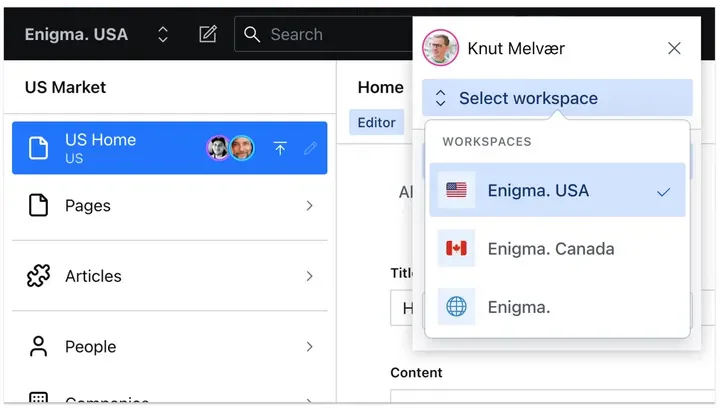
Sanity supports multiple workspaces, each configurable for different use cases like localization and content readiness. Different content requirements can be managed within a single platform, reducing complexity and improving operational efficiency.
Sanity’s real-time collaboration features allow multiple team members to work on content simultaneously. This speeds up the content creation and approval process, thus reducing time-to-market.
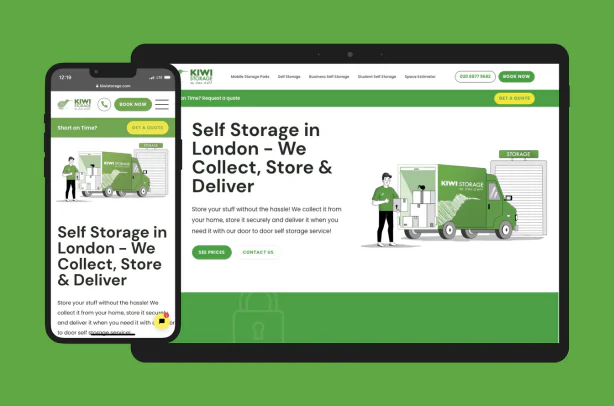
KIWI Storage, our client providing storage solutions decided to use Sanity for their Next.js web application.
The main reason was its full flexibility in content management. Additionally, they praised it for the live preview option. It enabled the editors to keep an eye on the overall look of the content during creation. Just take a look:
With support for both RESTful and GraphQL APIs, as well as its own GROQ query language, Sanity offers powerful tools for developers to fetch and manipulate content efficiently.
The platform provides a set of developer tools. These include a Command Line Interface (CLI), Software Development Kit (SDK), and webhooks. It makes Sanity well-suited for organizations with complex content management needs that require extensive customization and automation.
Scalability and Performance:
Sanity is designed to handle small-scale projects and large enterprise-level applications. Its structured content approach and integrated Content Delivery Network (CDN) ensure fast load times and consistent performance.
This combined with its flexibility, makes Sanity a reliable choice for growing businesses or those with fluctuating content management needs.
Security and Compliance:
For organizations concerned with data security and regulatory compliance, Sanity offers several key features. Two-factor authentication, activity logs, and compliance with GDPR and SOC2 standards. These help protect sensitive data and adhere CMS to industry regulations.
We suggested Sanity for our client, the UK’s leading insurance provider, dealing with a lot of sensitive data.
RELATED CASE STUDY
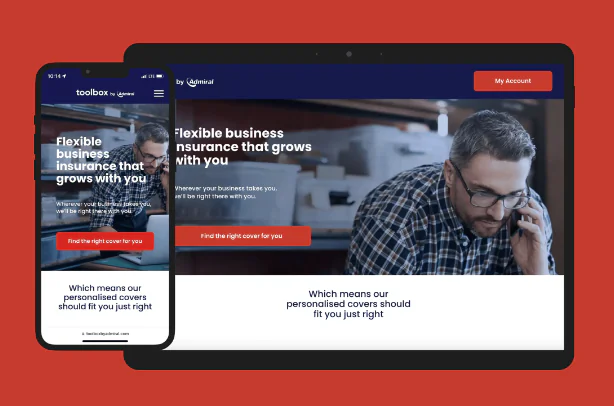
Next.js and Sanity Development for UK’S Top Insurance Company
Sanity offers the flexibility to host Sanity Studio on an organization’s own infrastructure, which can help reduce costs associated with third-party hosting services and provide greater control over deployment and security.
Why CTOs Should Consider Sanity:
For CTOs, Sanity is an ideal choice for projects that demand high customization, flexibility, and strong developer support. Its real-time collaboration features, robust API options, and developer-friendly tools make it an excellent platform for building complex, dynamic digital experiences.
Sanity’s features ensure that it can meet the needs of both current projects and future growth. It’s a top contender among headless CMS platforms, particularly for organizations aiming to create highly customized and efficient content management systems.
We find Sanity one of the best headless CMS ever. It gives us almost endless options for customization, allowing us to answer all users’ needs. And they vary – you can trust me on that.
Jakub Dakowicz, CTO at Pagepro, with 10+ years in CMS development
Strapi: A Versatile Choice for Modern Content Management
Strapi is a leading open-source Headless CMS that provides extensive customization and flexibility, making it an excellent choice for CTOs looking to build scalable and tailored digital solutions.
Strapi’s architecture is designed to accommodate a wide range of applications, from simple websites to complex, enterprise-level systems, making it suitable for businesses of all sizes.
Key Benefits of Strapi:
Flexibility and Customization:
Strapi offers unparalleled flexibility, allowing developers to adapt the platform to meet specific project needs. With customizable content structures, API endpoints, and authentication methods, Strapi enables the creation of intricate data models and content workflows that align precisely with business requirements.
Dual Hosting Options: Self-Hosted and Strapi Cloud:
Strapi’s flexibility extends to its hosting options, providing CTOs with the choice between self-hosting and a fully managed cloud solution.
The self-hosted option offers full control over the infrastructure and data, ideal for organizations with stringent compliance or security requirements or those looking to optimize costs by managing their own servers.
Meanwhile, Strapi Cloud provides a fully managed service, taking care of server maintenance, scaling, backups, and updates. It allows businesses to focus on development and content management, reducing operational overhead and ensuring a scalable, reliable environment for growing projects.
Enterprise-Ready Features and Scalability:
Strapi is built to handle projects of any scale, providing a scalable architecture that grows with your business. It supports enterprise-level applications with high traffic and content demands, making Strapi a reliable choice for companies anticipating growth.
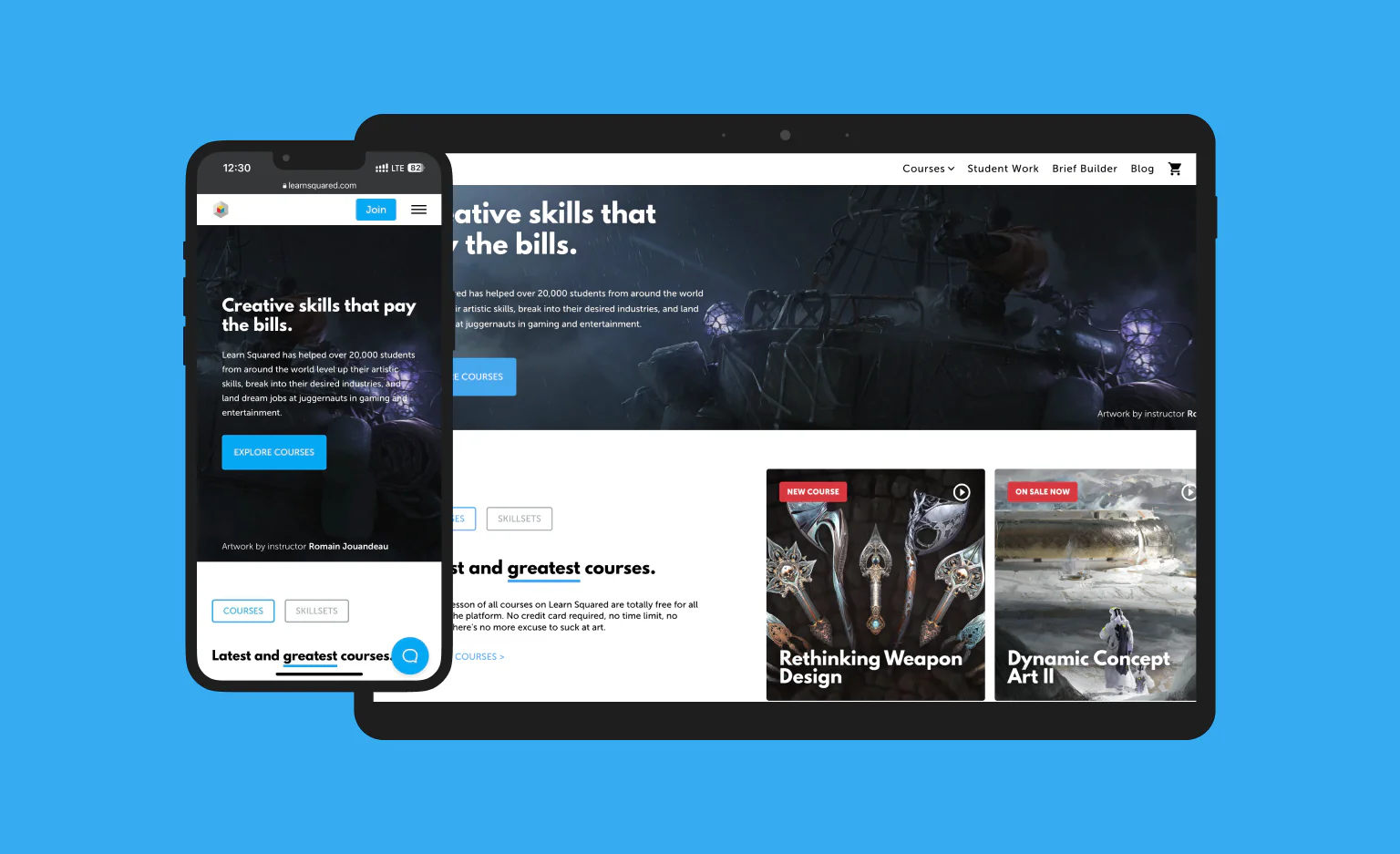
Our customer, an e-learning platform for artists, provides loads of different types of content. We suggested Strapi for this project because of its content handling, but also because of the wide API capabilities, which enable integration with different third-party solutions.
LEARN SQUARED CASE STUDY
Migrating an outdated e-learning platform from Drupal to Next.js & Strapi
Strapi prioritizes security by offering features such as role-based access control (RBAC), user verification, and regular security updates. It’s also SOC2 and GDPR compliant.
The platform’s Single Sign-On (SSO) feature allows users to log in to multiple applications with one set of login credentials, simplifying access management and control.
Consequently, these measures help safeguard content and data from unauthorized access, ensuring compliance with industry standards and regulations.
Why CTOs Should Consider Strapi:
For CTOs, Strapi is an attractive option due to its extensive customization capabilities, enterprise-ready features, and security.
Its ability to integrate seamlessly with various tools and frameworks allows for the development of flexible, scalable, and secure digital experiences tailored to specific business needs.
The availability of Strapi Cloud adds further value by providing a hassle-free, managed environment that supports rapid deployment and efficient scaling. It aligns well with modern development practices and long-term strategic goals.
Storyblok: A Powerful Headless CMS for Flexible Content Management
Storyblok is a robust headless CMS designed to provide exceptional flexibility and control for developers and content teams. It combines the benefits of headless architecture with intuitive editing tools and a highly modular approach to content management.
Consequently, Storyblok is suitable for a wide range of digital projects, from dynamic websites to complex, multi-language applications. This CMS is a versatile choice for organizations looking to build efficient digital projects.
Key Benefits of Storyblok:
API-First and Modular Architecture:
Storyblok is an API-first CMS, which means it is built around powerful APIs that enable seamless content delivery across different platforms and devices. It supports both RESTful and GraphQL APIs, allowing developers to choose the most suitable option for their needs.
The modular architecture of Storyblok allows users to create reusable content components that can be easily managed and deployed across multiple channels, improving consistency and reducing development time.
Visual Editing and Collaboration:
One of Storyblok’s standout features is its visual editor, which provides a user-friendly interface for creating and managing content. It supports drag-and-drop functionality and live previews, enabling users to see changes in real-time before publishing.
The built-in collaboration tools facilitate teamwork by allowing multiple users to work on content simultaneously and track version history.
We decided to implement Storyblok for our own website – pagepro.co to free our marketing team from developers.
We can easily manage the content, and make edits whenever and however we need. In the niche industry we operate in, staying flexible and up-to-date is essential.
Żaneta Lenczewska, Senior Marketing Specialist at Pagepro
Scalability and Performance:
Storyblok’s cloud-native platform offers auto-scaling capabilities, ensuring that resources are efficiently managed during peak demand periods.
It leverages a global Content Delivery Network (CDN) to deliver content quickly and securely to users worldwide, reducing latency and enhancing performance. This makes Storyblok well-suited for businesses looking to scale their digital presence globally.
Advanced Content Management Features:
Storyblok provides a centralized content hub with advanced management features, such as content versioning, digital asset management, and granular permission controls.
These features let businesses manage their content more effectively, maintain control over access and modifications, and optimize the use of media assets.
Why CTOs Should Consider Storyblok:
CTOs should consider Storyblok for its robust feature set, which supports both technical and non-technical teams.
Its API-first approach ensures seamless integration with modern tech stacks, including various front-end frameworks like React, Vue, and Next.js.
The platform’s modular design and visual editing capabilities empower teams to manage content efficiently while reducing dependency on development resources.
Prismic: A Flexible and Developer-Friendly Headless CMS
Prismic is a headless CMS designed to offer flexibility, ease of use, and scalability for both developers and content teams.
It stands out in the crowded market of CMS platforms by emphasizing a streamlined user experience, fast content delivery, and robust integration capabilities, making it ideal for a wide range of digital projects, from marketing websites to full-scale applications.
Key Benefits of Prismic:
Flexible Content Management with Slices:
Prismic introduces the concept of “Slices,” which are reusable website sections or components that allow developers and marketers to create dynamic pages effortlessly.
It provides a flexible content management framework where teams can quickly build and rearrange page elements such as headers, testimonials, or product showcases without extensive development work.
Prismic’s user interface is designed to be intuitive, making it accessible for both technical and non-technical users. The platform offers a visual page builder, live editing, and preview capabilities that allow users to see changes in real-time.
The cloud-based nature of Prismic also means that setting up a new repository is straightforward, with automatic connections and minimal maintenance requirements. Prismic is a great choice for teams looking to reduce time to market and streamline content workflows.
API-Driven and Technology-Agnostic:
Prismic is built to be technology-agnostic, supporting various frameworks and programming languages, including React, Next.js, and Node.js.
It provides robust RESTful and GraphQL APIs, which enable developers to interact with the CMS in a highly flexible manner. Teams on Prismic can fetch exactly the data they need and integrate it into their projects.
Scalability and Performance:
Prismic leverages a global Content Delivery Network (CDN) to deliver content quickly and efficiently to users around the world, ensuring fast loading times and improved user experiences.
The platform’s cloud infrastructure also supports multiple environments (development, staging, production), allowing teams to manage content across different stages.
Built-In SEO and Localization Support:
Prismic offers robust SEO tools and multi-language support, allowing businesses to optimize their content for search engines and manage multiple language versions easily.
This feature is particularly valuable for companies targeting international markets, as it simplifies the process of delivering localized content tailored to specific audiences.
Quick and easy multi-language support was one of the main reasons why we suggested Prismic for Localcoin, the largest bitcoin ATM network in Canada.
LOCALCOIN CASE STUDY
Migration from WordPress to Next.js and Prismic for bitcoin ATM network provider
For CTOs, Prismic offers a compelling mix of flexibility, scalability, and ease of use that supports both current and future digital initiatives.
Prismic’s technology-agnostic architecture allows seamless integration with various tech stacks.
The API support and cloud-based infrastructure provide a scalable and reliable foundation for managing content. It’s unique “Slices” feature empowers teams to build and manage dynamic content efficiently.
Contentful: A Scalable and Flexible Solution for Enterprise Needs
Contentful is a leading headless CMS that offers a powerful and scalable platform for managing and delivering content across various digital channels.
Designed with both developers and content teams in mind, Contentful provides an API-first architecture that allows organizations to create and distribute content seamlessly, supporting a wide range of use cases from simple marketing websites to complex, multi-brand digital experiences.
Key Benefits of Contentful:
API-First Architecture and Flexibility:
Contentful is built around an API-first approach, making it highly flexible for integration with any front-end technology, such as React, Angular, or Vue.js.
It offers multiple APIs, including REST and GraphQL, enabling developers to fetch and manage content programmatically, which is essential for building modern, dynamic web applications.
Structured Content Modeling and Reusability:
One of Contentful’s standout features is its structured content modeling, which enables teams to create custom content types and define fields that suit their specific needs.
Contentful’s content hub allows enterprises to centralize their content management, making it easier to orchestrate and distribute content globally while maintaining brand consistency.
Enterprise-Grade Scalability and Performance:
Contentful is designed to handle large-scale digital operations, making it ideal for enterprises that require robust content management solutions.
The platform leverages a global Content Delivery Network (CDN) to deliver content quickly and reliably, reducing load times and enhancing user experience.
Its scalability ensures that as businesses grow and content demands increase, Contentful can efficiently manage and deliver content without performance degradation.
Security and Compliance:
Security is a critical focus for Contentful, which offers comprehensive features like two-factor authentication, GDPR compliance, SOC2 compliance, and ISO27001 certification.
These security measures ensure that content is protected from unauthorized access and that businesses comply with international data protection standards and make Contentful a reliable choice for organizations that prioritize security and compliance.
Advanced Content Management and Collaboration Tools:
Contentful provides a range of tools that enhance collaboration and streamline content workflows.
Its Compose + Launch app framework allows content teams to manage content efficiently, schedule releases, and collaborate more effectively across different environments.
Additionally, Contentful’s built-in features like content versioning, live preview, and localization support ensure that teams can manage content precisely and deliver tailored experiences to different markets and regions.
CTOs should consider Contentful for its robust feature set, scalability, and flexibility. The platform’s API-first architecture and support for multiple programming languages make it highly adaptable to various tech stacks and future-proof for evolving business needs.
Contentful’s focus on security, compliance, and performance makes it an excellent choice for enterprises looking to manage complex content operations across multiple channels and markets.
EXPERT INSIGHTS, FRICTIONLESSLY DELIVERED!
Curated tech news delivered straight to your inbox every month.
Real-World Headless CMS Implementations: What Actually Happens
Vendor comparison tables tell you what most popular platforms claim to offer. Implementation experience tells you where they actually deliver – and where the gaps appear under real project conditions.
Below are examples from projects we’ve delivered, alongside third-party validation data to give you an independent reference point for each platform.
Sanity: Full Content Flexibility and Live Preview
Lyngen North – WordPress to Gatsby.js and Sanity migration for a luxury Arctic hotel
Lyngen North is a family business offering accommodation in glass igloos and houses with views of the Lyngen Alps and Lyngenfjord. The client wanted to move away from WordPress, which he found hard to maintain – particularly in terms of managing functionalities and integrations. The primary goals were to improve page speed, maintain high SEO rankings, and attract new customers with high-res visuals.
We chose Sanity because it works perfectly as a headless CMS in Jamstack projects and provides full flexibility in content management. The result: a blazingly-fast static website with consistently high Lighthouse scores, delivered without sacrificing visual quality.
KIWI Storage – WordPress to Next.js and Sanity for a high-performance storage solutions site
KIWI Storage provides business storage, self-storage, and mobile storage services in the City of London. When they came to us, they were dealing with WordPress limitations, heavy reliance on external developers, and serious security concerns. Their goal was to make their website the primary source of lead generation and automate the storage ordering process through third-party system integration.
Sanity was chosen for its full flexibility in content management and its live preview option, which allowed editors to monitor the overall look of the content during creation – without developer involvement. The project also laid the foundation for a future rebuild into a full ecommerce platform with customer accounts, which drove the choice of Next.js as the frontend framework.
Strapi: Open-Source Flexibility for Complex Content and Integrations
Learn Squared – Drupal 7 to Next.js and Strapi migration for an e-learning platform for artists
Learn Squared is an e-learning platform that has helped over 20,000 students worldwide develop their artistic skills. The platform was running on an outdated, monolithic Drupal 7 setup – no longer receiving security updates – which made creating new features complicated, time-consuming, and costly. Performance issues were impacting user experience, and an unintuitive checkout process was causing abandoned carts and lost revenue.
While the initial plan involved Sanity, we found Strapi better suited the project’s needs: it provided not only an admin panel for content management but also a comprehensive API framework for integrating custom logic and building a flexible, scalable architecture. Strapi was integrated with Shopify for ecommerce functionality, Mailchimp for automated contact data updates, JWPlayer for video content, and a Discord bot for exclusive course community access. The platform was hosted on AWS to handle the high user engagement spikes typical of US-based e-learning platforms on days like Black Friday.
The results were significant: the client reported a 4% decrease in bounce rate and a 24.35% increase in revenue within the first 26 days post-launch. Development velocity also improved markedly – the co-founder confirmed that turnaround time from ideation to feature launch was a marked improvement on the previous Drupal setup.
Prismic: Multi-Language Support and Editorial Independence
Localcoin – WordPress to Next.js and Prismic migration for Canada’s largest Bitcoin ATM network
Localcoin is a Toronto-based company and Canada’s largest Bitcoin ATM network, with over 900 cryptocurrency terminals across all provinces. Their WordPress-based website was struggling with slow page speeds, an outdated tech stack, and a user experience that was hurting business growth and customer satisfaction.
A key priority for Localcoin was moving to a headless CMS to streamline future content publishing – particularly for creating multi-language landing pages in English and French. After evaluating both Prismic and Sanity, they selected Prismic for its superior editor experience and more manageable multi-language support. Post-migration, Localcoin’s non-technical marketing team gained full independence in content updates, publishing multi-language content versions without requiring developer involvement. The project delivered a lighter website, faster page speeds, and improved SEO rankings – all confirmed KPIs according to their Product Manager.
Headless CMS Cost and ROI Analysis
Switching to a headless CMS is a business decision as much as a technical one. The license fee is the easiest number to find and the least useful one to base a decision on – what actually determines ROI is the total cost of ownership over 24–36 months and the measurable impact on your team’s output.
Here’s a realistic breakdown of what headless CMS adoption actually costs, and where the returns come from.
All prices are indicative as of May 2026 and subject to change – verify on each platform’s official pricing page before making a decision.
Hidden Costs of Headless CMS to Factor In
The subscription is rarely the largest line item. Based on our experience implementing headless CMS platforms for clients, these are the costs that most teams underestimate at the evaluation stage:
Implementation and migration. Moving from a traditional CMS to a headless architecture typically requires 4–12 weeks of development time depending on content complexity, existing integrations, and frontend framework. Factor this into your total first-year cost.
Content modeling design. Getting your content structure right upfront saves significant rework later. Teams that skip a proper content modeling phase typically spend 2–3x more on revisions in the first six months.
Editorial training. Every platform has a learning curve for non-technical users. Storyblok and Prismic are the fastest to onboard editors; Sanity and Contentful require more structured training but offer more control in return.
API overages. Most platforms meter API calls on paid tiers. High-traffic sites or content-heavy ecommerce operations can hit overage charges that aren’t visible during the evaluation phase. Always request overage pricing before signing.
Plugin and integration development. Native integrations cover the common cases. Custom integrations with your CRM, analytics platform, or ecommerce backend require additional development time that isn’t reflected in the subscription cost.
ROI Timeline of Headless CMS Implementation: What to Expect
ROI from a headless CMS investment typically materialises across three horizons:
0–3 months (setup phase): Net negative. Implementation costs are front-loaded and teams are still learning the new system. Productivity may temporarily dip for editorial teams during migration.
3–9 months (stabilisation phase): Teams start realising efficiency gains. Editors publish faster without developer involvement. Developers ship frontend changes without CMS constraints. Performance improvements from decoupled architecture begin reflecting in Core Web Vitals and organic traffic.
9–24 months (return phase): The compounding benefits become measurable. Faster content velocity, reduced developer dependency for editorial tasks, and lower infrastructure costs – particularly for teams that moved from a monolithic WordPress setup – typically deliver a positive ROI within this window for most mid-sized organisations.
In practice, the teams that see the fastest ROI are those that invest in content modeling and editorial training upfront – not those that choose the cheapest platform. A well-implemented Contentful or Sanity setup consistently outperforms a poorly implemented Storyblok or Strapi one, regardless of the license cost difference.
How to Choose the Right Headless CMS for Your Project
Choosing the right headless CMS is important to ensure your digital projects are managed effectively. Before making a choice, you should assess the project’s needs to select the best tool.
Content Model Flexibility
A good CMS should adapt to your content structure. Look for:
Customizable content types and fields
Easy relationships between content entries
Support for complex data structures (e.g., nested blocks)
Developer Experience
How easy it is for developers to integrate and maintain is extremely important for any headless CMS. Make sure yours has:
Clear API documentation
SDKs for your preferred frameworks (e.g., Next.js, React)
GraphQL or REST support
Local development capabilities
Editor Experience
Marketers and editors need to be make changes quickly and easily to keep the content going. Check for:
Intuitive content editing interface
Real-time preview capabilities
Role-based permissions
Localization and multi-language tools
Performance
The CMS should handle both traffic spikes and future growth. Look at:
CDN integration for faster delivery
Image optimization tools
API response times and uptime SLAs
Integrations
A CMS should play nicely with your tech stack. Ask about:
The pricing should be clear and scale with your needs. Review:
Pricing tiers and content limits
User/role limits
API request quotas
Security
Especially important for enterprise and regulated industries in the UK and Europe. Verify:
ISO or SOC 2 certifications
GDPR and CCPA compliance
SSO and two-factor authentication options
To check if a headless CMS fits your needs, pick two or three platforms and give them a try. All of the options we suggested have free tiers, which are perfect for experimentation.
Which Headless CMS Is the Best?
Each CMS we went over has unique strengths for different use cases.
Sanity excels in customization and collaboration, while Strapi offers open-source flexibility. Storyblok’s user-friendly visual editor balances ease and power, Prismic shines with its simplicity and quick setup, and Contentful provides enterprise-level scalability and strong features.
Still can’t decide on the best fit? We’re here to help.
Frequently Asked Questions When Choosing a Headless CMS
What Skills Are Needed for a Headless CMS?
To manage a headless cms architecture, you need content management skills for editors and API/front-end development skills for developers. Editors focus on structuring and publishing content, while developers handle integrations, frameworks like React or Next.js, and API connections (REST or GraphQL).
Why Is It Called a Headless CMS?
It’s called “headless” because it separates content storage from the presentation layer. Instead of being tied to one website “head,” the CMS delivers content via APIs so it can be displayed on any popular platform or device.
Is Headless CMS Bad for SEO?
No. Headless SEO results depend on your front-end implementation, not the CMS itself. With proper server-side rendering, metadata, and structured data, a headless CMS can perform as well as or better than a traditional CMS in search rankings.
What Is the Most Popular Headless CMS?
Contentful, Sanity, Strapi, and Storyblok are among the most widely used headless CMS platforms today. Popularity varies by use case, with some excelling in enterprise environments and others favored for developer-driven projects.
How Does a Headless CMS Handle Content Localization?
It uses built-in localization tools or APIs to create and manage multi-language content. This allows you to serve the right language or regional variation to the right audience, often with translation tracking and workflow features.
How much does it cost to implement a headless CMS?
The total cost of implementing a headless CMS varies significantly depending on the platform, project complexity, and whether you self-host or use a managed cloud solution. The CMS subscription itself can range from free (Strapi self-hosted, Sanity free tier) to several hundred dollars per month for enterprise tiers. However, the subscription is rarely the largest cost – implementation and migration typically require 4–12 weeks of development time, content modeling design, editorial training, and custom integration work. For a realistic budget, factor in both the recurring platform cost and the one-time implementation investment before comparing platforms on price alone.
How long does a headless CMS migration take?
Migration timelines depend on the size of your content library, the complexity of your existing integrations, and the frontend framework you’re migrating to. A straightforward WordPress to headless CMS migration for a marketing website typically takes 6–10 weeks. More complex projects – such as migrating a large ecommerce platform or a multi-language site with custom workflows – can run to 3–6 months. Our migration of Learn Squared from Drupal 7 to Next.js and Strapi, which involved custom integrations with Shopify, Mailchimp, and Discord, ran across 13 two-week sprints.
What are the biggest challenges when switching to a headless CMS?
The most common challenges we see in headless CMS migrations are: content modeling design (getting your content structure right before development starts saves significant rework later), editorial team onboarding (non-technical users need time to adapt to a new interface, particularly on developer-focused platforms like Sanity or Contentful), and integration complexity (connecting your CMS to existing ecommerce platforms, CRMs, or analytics tools requires careful API planning). The technical migration itself is rarely the hardest part – governance and workflow design take longer to get right in most enterprise projects.
Is a headless CMS good for SEO?
Yes – but the SEO outcome depends on your frontend implementation, not the CMS itself. With proper server-side rendering or static site generation (both supported natively in Next.js), structured data, and correct metadata management, a headless CMS can match or outperform a traditional CMS in organic rankings. In our experience, headless CMS projects built on Next.js consistently deliver strong Core Web Vitals scores, which are a confirmed Google ranking factor. The key is ensuring your frontend handles metadata, canonical tags, and structured data correctly from the outset.
How do I choose between Sanity, Strapi, Storyblok, Prismic, and Contentful?
The right platform depends on three factors: your team’s technical setup, your content structure, and who will be managing content day-to-day. Sanity suits projects that need high customization and real-time collaboration – it’s the top-rated headless CMS on G2 and our most-recommended platform for Next.js projects. Strapi is the strongest choice for teams that want open-source flexibility or need to self-host for compliance reasons. Storyblok works best when non-technical editors need to manage layout and content independently via a visual interface. Prismic is the fastest to set up for multi-language marketing sites. Contentful is the most established enterprise option, though its pricing scales aggressively and its interface offers limited customization compared to Sanity.
Can a headless CMS handle ecommerce?
A headless CMS manages editorial and marketing content – product descriptions, landing pages, blog posts, campaign assets – while your ecommerce platform (Shopify, Commercetools, or a custom backend) handles the transactional layer: catalog, pricing, inventory, and checkout. The two systems communicate via APIs. This decoupled approach gives you full control over the customer-facing experience without being constrained by the design limitations of a monolithic ecommerce platform. We implemented this architecture for Learn Squared, connecting Strapi as the content backend with Shopify handling all ecommerce transactions.