10 Common Next.js Mistakes That Hurt Core Web Vitals



Core Web Vitals have a direct impact on user experience, conversions, and SEO rankings in modern Next.js and React applications. In real production projects, poor performance metrics are rarely caused by Next.js itself. Much more often, they come from a set of common Next.js mistakes made at the architectural and implementation level.
Our CEO, Chris Lojniewski at Pagepro, had a conversation with professional Next.js developer Rafał Dąbrowski about these common Next.js performance mistakes and how to avoid them in real-world projects.
In this article, Rafał shares a practical list of common Next.js mistakes that hurt Core Web Vitals, based on issues encountered while working on a large medical platform, where performance optimisation and correct usage of Next.js SEO best practices led to a significant increase in Google rankings.
If you prefer video or audio format, you can find an interview on this topic on our YouTube channel.

What Are Core Web Vitals (CWV)
Core Web Vitals are a set of performance metrics defined by Google that measure how users actually experience a website, including Next.js-based applications. They focus on three key aspects:
- Loading performance (how quickly the main content becomes visible).
- Interactivity (how fast the page responds to user input).
- Visual stability (whether the layout shifts unexpectedly during loading).
These metrics-most commonly LCP, INP, and CLS go beyond raw speed scores and highlight real user frustration points that are often caused by Next.js optimisation mistakes rather than framework limitations.
Why Core Web Vitals Matter
Core Web Vitals measure how users actually experience your site:
- How fast meaningful content appears.
- How responsive the interface feels.
- How stable the layout is during loading.
Good metrics reduce bounce rate, improve conversions, and provide an SEO advantage, as Google uses these signals directly in ranking especially for Next.js and React websites.
If you want to learn more about Next.js optimization tips for Core Web Vitals, we encourage you to read our ebook: Fix Core Web Vitals.
Common Next.js Mistakes That Affects CWV
Mistake 1: CSS-in-JS Runtime Overhead

Let’s start with one of the most simple and widespread common Nextjs mistakes. CSS-in-JS libraries like Styled Components run JavaScript on the client to hash class names and inject styles into the DOM.
Each injection causes browser style recalculation for the entire page, significantly hurting LCP, FCP, and INP.
CSS-in-JS libraries introduce significant client-side overhead:
- JavaScript runs in the browser.
- Class names are hashed at runtime.
- Styles are injected into the HTML dynamically.
- Each injection triggers style recalculations.
All of this happens during runtime and directly affects INP and FCP.
Utility-first approaches like Tailwind avoid this problem by compiling a single CSS file at build time, with no runtime JavaScript and no client-side style recalculations.
Mistake 2: CSS Modules with Lazy-Loaded Components

Even without CSS-in-JS, performance issues can appear when combining:
- CSS Modules.
- Lazy-loaded components.
When a lazily loaded component is mounted, its styles are injected dynamically. If this happens during a user interaction (click, input, form submission), the browser must recalculate styles at a critical moment.
This often leads to increased input delay and worse INP.
This matters, because:
- When a dynamically imported component imports CSS Modules, styles are injected on demand.
- Each injection triggers expensive full-page style recalculation.
- If this happens during user interaction (button click, typing), it increases INP significantly.
Solution: Use Tailwind – all utility classes are compiled into a single CSS file loaded upfront
Mistake 3: Missing Dynamic Imports (next/dynamic)

A common mistake is shipping too much JavaScript in the initial bundle.
next/dynamic allows components to be loaded only when they are actually needed, which:
- Reduces the initial bundle size.
- Improves LCP, FCP, and INP.
- Improves perceived performance.
A typical example is modal dialogs. They are rarely visible on initial page load, yet often end up in the main bundle if dynamic imports are not used.
This directly addresses the “Reduce JavaScript Bundle Size” warning.
Smaller bundles = faster parse/compile = better LCP, FCP, and INP.
Mistake 4: Using Third-Party Font CDNs

Web fonts loaded from third-party CDNs introduce a costly request chain:
- DNS lookup.
- Request for CSS with @font-face.
- Request for the font files.
Even on fast networks, these extra round trips add latency.
Key optimization recommendations:
- Self-hosted fonts: they are served from your domain, no external DNS lookup.
- Subset optimization: only include needed character sets (Latin, Cyrillic, etc.).
- Weight filtering: include only weights you actually use.
- Automatic preload: font loaded early, no FOUT (Flash of Unstyled Text).
- Build-time optimization: zero runtime overhead.
And you know what?
next/font solves all of this by:
- hosting fonts on the same domain.
- allowing control over font weights.
- limiting character subsets.
- automatically preloading fonts.
This reduces delays and prevents flash of invisible or unstyled text. A simple, but very elegant solution.
Mistake 5: Not Using next/image

Using regular <img> tags in Next.js means losing built-in image optimizations for the web.
next/image provides:
- Lazy loading by default.
- Automatic image optimization.
- Preloading for LCP images.
- Responsive image sizes via srcset and sizes.
Without proper sizes, the browser may download large desktop images even on mobile devices, which directly hurts LCP.
next/image also provides automatic lazy loading, WebP/AVIF format conversion, responsive srcset generation, and CLS prevention with defined dimensions.
To get the full benefit from next/image, it’s not enough to rely on lazy loading alone.
For images that are likely to become the Largest Contentful Paint (LCP) element, the browser must start downloading them as early as possible. This is where priority / preload becomes critical.
By explicitly marking an image as high priority, you tell the browser that this asset is essential for the initial render, allowing it to bypass lazy loading and be fetched immediately. Used correctly, this has a direct and measurable impact on LCP – and used incorrectly, it can easily make things worse.

When to Use Priority / Preload
- Hero images: Any image above the fold that’s likely the LCP element.
- Logo / branding: Large logos that appear immediately.
- Product images: Main product photos on detail pages.
We highly not recommend to use next/image for:
- Below-the-fold images.
- Thumbnails.
- Decorative images.
- Use PageSpeed Insights to identify your LCP element.
Mistake 6: Unoptimized Third-Party Scripts

Many websites are bloated with third-party scripts, and the problem is rarely the scripts themselves, but when and how they are loaded.
By default, the browser treats all JavaScript as equally important, which can easily block the main thread during critical rendering phases. To avoid this, Next.js provides fine-grained control over script execution timing.
This is handled through the next/script component, which allows you to explicitly define when a script should be downloaded and executed, depending on its role in the page lifecycle.
Script Loading Strategies:
- beforeInteractive: Polyfills, critical scripts that must run before React hydration.
- afterInteractive (default): Analytics, A/B testing, feature flags.
- lazyOnload : Chat widgets, social media embeds, non-critical widgets.
- worker (experimental): Heavy computation scripts that don’t need DOM access.
next/script allows precise control over when scripts are loaded:
- beforeInteractive – critical scripts
- afterInteractive – analytics and widgets
- lazyOnload – non-critical scripts
- worker – heavy logic off the main thread
Using the wrong strategy can severely impact INP and Total Blocking Time.
Mistake 7: Skipping React Compiler

React Compiler is now stable and requires minimal setup:
- Eliminates unnecessary re-renders.
- Hoists object declarations.
- Automatically memoizes components and values.
What makes React Compiler different from most performance optimizations is that it does not require architectural changes or manual refactoring.
Instead of relying on developers to carefully add memoization and avoid unnecessary re-renders, the compiler applies these optimizations automatically at build time.
Zero Effort
React Compiler analyzes your code at build time and automatically adds memoization where beneficial.
Average ~15% performance improvement across sites.
Just enable it in next.config.js – no code changes needed.
Mistake 8: Sending Too Much Data to the Client
Any data passed to a client component is sent to the browser and parsed there.
Real-world example: a page returning a 7 MB payload from getStaticProps, most of which was never used by the UI but still had to be transferred and parsed by the browser.
Rule: do as much filtering, mapping, and transformation as possible on the server. Send only what the component actually needs.
Alternative: Move Data Processing to the Server
- Filter, map, and aggregate data on the server.
- Return minimal DTOs instead of raw datasets.
- Use Server Components, Route Handlers, or getServerSideProps / generateStaticParams.
- Avoid sending unused fields “just in case”.
Result: smaller payloads, faster parsing, better FCP and LCP.
Mistake 9: Too Much Client-Side JavaScript Logic
Excessive client-side logic such as filtering and sorting:
- Slows down FCP and LCP.
- Increases memory usage.
- Forces repeated JavaScript execution.
Even with React Compiler, memoization itself has a cost. If logic does not depend on browser APIs or direct user interaction, it should live on the server.
Mistake 10: Heavy Middleware Logic
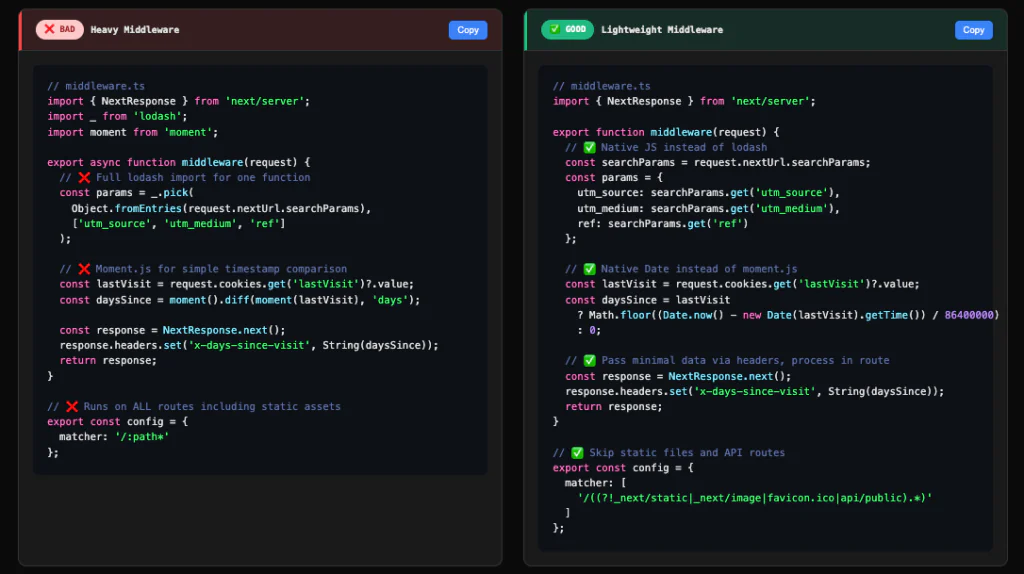
Middleware runs on every request.
Problems arise when middleware includes:
- Large libraries.
- Heavy imports.
- Poorly tree-shaken dependencies.
This increases TTFB, which directly affects both FCP and LCP.
Middleware should do as little work as possible and import only what is strictly necessary.
Middleware Best Practices:
- Use native JS: Replace lodash with native array/object methods (map, filter, spread operator).
- Use native Date: Replace moment.js with Date API or lightweight alternatives like date-fns/esm.
- Exclude static assets: Use matcher to skip _next/static, images, and public files.
- TTFB directly impacts FCP and LCP – every KB in middleware adds latency to all page loads.
Alternative: Shift Computation to Server Components
If logic does not depend on browser APIs or direct user interaction, it should not run in the browser.
- Move filtering, sorting, and transformations to Server Components.
- Cache results on the server instead of memoizing on the client.
- Use the client only for interaction, not computation.
- Treat client components as rendering layers, not data processors.
Result: less main-thread work, lower memory usage, improved FCP, LCP, and INP.
About Pagepro
Pagepro is a technology agency specializing in Next.js, Sanity, and Expo development, focused on building high-performance, SEO-optimized web and mobile applications for digital product teams and scale-ups.
We are a narrow-and-deep expert partner that delivers frictionless development processes, clear communication, and outcome-driven results, with services ranging from custom Next.js web apps to CMS migration and team augmentation. We offer Next.js development services for building fast, scalable, SEO-friendly applications, web performance optimization services for poorly-performing existing applications, Next.js SEO optimization services for improving google ranking.
Pagepro in numbers:
- 179 projects delivered.
- 15 years in business.
- 4.9 / 5 rating on Clutch.co.
- 40 team members.
- 92% client retention rate.
If you have a next.js project in mind, contact us.
Final Thoughts
Most common Next.js mistakes that hurt Core Web Vitals are not framework limitations – they are architectural defaults that were never revisited in production projects.
This checklist of common Next.js mistakes can be shared directly with developers to audit an existing application. The next step is not only identifying performance issues, but also fixing them with concrete code-level changes and measurable improvements to Core Web Vitals metrics.