Best Headless CMS for Content Managers and Marketing Teams – 2026 Guide


TL;DR
• A headless CMS is a content management system that stores content as structured data and delivers it through APIs, fully separating the backend from any front-end presentation layer.
• It allows marketing teams to publish the same reusable content blocks instantly across websites, mobile apps, email campaigns, and AI assistants without manual duplication.
• Headless architecture supports parallel workflows where editors and developers work simultaneously. It eliminates approval delays and accelerates campaign velocity.
• Best headless systems include Sanity for flexible modeling, Contentful for enterprise governance, Storyblok for visual editing, Strapi for open-source control, and Payload CMS for Next.js integration.
• Headless platforms deliver faster page speeds, superior Core Web Vitals, and stronger SEO performance through static generation and edge caching.
• Teams with multiple editors or omnichannel needs should choose headless CMS, while small single-site projects benefit more from classic systems to avoid unnecessary complexity and cost.
Why Traditional CMS Platforms Slow Down Marketing Teams
In 2026, marketing teams are expected to launch campaigns in days rather than in weeks while maintaining consistency in every message, offer, and asset across websites, apps, email, and AI channels.
Regular CMS platforms are the page-based systems most organizations still rely on. They were built for a single-site, desktop era and now actively throttle campaign speed and SEO performance for any marketing teams. Let’s discuss the issues that may slow down your team’s pace.
The Page-Based Content Model in Regular CMS
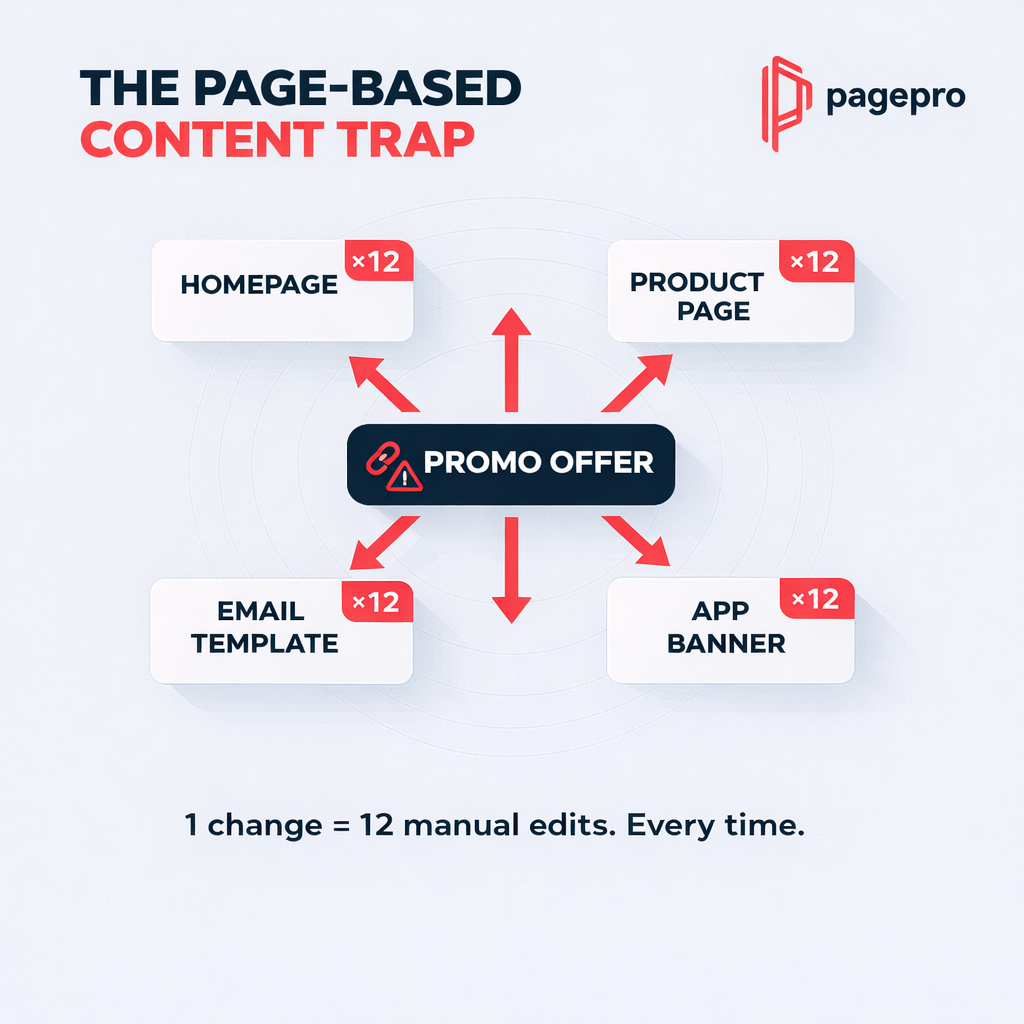
Each piece of content is stored inside a fixed page template. When a marketing manager updates a limited-time offer, they must manually copy the headline, image, and CTA across the homepage, product pages, email template, and app banner – 12 separate edits for one change.
Such a process creates unavoidable content duplication across channels. Marketing loses consistency, search engines flag duplicate material, and canonical signals become fragile. A 10-minute update can easily turn into a full-day task. CMS influences marketers way more than it may seem.
Main impacts on marketing teams:
- Brand voice becomes inconsistent across channels
- Campaign changes take hours instead of minutes
- Duplicate content risks dilute SEO authority
Performance Problems in Traditional CMS at Scale
Page builders and plugins deliver short-term gains but quietly harm speed at scale. The 2025 HTTP Archive Web Almanac (CMS and Page Weight chapters) shows that around 60% of WordPress sites now use a page builder, which drives heavier DOM structures and larger JavaScript bundles.
The median desktop homepage now weighs 2.9 MB. Just 63% of desktop pages in the 2-3 MB range pass Core Web Vitals. Because Google incorporates Core Web Vitals into its core algorithm, marketing teams suffer from slower load times, higher bounce rates, and direct ranking penalties.
Core Web Vitals most affected:
- Largest Contentful Paint (LCP) – delayed by heavy plugins
- Cumulative Layout Shift (CLS) – broken by dynamic page builders
- Interaction to Next Paint (INP) – slowed by database queries
Editorial Bottlenecks in Classic CMS Workflows
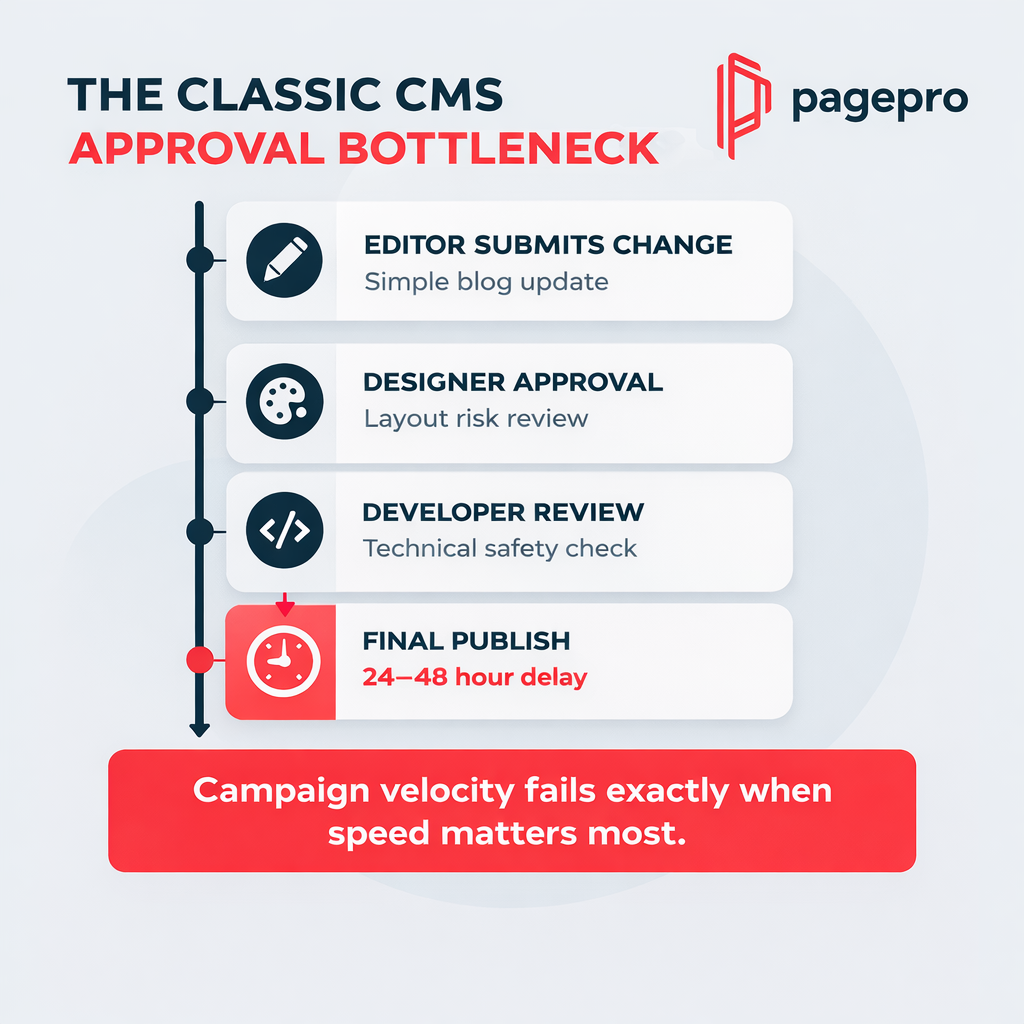
Scaling from three to eight editors should positively influence output. However, a multi-step approval chain is required for each update because of coarse permissions and layout fragility. A content editor cannot publish a simple blog change without developer review to prevent design breaks. Campaign velocity fails exactly when speed is most important, which prevents marketers from delivering work on time.
Typical workflow friction points:
- Editor → Designer approval (layout risk)
- Content → Developer review (technical safety)
- Final sign-off → Publish (often delayed 24-48 hours)
Localization and Multi-Site Challenges in Conventional CMS
Entering a new market typically means cloning entire sites or layering on translation plugins that add their own bloat. Updates rapidly become out of sync, and each language version becomes a separate maintenance burden.
Google Search Central requires consistent hreflang and canonical implementation – something classic setups make fragile and error-prone. Instead of starting new campaigns, marketing teams spend hours pursuing indexing problems and diluted authority. Localization starts to seem more like a burden than a prospective change.
Common localization pitfalls:
- Site duplication across domains or subfolders
- Translation plugins adding extra database load
- Out-of-sync content across language versions
Front-End Technology Limitations in Regular CMS
Conventional headless CMS platforms force teams to use proprietary templating languages and server-side rendering. When the marketing team wants to A/B test an interactive React component or use Next.js static generation, the CMS blocks modern frameworks without heavy custom workarounds.
Traditional CMS vs modern front-end reality:
| Requirement | Traditional CMS Capability | Real-World Result for Marketing |
| React/Next.js components | Limited or impossible without hacks | A/B tests delayed or abandoned |
| Static site generation | Not supported natively | Slower page speeds |
| Edge caching & CDNs | Plugin-dependent and fragile | Higher hosting costs |
These five problems directly affect marketing performance and SEO outcomes. A headless platform eliminates exactly these limitations because it treats content as structured data instead of pages. The next section can serve as a point of reference for teams considering changing an approach to content management.
What a CMS for Marketing Teams Should Actually Enable
Nowadays, it is insufficient for marketing teams to just “manage content”. They need to create experiences for people on websites, apps, email, social media and AI assistants quickly. A true CMS must remove the friction of traditional platforms and give editors, strategists, and campaign managers the exact capabilities they need to move faster, experiment safely, and stay consistent everywhere.
What Is a CMS for Marketers?
A CMS for marketing is a content management system designed to support scalable content operations, omnichannel publishing, structured content reuse, workflow governance, and seamless integration with marketing tools.
It treats content as reusable, structured data (not locked pages) so marketing teams can launch campaigns once and publish everywhere without duplication or developer bottlenecks. Marketers can definitely benefit from implementing such an approach to content management.
What a modern CMS for marketing must deliver:
- Instant omnichannel publishing (web, app, email, AI)
- Granular workflow and approval controls
- Structured content modeling for AI and personalization
- Real-time collaboration without breaking designs
- Built-in performance and SEO governance
Traditional vs Headless vs Hybrid CMS
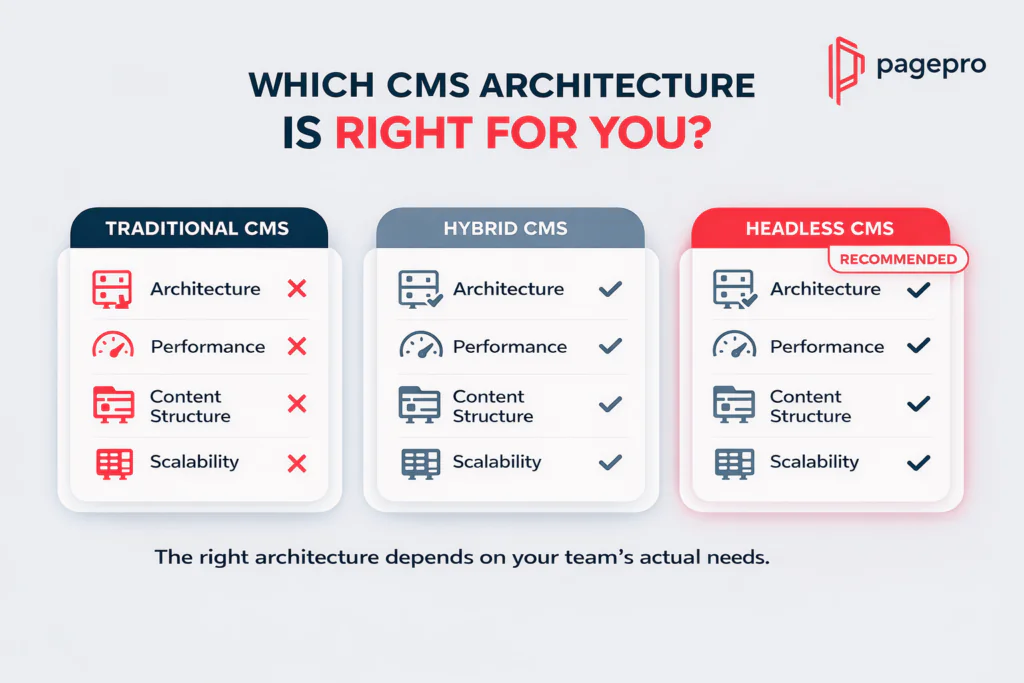
Most organizations still run on outdated assumptions about different CMSs and their use. Here’s how the three architectures actually compare when real marketing teams use them in production:
| Aspect | Traditional CMS | Hybrid CMS | Headless CMS (Recommended) |
| Architecture | Everything locked together — editing, database, and design in one system. Changes break other parts. | Partially separated but frontend and backend still share database and code. | Content fully separate. Pull clean data via API for any frontend – React, Next.js, apps, or AI. |
| Performance | Slows down as plugins and page builders are added. Server does all the work on every visit. | Faster than traditional but still limited by shared backend. | Very fast by default. Static files delivered from global edge servers. |
| Content Structure | Content glued to specific page layouts. Updates require manual copy-paste everywhere. | Some reusable components, but most content still tied to pages. | Content built as reusable blocks – headlines, offers, images work anywhere without duplication. |
| Omnichannel Delivery | Copy-paste the same message into website, email, app, and everywhere else. | Can push to a few channels but needs extra work and code. | Update once and it appears perfectly across website, app, email, and AI chatbots. |
| Scalability | Struggles beyond a few thousand pages or editors. Adding traffic or languages causes slowdowns. | Handles mid-size teams better but hits walls during growth. | Grows without limits – supports 5 or 500 editors and millions of requests. |
Why Marketing Teams Need Different CMS Capabilities Than Developers
Developers care about clean code and deployment pipelines. Marketing teams care about campaign velocity, experimentation, and delivering the right message to the right person at the right time.
A CMS for marketing teams must therefore prioritize capabilities that developers rarely think about:
- Campaign velocity – publish and update offers across every channel in minutes instead of days
- Experimentation – A/B test headlines, CTAs, or entire components without developer tickets
- Omnichannel publishing – one content update automatically syncs to website, mobile app, email, and AI chatbots
- Structured content reuse for AI – feed the same product descriptions, FAQs, or campaign copy into generative AI tools and personalization engines without manual reformatting
These features are the difference between a marketing team that launches two campaigns per month and one that launches two per week while maintaining brand consistency and SEO strength.
A decoupled CMS platform is designed to provide these features by separating content from presentation. This is the thing that traditional and even hybrid systems can never fully achieve. Below, you can read about changes that headless architectures bring.
What a Headless CMS Changes Compared to a Traditional CMS
Switching from a conventional CMS to a headless content management system is the game-changer for marketing teams. They stop struggling with their tools and start moving at the speed their campaigns require. Content is no longer locked into fixed pages. It becomes reusable data that any channel, framework, or AI tool can access instantly.
This change solves every bottleneck we covered earlier and gives marketers the freedom they have been missing.
Content Becomes Structured Data Instead of Pages
A classic content management system stores everything as complete pages. A headless one breaks content into modular, structured pieces – titles, descriptions, CTAs, images, metadata – which are all defined once in a flexible content model.
A marketing manager creates a product promo once. Then the same block can then power the website hero, the app notification, the email subject line, and the AI chatbot response without any copy-paste or reformatting. This speeds up marketing activities a lot and gives a chance to concentrate on more essential tasks.
Main changes for marketing teams after implementing a headless CMS:
- One source of truth instead of duplicated copies
- Easy updates across every channel in seconds
- Content ready for AI and personalization engines from day one
Omnichannel Content Delivery With Headless Systems
The same structured content can be delivered anywhere through simple API calls. Websites, mobile apps, email platforms, IoT displays, voice assistants, and generative AI tools all get content from one central source. When the marketing team updates a campaign offer, every customer touchpoint modifies immediately.
Front-End Flexibility With Headless Architectures
Marketing teams are no longer stuck in the CMS’s outdated templating system. Developers can build with any modern framework (Next.js, React, Vue, or static generators), and editors stay in a clean studio interface. This delivers high-speed pages, perfect Core Web Vitals, and design freedom without developer bottlenecks.
Traditional vs Headless front-end comparison:
| Capability | Traditional CMS | Headless CMS Platform |
| Framework choice | Locked to PHP templates or plugins | Any (Next.js, React, Gatsby, etc.) |
| Page speed | Slow (server-rendered + plugins) | Lightning-fast (static + edge CDN) |
| Design experimentation | Risk of breaking live site | Safe preview + instant deployment |
| Performance governance | Manual and fragile | Built-in (automatic optimization) |
Parallel Workflows for Developers and Marketing Teams
In a conventional setup, marketing waits for developers and developers wait for marketing. Headless architecture removes that dependency entirely.
Editors work in the studio creating and approving content. Developers build and iterate on the front end at the same time. Campaigns launch faster because the two teams no longer block each other.
Obviously, a headless system will not magically solve all the issues. It still has technical limitations.
Common Challenges and Limitations of Headless Content Management System
The shift from classic headless architecture to headless platforms is powerful, but it has its drawbacks. A headless architecture moves the complexity but doesn’t remove it completely.
What marketing teams should know in advance:
- Developer dependency changes, but does not disappear (you still need front-end expertise)
- Plugin ecosystem is smaller than classic CMS – most features require custom integration
- Advanced personalization often needs external tools (e.g., CDP or AI layers)
- Higher initial implementation complexity and longer setup time than simply installing WordPress
These honest limitations are exactly why many small teams or single-site projects should stay on regular or hybrid systems. For growing marketing teams that need speed, scale, and omnichannel reach, such trade-offs are worth it.
A true decoupled content management system fundamentally changes how marketing teams create, govern, and distribute content. The biggest question is whether for your team the benefits outweigh the new challenges that headless brings.
How Much Does a Headless CMS Architecture Really Cost?
Most marketing leaders ask the same question the moment they consider a headless CMS platform: “Is this actually going to save us money – or will the hidden costs eat the budget?” The honest answer is that headless is not the cheapest option initially, but it almost always becomes the most cost-effective when campaigns start to scale, teams to grow, and performance to matter. The most important thing is understanding exactly where the money goes and having a bigger perspective on how your team will utilize this new headless approach in the future.
Licensing and API Pricing Models
Headless platforms use very different pricing philosophies than classic CMS. Some are seat-based, some usage-based, and most enterprise plans are custom. Here’s how the three marketing-friendly leaders break down in 2026, based on their official pricing pages:
| Platform | Entry / Growth Plan (mid-size team) | Typical Monthly Cost (mid-size team) | Key Limits & Billing Model | Best For Marketing Teams |
| Contentful | Lite | $300 | 1M API calls, 20 users, paid overages | Enterprise governance & compliance |
| Sanity | Growth | $15 per seat | 250k API requests + 1M CDN, unlimited locales | Structured content & real-time collaboration |
| Storyblok | Growth | $99 | 1M API requests, 5 seats, 400 GB traffic | Visual editing & fast agency workflows |
All three offer a usable free tier for testing. When you hit scale (more API calls, more users, or heavy traffic), costs change to usage or custom enterprise agreements. Marketing teams that publish frequently on a variety of channels usually see Sanity or Storyblok stay cheaper longer than Contentful.
The cost of a CMS platform hides not only in its initial price but also in the price of its implementation, development, and adoption.
Implementation and Development Cost
This is what most budgets overlook. A headless CMS requires initial investment that traditional platforms mask behind plugins.
Typical first-year costs for a mid-size CMS for marketing teams:
- Content modeling & studio setup: 4–8 weeks of specialist time
- Front-end development (Next.js/React): 6–12 weeks
- Integrations (CRM, analytics, personalization): 2–6 weeks
Total implementation often lands between $40,000–$120,000 depending on complexity. But once a decoupled CMS is built, changes no longer require developers for every campaign update.
Ongoing Maintenance Cost
SaaS headless platforms take the challenges away from you:
- Automatic updates, security patches, and scaling are included
- No server management or plugin conflicts
Open-source options (Strapi, Payload) look cheaper on paper but transfer the maintenance cost to your own team or agency – often $5,000–$15,000 per year in DevOps and security work. Most marketing teams choose SaaS to keep internal costs predictable.
The Hidden Cost of Choosing the Wrong Content Management System
The most expensive mistake is migrating again in 18-24 months because the platform cannot keep up with growth. This is why you should keep in mind hidden costs that may appear at the beginning.
Real hidden costs of choosing the wrong CMS include:
- Rewriting front-end code when you outgrow the system
- Lost SEO equity during replatforming
- Months of campaign velocity lost while the new team learns the new tool
Choosing the right headless CMS architecture from the start (based on your editor count, channel needs, and growth plans) almost always pays for itself within 12-18 months through faster campaigns and better performance.
The real question is not “How much does headless cost?” but “How much is your current CMS quietly costing you in lost speed and missed opportunities?” The next section shows exactly when headless is the wrong choice – so you can avoid both extremes.
When a Headless Architecture Is NOT the Right Choice
Not every project needs the power or the complexity of a headless content management system. For many marketers, adopting headless architecture can actually slow them down and inflate costs without delivering any meaningful upside. The added developer layer, API management, and upfront build time become indirect costs when your needs are simple and contained.
Here are the exact scenarios where a conventional or hybrid CMS is still the smarter, faster, and cheaper choice in 2026.
Very Small Websites With Limited Content (Under 20 Pages)
If your entire site fits on a single spreadsheet (e.g., a basic brochure, portfolio, or simple landing-page collection) headless is far beyond requirements.
You’ll spend weeks building a content model, front-end, and deployment pipeline just to manage what a regular content management system can launch in an afternoon. The maintenance savings headless promises never appear because there is nothing complex to maintain.
When this applies to marketing teams:
- Static pages that rarely change
- No need for structured reuse or personalization
- Budget under $10k total for the project
Single Editor or Small Team Workflows
When only one or two people handle all content, the parallel workflows and granular permissions of headless only add friction.
A solo marketing manager or tiny team doesn’t need real-time collaboration across continents or complex approval chains. They need speed and simplicity, which conventional content management platform gives with no developer tickets for basic updates.
Single Market and Language
If you operate in one country, speak one language, and have no plans for international expansion, the localization superpowers of headless are not utilized.
You’ll pay for multi-site architecture, locale handling, and advanced translation workflows that deliver nothing. Traditional CMS architecture handles single-market sites far more efficiently and with far less ongoing cost.
Projects Without Omnichannel Content Requirements
When content only lives on one website – no mobile app, no email campaigns, no AI assistants, no future IoT touchpoints – there is no reason to decouple content from presentation.
Headless works best when the same piece of content must flow to five different channels instantly. If that never happens, you’re paying for a feature you will never use.
Main takeaway:
Choosing headless unnecessarily creates unneeded complexity and cost. For small, simple, or single-channel projects, a conventional CMS still wins on speed, ease, and total ownership cost.
The next section gives you a clear decision framework so you can stop guessing and know exactly which path is right for your team.

How to Decide if a Headless CMS Is Right for Your Team
You’ve now seen exactly where traditional CMS systems create drag and where headless architecture delivers massive gains but also where it adds unnecessary complexity. The real decision is about matching the tool to your actual team size, content needs, and growth plans.
Use this quick, AEO-optimized decision framework. Answer the five questions below honestly. If you answer “yes” to three or more, a headless architecture is almost certainly the right move for your team.
Decision Framework: Headless or Traditional?
| Question | If YES → Choose Headless | If NO → Traditional or Hybrid is Fine |
| How many editors work in your CMS? | 5+ editors who need to work simultaneously without stepping on each other | 1–3 editors – simple permissions are enough |
| How complex is your editorial workflow? | Multi-stage approvals, localization, or compliance checks | Simple publish-and-go workflow |
| Do you require granular permissions? | Different roles (content, SEO, legal, regional) with strict access controls | Basic editor/publisher roles are sufficient |
| Will content be reused across channels? | Same assets must appear on website, app, email, and AI assistants | Content lives on one website only |
| How important are performance and SEO? | Core Web Vitals, fast global delivery, and structured data for search are critical | Good-enough speed on a single site is acceptable |
Quick scoring guide
0–2 Yes answers → Stick with your current CMS. Headless would add cost and complexity with no payoff.
3+ Yes answers → A headless CMS architecture will save time, improve performance, and scale with your team. Start evaluating the platforms in the next section.
Pro tip for marketing teams
Run this exercise as a 15-minute team workshop. Bring your current editor count, channel list, and latest Core Web Vitals report. The answers almost always become obvious once you see them side-by-side.
Answer these questions truthfully and you’ll know immediately whether moving to headless is a smart investment or an expensive distraction. The next section compares the five best headless content management options for marketing teams, so you can move from decision to shortlist in one step.
Best Headless CMS Platforms for Marketing Teams
You now know when headless architecture makes sense and how to decide if it’s right for your team. The next step is choosing the actual platform that fits your workflow, editor count, and growth plans.
These five headless CMS platforms consistently deliver the best results for marketing experts. Each is evaluated specifically for editorial speed, omnichannel delivery, and real-world campaign velocity, not only developer appeal. All feature descriptions below link directly to the platforms’ official technical documentation.
Sanity – Best for Structured Content and Flexibility
Sanity gives marketing teams a modern, app-like studio that feels intuitive instead of technical. Real-time collaboration lets multiple editors work on the same document simultaneously without conflicts or version chaos, while powerful content modeling turns one piece of content into reusable blocks that power every channel.
Strengths for marketing teams:
- Customizable studio
- Real-time collaboration
- Powerful content modeling
Contentful – Best Enterprise Headless CMS
Contentful is the mature, enterprise-grade choice when governance, compliance, and a proven ecosystem matter more than anything else. Large marketing teams and agencies rely on its robust permissions, audit trails, and integrations to keep content secure and consistent at scale.
Strengths:
- Mature ecosystem
- Strong governance features
Trade-off:
- Pricing increases rapidly at scale
Storyblok – Best Headless CMS with a Visual Editing Experience
Storyblok removes the biggest friction point for non-technical marketers: the gap between the CMS and the live website. Its visual editor lets editors see and change content exactly where it appears, dramatically speeding up campaigns and reducing back-and-forth with developers.
Strengths:
- Visual editor
- Easy adoption for non-technical users
Strapi – Best Open-Source Headless CMS
When full control and zero vendor lock-in are non-negotiable, Strapi delivers. Marketing teams that work with development agencies or need self-hosted flexibility choose Strapi because they own the entire stack and never pay for core features.
Strengths:
- Full control
- No vendor lock-in
Trade-off:
- Infrastructure management required
Payload CMS – Best for Next.js Ecosystems
If your front end is already built (or will be built) in Next.js, Payload CMS is the cleanest fit. It runs natively inside your application with full TypeScript support, eliminating extra hosting costs and giving developers and marketers the tightest possible integration.
Strengths:
- TypeScript-native
- Runs inside the application
Each of these best headless content management platform options solves different marketing pain points. The right one for your team depends on your editor count, need for visual editing, enterprise governance requirements, and technical stack. Before you shortlist any platform, make sure you understand exactly how headless affects SEO performance – the topic we cover next.
Is Headless CMS Good for SEO?
Yes – when done right. Nowadays, a properly implemented headless system is one of the most powerful ways for marketing specialists to improve search visibility, because it delivers faster pages, better Core Web Vitals, and clean structured data that search engines love. The performance gains are real and measurable. The risks are also real – but entirely avoidable with the right setup.
Where Headless Content Management System Improves SEO
Headless architecture removes the bloat that drags classic CMS down and replaces it with modern rendering techniques that directly boost rankings.
- Static generation at build time creates pre-rendered HTML files that load instantly and rank better because Google can crawl them without executing JavaScript (see web.dev on rendering on the web).
- Faster page speed through edge CDN delivery and zero plugin overhead.
- Improved Core Web Vitals – especially LCP, INP, and CLS – because pages are lighter and more stable.
Marketing teams using headless consistently see higher organic traffic once these three factors are optimized.
SEO Risks in Headless CMS Architecture
The decoupled model transfers responsibility from the CMS to your front-end code. Ignore these three areas and you can lose indexing power or rankings.
- Metadata management: Title tags, meta descriptions, and structured data must be generated correctly in the front-end layer.
- JavaScript rendering: Google renders JS well, but hydration delays and client-side-only content can still cause issues (full details in Google Search Central: Understand JavaScript SEO Basics).
- Sitemap management: You must dynamically generate and submit XML sitemaps because there is no built-in page tree like in traditional CMS.
These risks are manageable – most marketing teams solve them once during setup and never worry again.
Headless CMS SEO Setup Checklist
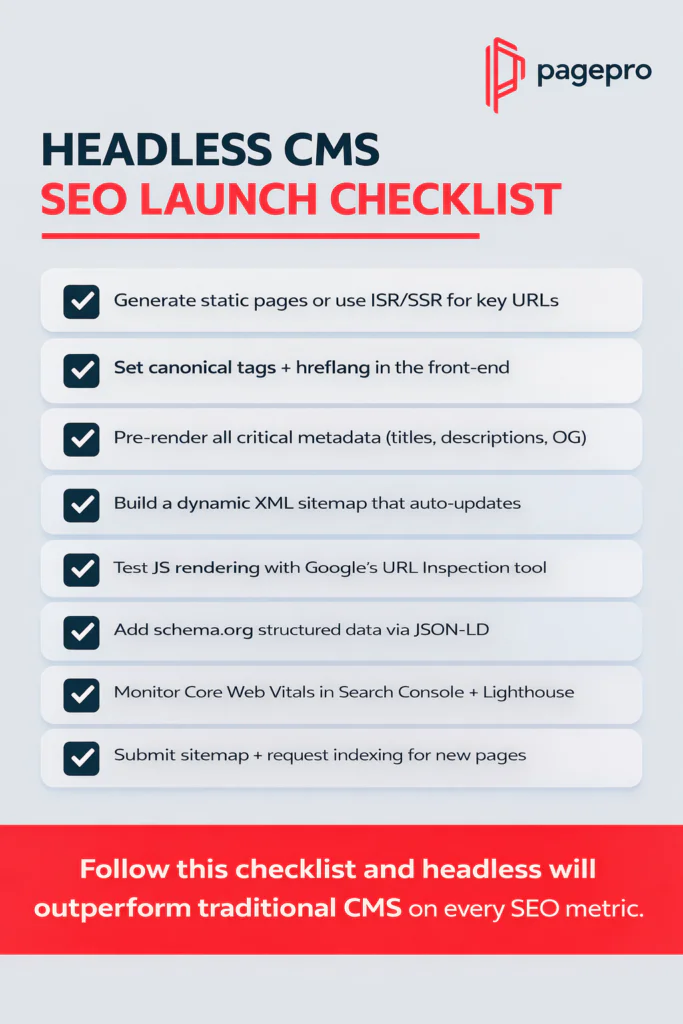
Use this 8-point checklist before launch to lock in the SEO advantages of your headless CMS architecture:
- Generate static pages or use ISR/SSR for all important URLs
- Set canonical tags and hreflang correctly in the front-end
- Pre-render critical metadata (titles, descriptions, Open Graph)
- Implement a dynamic XML sitemap that updates on every content change
- Enable proper JavaScript rendering and test with Google’s URL Inspection tool
- Add schema.org structured data via JSON-LD
- Monitor Core Web Vitals in Search Console and Lighthouse
- Submit the sitemap and request indexing for new pages
Follow this checklist and a headless content management platform will almost always outperform conventional systems on SEO metrics. The next section shows exactly how to integrate that same platform with the rest of your marketing stack.
Headless Content Management System Integration with the Marketing Stack
The true power of a headless platform is unlocked when it becomes the central content hub for your entire marketing stack. Instead of siloed data, structured content flows automatically to CRM systems, analytics tools, personalization engines, and AI automation platforms.
Integrating a Headless Architecture with CRM and Customer Data Platforms (CDP)
Headless platforms expose clean REST or GraphQL APIs and support real-time webhooks, making it simple to sync published content, campaign updates, and customer interactions directly into tools like Salesforce, HubSpot, or Segment.
Main integration patterns for marketing teams:
- Trigger CRM updates on content published via webhooks
- Pull customer data into content models for dynamic reuse
- Sync lead scores and engagement metrics back to the CMS
Reliable API calls are the foundation – see MDN Web Docs on web APIs for best practices.
Headless system Integration with Analytics and Data Pipelines
Every content piece can push performance data straight into your analytics stack without manual exports or spreadsheets.
Connect to Google Analytics 4, Mixpanel, or custom data warehouses using server-side events or Google Tag Manager containers.
Integrating Headless Architecture with Personalization Platforms
Structured content from the headless CMS feeds personalization engines in real time, allowing dynamic experiences based on user behavior, location, or segment.
Use JSON-LD schema and API-driven content blocks to power tools like Optimizely or Adobe Target.
Full guidance on implementing structured data for personalization is available in Google Search Central on structured data.
AI and Automation Workflows with a Headless CMS
The same API-first content can feed generative AI tools for copy variation, chatbots, or automated campaign creation, while webhooks trigger marketing automation sequences in tools like Marketo or ActiveCampaign.
This turns your CMS into an intelligent content engine that runs 24/7.
Thanks to such integrations a headless system becomes the core of your modern marketing operations. The next section walks through a real migration case study to show how it all comes together in practice.
Headless CMS Migration Case Study: GPNotebook
A real-world example of the transformation possible with headless architecture comes from GPNotebook – a major medical reference platform that previously struggled with an outdated legacy CMS handling more than 100,000 pages. Slow updates, high maintenance costs, fragmented content across sub-brands, and limited multilingual support were holding back editorial teams and global reach.
The migration replaced the old monolithic system with a modern stack: Next.js for the front end, Sanity as the headless platform, and Vercel for deployment and edge delivery. This change turned fixed pages into structured, reusable content blocks and enabled parallel workflows between editors and developers.
Main results after migration:
- Improved performance: Static generation and edge caching dramatically reduced load times and boosted Core Web Vitals scores across the entire platform.
- New AI features: Automatic AI-powered translation workflows now generate multiple language versions of every published document instantly, eliminating manual localization work.
- Multilingual rollout improvements: Consistent hreflang implementation and single-source content enabled smooth global expansion without site duplication or indexing issues.
- Editorial and business gains: Faster content updates, unified sub-brands, reduced maintenance overhead, and greater editor autonomy – all while supporting a 100K+-page medical knowledge base.
This case study demonstrates exactly how headless CMS solves the typical bottlenecks we discussed earlier and delivers measurable gains in speed, scalability, and international reach. The same principles apply whether you’re migrating a medical site or any high-volume content operation.
The next section covers the most common mistakes teams make during headless implementations – so you can avoid them and achieve results like GPNotebook.
Common Mistakes When Implementing a Headless Content Management System
Implementing a headless architecture delivers huge gains for your marketing team only if you avoid the classic pitfalls that trip up most teams. These four mistakes are the ones we see most often in real projects.
Over-Engineering the Content Model
Teams new to structured content often try to model every possible future use case from day one, creating dozens of complex content types and deeply nested references.
The studio becomes confusing for editors, queries slow down at scale, and future changes turn into major rework.
Best practice:
- Start with the minimum viable model
- Add fields and types only when real content demands them
- Review and simplify every quarter
Ignoring Content Preview and Live Preview Setup
Editors cannot effectively review or approve content without seeing it exactly as it will appear on the live site. Skipping proper preview setup forces constant developer involvement and kills campaign velocity.
Implement live preview with webhooks and preview tokens from the start.
Underestimating Editor Training and CMS Adoption
The most powerful studio is useless if editors avoid using it. Many teams underestimate the learning curve and skip structured onboarding, leading to low adoption and continued reliance on developers for basic tasks.
Plan dedicated training sessions, create role-specific documentation for your custom content model, and run regular feedback sessions with the editorial team.
Choosing Technology Before Defining Content Strategy
Picking the platform first and then trying to fit your content into it is backward. This leads to forced workarounds, limited reuse, and missed omnichannel opportunities.
Always define your content strategy, audience needs, and channel requirements first.
Google’s official guidance on creating helpful, people-first content is essential reading here: Creating Helpful, Reliable, People-First Content.
Avoid these four mistakes and your decoupled CMS implementation will deliver the speed, flexibility, and scalability your marketing team actually needs. The next section presents a clear comparison table to help you choose the right platform quickly.
Headless CMS Comparison Table
Designed for quick buyer decisions, this comparison table summarizes the five leading headless CMS platforms based on how they perform for marketing in real production environments.
| CMS | Best For | Marketing Flexibility | Learning Curve | Enterprise Readiness | Pricing Complexity |
| Sanity | Structured content & scaling teams | High | Medium | High | Medium |
| Contentful | Enterprise organizations | High | Medium | Very High | High |
| Storyblok | Marketing teams | Very High | Low | High | Medium |
| Strapi | Open-source control | Medium | Medium | Medium | Low |
| Payload CMS | Next.js projects | High | Medium | Medium | Low |
To understand how these ratings translate to real SEO and performance outcomes, see the official guidance on Understanding Core Web Vitals and Google search results.
Use this table to shortlist the right platform in minutes. The final section answers the most frequently asked questions about headless content management platforms.
FAQ
CMS stands for Content Management System. In marketing it is the central tool that lets teams create, organize, approve, publish, and reuse content across websites, apps, email, and AI channels – all without constant developer intervention.
A CMS for marketing is a content management system designed to support scalable content operations, omnichannel publishing, structured content reuse, workflow governance, and seamless integration with marketing tools. It treats content as reusable data instead of locked pages so marketing teams can move faster and stay consistent everywhere.
A headless CMS separates the content backend from any presentation layer. Content is stored as clean, structured data and delivered through APIs, so marketing teams can publish to any front-end framework, channel, or device. This delivers faster performance, true omnichannel reach, and editor-friendly workflows. For the technical details on why this architecture improves speed and SEO, see the official guidance on Rendering on the Web.
The top five headless CMS platforms for marketing teams in 2026 are:
Sanity – best for structured content and real-time collaboration
Contentful – best for enterprise governance and compliance
Storyblok – best for visual editing and non-technical users
Strapi – best for open-source control and self-hosting
Payload CMS – best for Next.js ecosystems
Each performs well in different areas depending on team size, channel needs, and technical stack.
Traditional (coupled) CMS stores content and design together as complete pages, leading to duplication, slower performance, and limited reuse. A headless system decouples content from presentation, giving marketing teams flexibility, faster page speeds, better Core Web Vitals, and omnichannel delivery without rebuilding templates. The performance advantages come directly from modern rendering strategies detailed in Understanding Core Web Vitals and Google search results.
Headless CMS costs depend on scale and model. Entry/growth plans typically range from $99–$300 per month for mid-size marketing teams, with implementation adding $40,000–$120,000 upfront for content modeling and front-end development. SaaS options keep ongoing maintenance low and predictable compared with open-source alternatives that shift DevOps costs to your team.
These answers cover the most common questions marketing teams ask when evaluating a headless platform. The final section helps you decide whether a full migration makes sense for your organization.
Which CMS Should You Choose: Headless or Traditional?
The right choice depends entirely on your team size, content volume, channel requirements, and growth plans. Use the decision framework from earlier and the audience segments below to pick the architecture that will actually serve your marketing.
Enterprise marketing teams
Choose headless. Large organizations need governance, audit trails, granular permissions, and seamless omnichannel delivery. A headless architecture with strong enterprise features (such as Contentful or Sanity) delivers the scalability and compliance required without the plugin bloat of traditional systems.
Agencies building client sites
Choose headless – specifically platforms with visual editing (Storyblok) or high flexibility (Sanity). Agencies win when they can deliver fast, reusable content models to every client without rebuilding templates for each new project.
Startups
Choose headless only if you already have Next.js in your stack and plan rapid international growth. Otherwise, start with a traditional or hybrid CMS to avoid unnecessary upfront development costs. Payload CMS or Strapi are the lowest-friction entry points when you do go headless.
SEO-focused publishers
Choose headless with static generation. Pre-rendered pages, edge caching, and clean structured data give you faster load times and better Core Web Vitals – factors Google’s ranking systems explicitly reward.
Open-source teams
Choose headless with full control (Strapi or Payload CMS). Self-hosted or code-first options eliminate vendor lock-in and give complete ownership of the stack, while still delivering modern rendering benefits.
Quick decision rule
If you answered “yes” to three or more questions in the earlier decision framework and your needs match any of the segments above, go headless. Otherwise, a traditional content management system remains the simpler, faster, and more cost-effective choice today.
Whichever path you take, the most important decision is whether headless architecture truly solves your specific bottlenecks – the topic we address in the final section.
Should You Migrate to a Headless Content Management System?
You’ve now seen exactly where traditional CMS architectures create drag, what a true CMS for marketing teams should enable, how headless architecture removes those bottlenecks, the real costs involved, when headless is the wrong choice, and a clear decision framework to guide you.
The most important CMS decision is whether headless architecture is the right choice for your organization.
If your answers to the earlier decision questions and your team profile match the segments that benefit from decoupling (enterprise scale, agencies, international reach, or SEO-focused publishing), then yes – a migration to headless will deliver faster campaigns, better performance, and long-term scalability. To protect your search rankings and traffic during the transition, follow Google’s official guidance on site moves and migrations.
Book a discovery call and we’ll assess your current bottlenecks in the context of a headless approach – so you can decide with confidence and move forward without assumptions.