


Every Next.js project runs into this decision eventually: which rendering strategy fits which page. Get it wrong and you pay for it in server costs, search visibility, or Core Web Vitals — sometimes all three.
Next.js 16 changed the calculus by making Cache Components and Partial Prerendering the default, which means the old “pick one strategy for your whole app” framing no longer applies.
Here’s how SSR, SSG, ISR, and CSR actually differ in 2026, when each is the right call, and how Cache Components let you combine them on a single page.
The Four Rendering Strategies at a Glance
| Strategy | When HTML Is Built | SEO Impact | Typical Cost | Best For |
| SSR | On every request, server-side | Strong — full HTML at request time | Higher — server computes per visit | Personalized or per-request data: search results, checkout |
| SSG | At build time | Strong — full HTML pre-rendered | Lowest — served from CDN | Marketing pages, docs, rarely-changing content |
| ISR | At build time, then regenerated on an interval or on demand | Strong — same as SSG | Low — regenerates only when needed | Blogs, product catalogs, content that changes but not per-second |
| CSR | In the browser, after JS loads | Weak — content arrives after JS executes | Lowest server cost, highest client cost | Authenticated dashboards, internal tools where SEO doesn’t matter |
The pattern worth internalizing: SSR, SSG, and ISR all send complete HTML, so search engines index them the same way. CSR is the outlier — a crawler has to execute JavaScript before there’s anything to read, which is slower and less reliable at scale. This also shows up in Core Web Vitals: Interaction to Next Paint (INP), a confirmed Google ranking signal, penalizes heavy client-side JavaScript execution, which is exactly what CSR depends on.
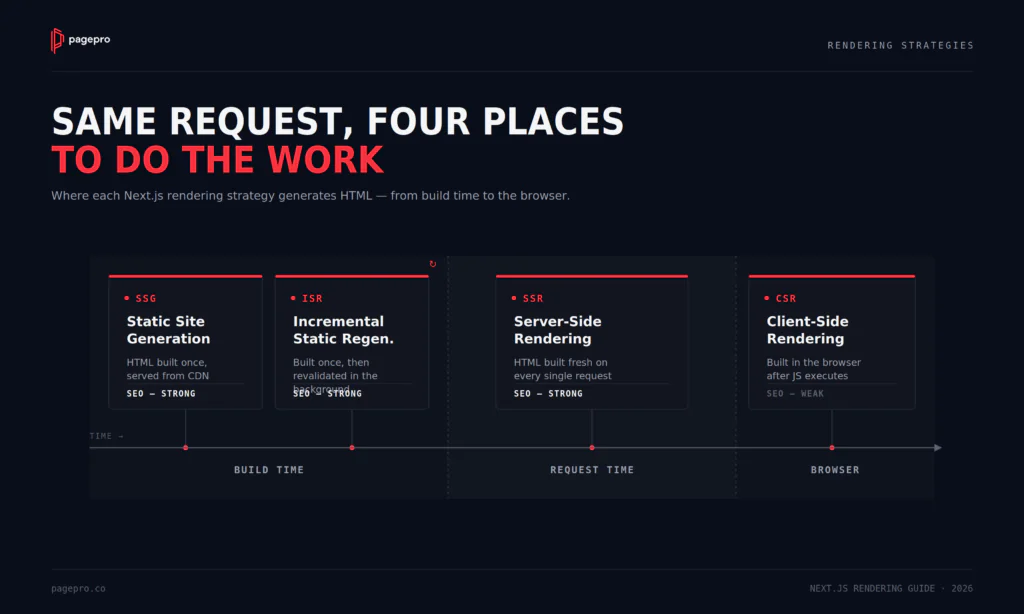
Server-Side Rendering (SSR)
SSR generates HTML on the server for every request. The visitor — and the crawler — gets complete, current markup immediately, and the page can reflect data that’s specific to that request: a logged-in user, a live price, a search query.
In the App Router, a route becomes dynamic (SSR) as soon as it reads request-time data — cookies, headers, search params, or an explicitly uncached fetch:
// app/products/[id]/page.tsx
async function getProduct(id: string) {
  const res = await fetch(`https://api.example.com/products/${id}`, {
    cache: 'no-store',
  });
  return res.json();
}

export default async function ProductPage({
  params,
}: {
  params: { id: string };
}) {
  const product = await getProduct(params.id);
  return <div>{product.name}</div>;
}
The tradeoff: the server does work on every visit, so cost and latency scale with traffic. Use SSR when data genuinely can’t be cached — not as a default.
Static Site Generation (SSG)
SSG generates HTML once, at build time, and serves it from a CDN. There’s no per-request server computation, so it’s the fastest and cheapest option to run — Time to First Byte is close to minimal, and the attack surface shrinks along with the infrastructure.
In the App Router, this is simply a fetch with default caching — no extra configuration needed:
async function getPosts() {
  const res = await fetch('https://api.example.com/posts'); // cached at build
  return res.json();
}

export default async function BlogPage() {
  const posts = await getPosts();
  return <PostList posts={posts} />;
}
The limitation: content is frozen until the next build. On a site with thousands of pages, or content that changes often, that means either long build times or stale pages — which is exactly what ISR exists to fix.
Incremental Static Regeneration (ISR)
ISR keeps SSG’s speed but regenerates individual pages in the background, either on a fixed interval or on demand, without rebuilding the whole site. It’s the right default for most content-driven pages: fast to serve, cheap to run, and never more than one revalidation cycle out of date.
async function getPosts() {
  const res = await fetch('https://api.example.com/posts', {
    next: { revalidate: 3600 }, // regenerate at most once per hour
  });
  return res.json();
}
For updates triggered by an event — a CMS publish, an inventory change — call revalidatePath() or revalidateTag() from a Server Action or webhook handler instead of waiting on the interval. That’s the on-demand half of ISR, and it’s what makes it viable for e-commerce and news, not just blogs.
Client-Side Rendering (CSR)
CSR sends a minimal HTML shell and builds the page in the browser with JavaScript. It’s the right model for authenticated, highly interactive surfaces where SEO is irrelevant — dashboards, admin panels, internal tools — because the user stays in one long session and speed-to-first-paint matters less than responsiveness after that.
'use client';
import { useEffect, useState } from 'react';

export default function Dashboard() {
  const [data, setData] = useState(null);

  useEffect(() => {
    fetch('/api/dashboard')
      .then((r) => r.json())
      .then(setData);
  }, []);

  return data ? <DashboardView data={data} /> : <Spinner />;
}
The cost: content only exists after JavaScript executes, which is slower and less crawler-friendly than the alternatives, and heavy client-side execution is a direct driver of poor INP scores.
CSR behind a login wall is a reasonable, deliberate choice. CSR as the default rendering strategy for a public, SEO-dependent page usually isn’t.
What Changed in Next.js 16: Cache Components and Partial Prerendering
Through Next.js 15, a route was either fully static or fully dynamic — there was no in-between.
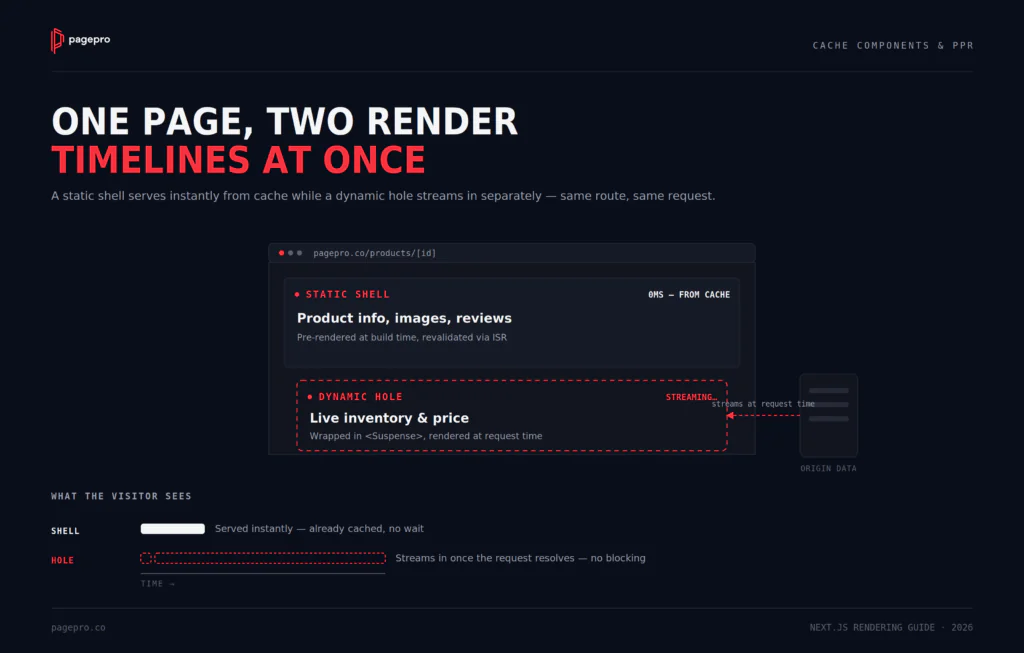
Next.js 16 removes that constraint with Cache Components, which complete the Partial Prerendering (PPR) model first introduced in 2023: a single route can serve a static, pre-rendered shell immediately while genuinely dynamic parts stream in separately, without holding up the rest of the page.
Enable it with one flag:
// next.config.ts
import type { NextConfig } from 'next';

const nextConfig: NextConfig = {
  cacheComponents: true,
};

export default nextConfig;
In practice, this means wrapping the request-time-dependent part of a page in Suspense, while everything else stays static:
export default function ProductPage({ params }: { params: { id: string } }) {
  return (
    <div>
      <ProductInfo id={params.id} /> {/* static shell */}
      <Suspense fallback={<InventorySkeleton />}>
        <LiveInventory id={params.id} /> {/* streamed in, dynamic */}
      </Suspense>
    </div>
  );
}
This is why the SSR-vs-SSG framing is incomplete on its own in 2026: on a single product page, the description and layout can be static (SSG/ISR), while live inventory or a personalized recommendation streams in dynamically (SSR-like), all without the old all-or-nothing tradeoff.
The strategies above are still the building blocks — Cache Components just mean you’re no longer forced to pick exactly one per route.
How to Choose: A Decision Framework
| Page Type | Recommended Strategy | Why |
| Marketing / landing pages | SSG (or ISR if content is CMS-managed) | Content rarely changes; maximum speed at the lowest cost |
| Blog / documentation | ISR | Updates without full rebuilds; still fully static between revalidations |
| E-commerce product pages | ISR + Cache Components for live inventory/price | Catalog data is stable; inventory and price need to stay current |
| Search results / filtered listings | SSR | Query-specific output isn’t cacheable per fixed URL |
| Checkout / cart | SSR, or CSR behind auth | Per-user, per-session; no SEO value to preserve |
| Authenticated dashboards | CSR | No SEO requirement; rich interactivity is the actual point |
Default to ISR for anything content-driven unless there’s a specific reason not to.
SSR should be the exception you reach for when data truly can’t be cached — not the starting point — because it’s the only one of the four whose cost scales directly with traffic.
Applying This to Common Page Types
The framework above is easy to nod along to in the abstract. It gets more useful once you attach it to three architectures almost every team ends up building — because each one has a natural rendering fingerprint, and fighting it is where most of the wasted server spend actually comes from.
The marketing site: mostly static, and deliberately boring about it
A corporate or marketing site should be one of the cheapest, fastest things you run — the homepage, service pages, and blog have no business paying SSR’s per-request tax, because almost nothing on them is actually per-request. SSG or ISR carries essentially the whole site.
Common mistake: a contact form or personalized CTA banner convinces a team to make the entire page dynamic. The fix isn’t SSR for the route — it’s a small client component dropped into an otherwise static page, so one form doesn’t tax every visitor who never touches it.
The e-commerce catalog: static bones, live nerve endings
A product page is really two pages wearing one URL: the description, images, and reviews that barely change, and the stock count or price that can change by the minute. ISR handles the first half; Cache Components stream in the second half as a live “hole” in an otherwise cached shell.
Cart and checkout don’t belong in this conversation at all — they’re per-session, carry zero SEO value, and are better handled by SSR or CSR without dragging the rest of the site’s rendering strategy into the decision.
The internal dashboard: where CSR finally gets to be the right answer
Everywhere else in this article, CSR is the strategy you reach for reluctantly. An admin panel or analytics dashboard is the exception, not a compromise: nobody needs to find it on Google, users stay logged in for long stretches, and the interactivity is the entire product.
The slow-first-paint, weak-SEO tradeoffs that rule CSR out for a marketing page simply don’t apply behind a login wall — so this is the one place a full client-rendered app is the deliberate, correct default.
Quick self-check — is your current setup fighting its own architecture?
- A marketing or blog route running SSR with no personalization on it
- A product page fully dynamic just to show live stock for one widget
- An internal dashboard built with SSR/SSG when nothing on it needs to be indexed
If any of those sound familiar, that’s usually a rendering strategy left over from before the page’s actual requirements were clear — not a deliberate choice.
Getting the Rendering Strategy Right the First Time
Here’s the uncomfortable version: most Next.js apps aren’t running the wrong rendering strategy because someone chose wrong.
They’re running whatever was default the day the project started, untouched since — an SSR route that’s been quietly billing per-request for a page that hasn’t changed in a year, a dashboard someone built as SSG because that’s what the last project used.
Next.js 16 raised the stakes on that inertia. When the decision lived at the app level, “good enough” was a reasonable place to stop. Now that it lives at the component level, every route you haven’t revisited is a small, compounding bill.
If you’re not sure which of your pages are paying for freshness they don’t need, that’s exactly the audit Pagepro runs. Talk to us before your next Core Web Vitals report finds it for you.
FAQ
What’s the difference between SSR and SSG in Next.js?
SSR generates HTML on the server for every request, so it can reflect data specific to that request. SSG generates HTML once at build time and serves the same static file to every visitor until the next deployment. Both produce complete HTML that search engines can index equally well; the difference is when the work happens and whether the output can vary per request.
Is ISR still relevant with Cache Components in Next.js 16?
Yes. Cache Components change how static and dynamic content combine within a single page, but ISR is still the mechanism for revalidating cached data on an interval or on demand. In Next.js 16, ISR-style caching and Partial Prerendering work together rather than replacing each other.
Does CSR hurt SEO?
It can. A pure client-side-rendered page sends a near-empty HTML shell, so a crawler has to execute JavaScript before there’s content to index — a slower, less reliable step than reading complete HTML directly, especially at scale. CSR is a reasonable choice for pages that don’t need to rank, such as authenticated dashboards.
Can you mix rendering strategies on the same page?
Yes — this is what Cache Components and Partial Prerendering are built for. A single route in Next.js 16 can serve a static, cached shell immediately while specific components stream in dynamically, so a page is no longer required to be entirely static or entirely server-rendered.
What is Partial Prerendering (PPR)?
PPR is the Next.js model that lets a single page serve a static, pre-rendered shell while dynamic sections — wrapped in Suspense — stream in separately once their data is ready. First introduced in 2023, it became the default behavior in Next.js 16 through Cache Components.
Which rendering strategy is best for e-commerce?
Usually ISR for product and category pages, since catalog content is stable but needs periodic updates, combined with Cache Components to stream in genuinely live data like stock levels or personalized pricing. Cart and checkout, which are per-session and carry no SEO value, are better served by SSR or CSR.


