Introduction
Node.js has become a common choice for companies building scalable, event-driven systems and applications that need to respond quickly to user activity. It allows teams to use JavaScript on both the frontend and backend, which simplifies development and shortens delivery cycles.
The runtime is known for strong performance characteristics and is supported by a large open-source ecosystem that continues to grow among developers. In this article, you’ll find where Node.js is used most effectively and why it remains a strategic option for long-term architecture and platform planning.
TL;DR:
- Server-Side Web Applications: Build scalable, high-performance web servers that handle multiple concurrent connections.
- API Development: Create efficient RESTful and GraphQL APIs that integrate seamlessly with frontend frameworks like React.
- Microservices: Develop lightweight, scalable microservices architectures that fit well in cloud-native environments.
- Real-Time Applications: Power real-time communication and event-driven apps like chat systems, collaborative tools, and streaming platforms.
- Cross-Platform Development: Use JavaScript for both client-side and server-side code, reducing the need for multiple languages in web and mobile app development.
- Cloud-Native Systems: Deploy serverless applications and use Node efficiently in cloud environments like AWS Lambda and Google Cloud Functions.
- Data Streaming: Handle large streams of data, such as video/audio or IoT data, in a non-blocking, event-driven way.
- Command-Line Tools: Build powerful automation tools and command-line applications using Node.js.
- IoT Apps: Power Internet of Things (IoT) devices and systems with lightweight, efficient code.
Node.js Architecture
Node.js is an open-source, cross-platform JavaScript runtime environment built on the V8 engine, which compiles JavaScript into machine code for fast execution. Its core design is based on an event-driven, non-blocking I/O model and a single execution thread that delegates I/O operations to the libuv layer. This approach allows Node.js to handle large numbers of concurrent connections efficiently without spawning additional threads or processes.
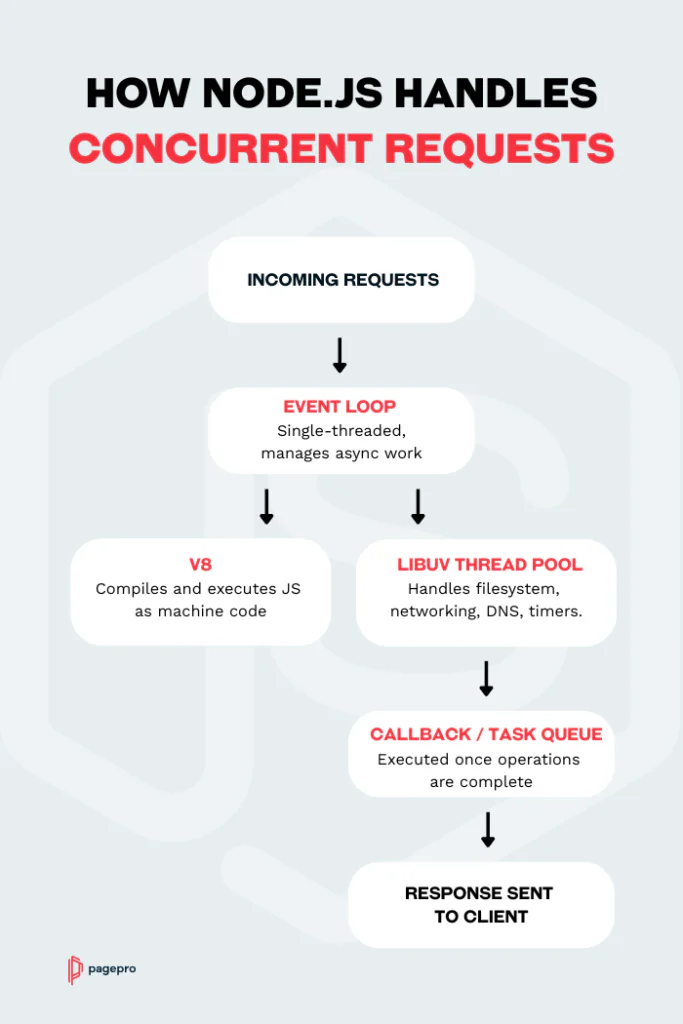
At runtime, the event loop coordinates incoming requests, schedules asynchronous tasks and manages callbacks or promises. This architecture is especially effective for I/O-heavy workloads such as APIs, messaging systems and real-time communication where latency and throughput matter more than CPU-bound processing.
Pros and Cons of NodeJS
Like any technology, Node.js solves specific engineering challenges very well, but it also comes with constraints. The tables below will give you a quick overview of where it works best and where it may require extra planning.
Advantages of Using Node.js
| Benefit | Why It Matters |
|---|---|
| Efficient with high concurrency | It’s model handles many simultaneous connections without heavy resource usage. |
| Fast execution | The V8 engine compiles JavaScript into machine code, resulting in strong runtime performance. |
| One language across the stack | Teams use JavaScript for frontend and backend, reducing context switching. |
| Large package ecosystem | npm provides extensive libraries and tooling, accelerating development and reducing time to market. |
| Cloud-native alignment | Works well with containerized workloads, microservices and serverless platforms. |
| Strong community support | Active Node.js community helps ensure long-term stability and innovation. |
Disadvantantages of NodeJS
| Limitation | Impact |
|---|---|
| Not ideal for CPU-heavy tasks | Computationally intensive work can block the event loop unless moved to worker threads or separate services. |
| Complexity in asynchronous code | Large projects require structure, tooling and patterns to avoid callback or async complexity. |
| Package quality varies | Not all npm libraries are well-maintained, and require frequent audits. |
| Requires architectural planning | High-scale deployments may need clustering, message queues or distributed systems patterns. |
Benefits of Node.js for CTOs
Node.js offers a practical mix of performance, scalability and development speed. It supports cloud-native architectures, handles high traffic efficiently and allows developers to work with one language across the stack.
From an organisational standpoint, using JavaScript both in the browser and on the server reduces language fragmentation and simplifies team workflows. For CTOs, this can lead to shorter development cycles, easier staffing and a stack that scales well with cloud-native and distributed application patterns.
- Efficient Scaling: The event-driven, non-blocking model handles many concurrent requests without requiring proportional increases in infrastructure.
- Faster Development: Using JavaScript on both the frontend and backend shortens iteration cycles and reduces context switching.
- Simplified hiring: A single language stack makes onboarding easier and helps avoid fragmented skill sets inside the team.
- Flexible Architecture: Works well with microservices, serverless systems, real-time apps and streaming workloads.
- Cloud Integrations: It pairs easily with modern DevOps practices, container platforms and serverless environments.
- Strong Ecosystem: A mature community, extensive npm library and widespread enterprise adoption support long-term maintainability.
Now that you’re familiar with Node.js, let’s have a look at the cases where it performs best.
Node.js for Server-Side Web Applications
Traditional server-side technologies like PHP or Ruby on Rails often handle concurrent connections inefficiently by blocking I/O operations. This leads to slower response times and resource bottlenecks. In contrast, Node.js uses asynchronous I/O to handle thousands of concurrent connections without blockers. Because of that, it became a popular choice for building server-side web applications.
Why is Node.js used for building Server-Side Web Applications?
- Non-blocking I/O: Node.js can handle multiple requests concurrently without blocking the main thread, making it highly scalable.
- Large Ecosystem: The npm (Node Package Manager) ecosystem provides a vast library of modules that can help speed up development.
In September 2022 over 2.1 million packages were reported being listed in the npm registry, making it the biggest single language code repository on Earth, and you can be sure there is a package for (almost!) everything.
Source: Nodejs.org
Want to build your app with Node.js?
Node for API Development
APIs are the backbone of modern applications, facilitating communication between different services and client applications. Node.js has become a preferred technology for building both RESTful and GraphQL APIs. This is especially true in distributed architectures where scalability and performance are crucial. Thanks to Node.js asynchronous, event-driven nature, it allows API servers to handle multiple requests concurrently with minimal overhead.
Node.js is well-suited for building both RESTful and GraphQL. Node developers can create highly efficient API layers that can handle numerous concurrent requests without impacting performance. It ‘sa natural choice for high-traffic applications.
Why use Node.js for API Development?
- Microservice-Friendly: Many API-based applications, especially in cloud-native environments, are built using microservice architectures. Node.js works well in a microservices framework due to its lightweight nature, allowing teams to break down monolithic applications into smaller, independent services that communicate via APIs.
- GraphQL Integration: Node.js integrates very well with GraphQL, making it easier to build flexible APIs. Instead of multiple endpoints, the client can query precisely the data it needs from a single API endpoint. This reduces over-fetching and under-fetching of data. What’s more, Node.js’s async capabilities handle GraphQL’s often complex queries efficiently and provide fast data retrieval without blocking other operations.
Seamless Integration with Frontend Technologies
Node.js works great with frontend technologies like React.js and React Native. Since both Node.js and React.js use JavaScript, developers can easily share code between the client-side (React) and server-side (Node.js), improving developer efficiency and reducing cognitive load. Here’s how Node.js integrates with these frontend frameworks:
React with REST APIs:
React applications commonly fetch data from a backend API built with Node.js. The API can be easily consumed using fetch or libraries like axios, allowing React to dynamically render the data it receives. Because both the backend (Node.js) and frontend (React.js) are in JavaScript, debugging and maintaining the communication layer becomes simpler.
React Native with REST and GraphQL APIs:
For mobile apps built using React Native, Node.js serves as a backend to power the app’s functionality. Whether it’s handling user authentication, fetching data from external APIs, or syncing with databases, a Node.js-powered API can be used to serve the mobile app with minimal latency. GraphQL, when integrated with Node.js, offers React Native apps more flexibility in managing complex data-fetching needs.
Server-Side Rendering (SSR) with Next.js:
For server-side rendering (SSR) of React applications, Next.js makes it easy to build fast, SEO-friendly web apps. With Node.js on the backend and React rendering on the server, you can send pre-rendered HTML to clients, improving initial load times and SEO.
Microservices Architecture
In a microservices architecture, applications are broken down into smaller, independent services that each handle a specific functionality, such as user authentication, payments, or notifications.
These services communicate with one another over APIs, often through lightweight protocols like HTTP or messaging systems such as Kafka. Node.js is a natural fit for microservices due to its lightweight, event-driven nature, making it ideal for creating and managing these independent services.
Node.js and Microservices
- Lightweight and Efficient: Node.js’s single-threaded, event-driven architecture is perfect for microservices, where each service is designed to be small, fast, and resource-efficient.
- Asynchronous Processing: In a microservices architecture, services often need to handle asynchronous tasks, such as processing background jobs, handling messaging queues, or communicating with external APIs.
- Ease of Deployment: With microservices, it’s essential that each component can be developed, tested, and deployed independently. The modularity of Node.js makes that easy.
- Decoupled Communication: Microservices need to communicate with each other efficiently, often through lightweight HTTP APIs, messaging queues, or event-driven systems. Node.js can handle asynchronous communication, making it ideal for such tasks.
Serverless and Node.js
Serverless architecture complements microservices, and Node.js plays a significant role here. In serverless, individual functions are deployed and triggered by events without the need for server management. Platforms like AWS Lambda, Google Cloud Functions, and Azure Functions support Node.js as one of their primary runtime environments.
- Event-Driven Architecture: Node.js’s event-driven model aligns perfectly with the serverless paradigm, where services are often triggered by specific events, such as HTTP requests, file uploads, or database updates.
- Scalability without Infrastructure Management: Node.js in a serverless environment allows microservices to scale automatically in response to demand. This eliminates the need for managing servers and infrastructure, reducing operational overhead for engineering teams.

Real-Time Applications
Real-time applications, such as messaging platforms and collaborative tools, require instant data synchronization between multiple users, and Node.js enables this with its efficient use of WebSockets.
Why Node.js for Real-Time Applications?
- WebSockets Integration: Node.js allows for seamless WebSocket integration, enabling continuous two-way communication between the client and server without the overhead of traditional HTTP requests.
- Event-Driven Model: Node.js’s event-driven nature is well-suited for handling real-time events, such as live updates, notifications, and data synchronization across connected clients.
Cross-Platform Development
One of the key advantages of using Node.js is its ability to power both web and mobile backends with a single programming language: JavaScript. This enables teams to work across the full stack—from frontend interfaces to backend services—without needing to learn multiple languages or frameworks.
Node.js fits seamlessly with popular frontend technologies like React for web development and React Native for mobile apps, providing a unified development experience.
Why use Node for Cross-Platform Development?
- Single Language for Frontend and Backend: With Node.js, developers can use JavaScript across the entire stack, from the frontend to the backend. This reduces the need for separate backend languages like PHP, Python, or Ruby, simplifying development processes.
- Code Reusability: Teams can reuse code across different platforms, particularly when using React for web apps and React Native for mobile apps. This leads to faster development cycles and reduces redundant codebases, improving overall efficiency.
- Shared Skills Across Teams: Frontend and backend developers can work in the same language, which reduces context-switching and allows teams to be more flexible. Developers can contribute across the full stack, reducing bottlenecks and improving collaboration.
Cloud-Native Development
Node.js has become a go-to choice for cloud-native environments, seamlessly integrating with leading cloud platforms like AWS, Google Cloud Platform (GCP), and Azure.
Its lightweight, event-driven architecture aligns perfectly with the needs of cloud-native applications, which focus on scalability, efficiency, and modular deployment. Node.js is also well-suited for DevOps practices, enabling teams to deploy applications quickly and scale them based on real-time demand.
Why Node.js is used during Cloud-Native Development?
- Seamless Cloud Integration: Node.js is natively supported by cloud platforms like AWS, GCP, and Azure. Developers can easily deploy Node applications using containers, virtual machines, or serverless functions, depending on the needs of the application.
- DevOps-Friendly: It aligns well with modern DevOps practices, particularly in Continuous Integration/Continuous Deployment (CI/CD) pipelines. Cloud-native tools such as Docker, Kubernetes, and Terraform can be easily integrated with Node.js, allowing for streamlined containerization, orchestration, and deployment processes.
Data Streaming Applications
Node.js is well-suited for handling large data streams, making it ideal for applications that need to process real-time data, such as audio/video streaming and IoT data ingestion. Its architecture allows it to process continuous streams of data without blocking other tasks, ensuring smooth real-time data handling.
Why Node for Data Streaming Applications?
- Real-time Processing: Node.js can handle real-time data streams effectively, making it ideal for video streaming services, live data dashboards, and audio processing. It enables the processing of large amounts of data in small chunks, avoiding memory overload.
- Non-blocking I/O: For applications that require constant data flow (e.g., live video or sensor data from IoT devices), Node.js’s asynchronous architecture ensures that the system continues running without performance issues.

Command Line Tools and Automation
Node.js is widely used to build command-line interface (CLI) tools and automation scripts, providing developers with powerful tools to streamline their workflows. With a vast ecosystem of packages and its ability to handle asynchronous tasks, Node.js is a good pick for building highly customizable automation tools.
Why Node.js for Command Line Tools and Automation?
- Efficient Scripting: Node.js’s lightweight nature and asynchronous handling make it an excellent choice for building CLI tools that automate repetitive tasks, manage infrastructure, or interact with APIs.
- Cross-Platform Compatibility: Node.js provides easy access to the underlying file system, making it an ideal choice for building cross-platform CLI tools that work consistently on different operating systems (Linux, macOS, Windows).
Internet of Things (IoT)
In IoT ecosystems, where devices are constantly sending and receiving data, Node.js’s asynchronous capabilities allow it to handle multiple devices concurrently. It’s ideal for real-time IoT systems.
Why Node.js for IoT Applications?
- Event-Driven Architecture: Node.js’s event loop is perfect for IoT systems that rely on continuous, event-driven communication between devices and servers. Whether it’s managing sensors or controlling smart devices, it efficiently handles the asynchronous nature of IoT communication.
- Lightweight and Efficient: It’s low resource consumption makes it a great fit for running on edge devices or gateways, where resources are limited but performance is critical.
Node.js Use Cases
Node.js powers many apps we use daily. Here are some of them.
Netflix
Netflix has moved towards a microservices architecture using Node.js to handle millions of users with low latency. Each service is modular and handles specific business functionality, such as recommendations or streaming data.
With Node.js and React.js, we can render from the server and subsequently render changes entirely on the client after the initial markup and React.js components have been transmitted to the browser. This flexibility allows for the application to render the exact same output independent of the location of the rendering. The hard separation is no longer present and it’s far less likely for the server and client to be different than one another.
Source: Netflix Tech Blog
PayPal

PayPal switched from Java to Node.js for their web applications and saw major performance improvements. The company reported that their Node.js application was built almost twice as fast with fewer lines of code and fewer people. At the same time, it was handling double the requests per second compared to their previous Java-based stack.
Our first adopter of Node.js in production wasn’t a minor application; it was our account overview page and one of the most trafficked apps on the website. We decided to go big, but we also mitigated that risk by building the equivalent Java application in parallel. We knew how to deploy and scale Java applications, so if anything went wrong with the node.js app, we could fall back to the Java one. This provided the setting for some interesting data.
Source: PayPal Tech Blog
Uber

Uber originally chose Node.js for its core trip-execution engine because of its asynchronous primitives and single-threaded model, which give Uber the ability to handle huge volumes of concurrent connections efficiently. Its use allowed the company to build over 600 stateless endpoints in its mobile-facing edge API and deliver high throughput under demanding, real-time conditions.
Uber’s core trip execution engine was originally written in Node.js because of its asynchronous primitives and simple, single-threaded processing. (In fact, we were one of the first two companies to deploy Node.js in production.) Node.js gives us the ability to manage large quantities of concurrent connections.
Source: Uber Tech Blog
Walmart

Walmart can offer sophisticated features to mobile users on the client side using Node. It’s saving mobile shoppers a ton of time by customising content based on device type and browser capabilities.
We believe that Node.js is a programming mega-event on the scale of Java or Ruby on Rails. [It is] not merely a new way of expressing existing ideas, but rather a new way of thinking about how software systems should be built.
Source: VentureBeat
Conclusion
Node.js presents a compelling solution to several key business and technical challenges. It can significantly reduce development time and costs by enabling full-stack JavaScript development, potentially streamlining hiring and team management.
This technology excels in real-time applications and microservices architectures, aligning well with modern cloud-native development practices. This can lead to more efficient resource utilisation and potentially lower infrastructure costs, especially in cloud environments.
Need help in Node.js Development?
Read more:
How to Prepare for an IT Kick-off Meeting?
FAQ
Node.js is used for building network applications such as real-time chat apps, REST APIs, microservices, streaming platforms, and IoT systems.
Because it can run JavaScript outside the web browser using the V8 engine, it’s great for applications that handle large numbers of connections.
Yes, Node.js is still relevant in 2026. The strong community, continued improvements to the V8 engine, and adoption across modern cloud platforms help keep Node.js competitive for building scalable, production-ready systems.
Node.js is mostly used for backend development. It acts as a JavaScript runtime environment that allows developers to execute JavaScript on the server.
A common real-life example of Node.js is a real-time messaging application or live dashboard. Platforms like Uber, PayPal, and Walmart use it for handling fast, event-driven communication between users and servers.
Yes. Netflix uses Node.js in parts of its backend to improve performance and reduce startup time. Its lightweight event-driven architecture helps Netflix handle high-volume streaming traffic efficiently.
No. Node.js is not a coding language. It’s a runtime environment that allows developers to run JavaScript outside the web browser. It uses the V8 engine to compile JavaScript into machine code so it can execute efficiently on the server.
Node.js and React serve different purposes, so one isn’t “better” universally. It’s used to execute JavaScript on the server, while React is used to build interactive user interfaces in the browser.