Vercel as a hosting platform: When It’s the best choice and when it’s not


TL;DR
• Vercel is a managed cloud platform known as the Frontend Cloud that combines global CDN distribution, serverless execution, edge computing, automated CI/CD, and Git-native deployments for modern frontend and full-stack JavaScript applications.
• It automatically builds and deploys code on every git push and provides instant preview URLs, edge caching, and zero-config optimizations especially for Next.js applications.
• Vercel hosting excels for frontend-driven projects, Next.js apps, MVPs, marketing sites, headless CMS platforms, and globally distributed applications needing edge-level personalization.
• The platform offers exceptional speed of delivery, developer experience, and automatic scaling without requiring dedicated DevOps teams for suitable workloads.
• Limitations include usage-based pricing that can become unpredictable, restrictions on long-running backend processes, WebSockets, and limited low-level infrastructure control.
• Teams achieve the best results by using Vercel hosting for the frontend and edge layer in a hybrid architecture while placing backend-heavy or stateful services on more flexible platforms such as AWS, Render, or Railway.
What Is Vercel Hosting?
Vercel is a managed cloud platform built specifically for modern frontend and full-stack JavaScript applications. It is frequently described as the Frontend Cloud – a comprehensive abstraction layer that combines global CDN distribution, serverless execution, automated CI/CD, edge computing, and tight Git integration.
Teams connect a Git repository and Vercel builds, deploys, and serves the application worldwide on every push. You don’t need to set up any servers, configure any load balancers, or manage any SSL certificates.
How Vercel Hosting Differs from Traditional Hosting
This is the exact question every CTO should ask themselves if their team is considering Vercel hosting.
Traditional hosting (VPS, EC2 instances, or any generic cloud server) forces teams to manage the entire stack themselves. Teams select the server, install the runtime, configure the CDN, define caching rules, and handle scaling. Of course, it provides full control, but it consumes significant engineering time and typically demands DevOps expertise that most teams with limited hiring bandwidth simply don’t have.
Vercel hosting, on the contrary, eliminates such issues entirely because every git push triggers a build and deployment automatically, preview URLs appear instantly for every branch and pull request, and edge caching, image optimization, and serverless functions are enabled by default.
Here’s a clear comparison we use when auditing infrastructure for clients:
| Aspect | Traditional Hosting | Vercel Hosting |
| Deployment | Manual provisioning & configuration | Automatic on every git push |
| Preview environments | Requires custom setup | Instant preview URLs for every branch/PR |
| Global CDN & caching | Manual CDN configuration | Built-in global edge network with smart caching |
| Infrastructure management | Full DevOps responsibility | Completely abstracted |
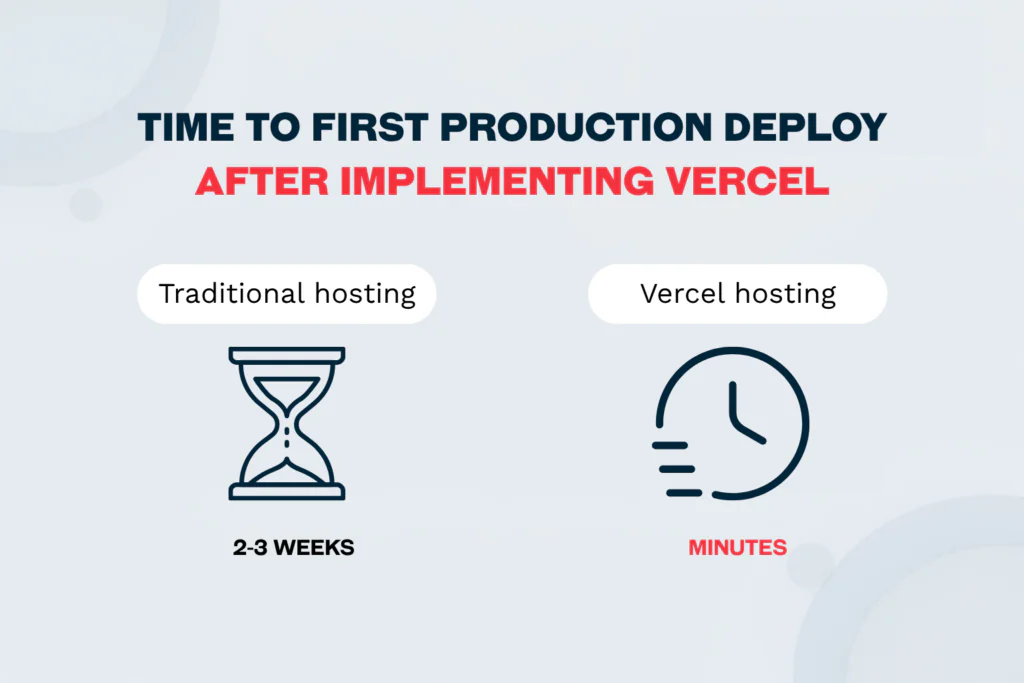
| Time to first production deploy | 2–3 weeks typical for small teams | Minutes |
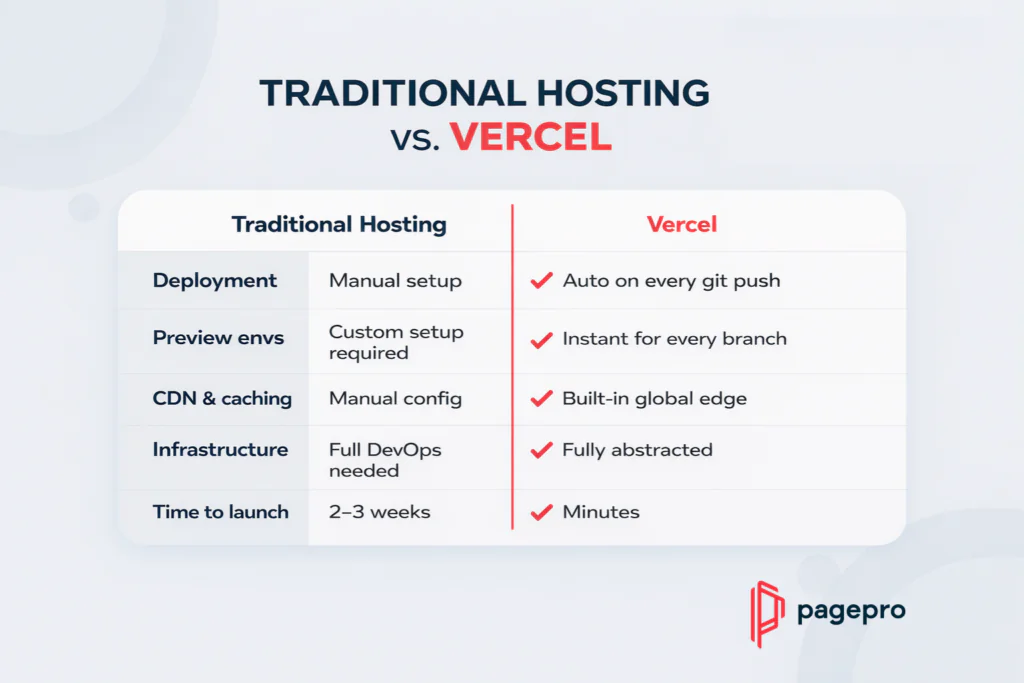
Actual impact example: Vercel hosting vs. traditional hosting
We’ve guided dozens of five-person SaaS teams building customer dashboards through this exact choice.
On traditional infrastructure they would spend two to three weeks on DevOps setup before shipping a single feature, but on Vercel they deploy a production-ready application in minutes and redirect that time into actual product development instead of infrastructure management.
Vercel and Next.js Integration: Why They Work So Well Together
Vercel was built by the same team that created Next.js, so the integration is seamless. The platform automatically applies the framework’s optimizations that are simply unavailable on generic hosting providers.
Main Next.js features that work with no additional configuration on Vercel hosting:
- Incremental Static Regeneration (ISR)
- React Server Components
- Middleware and edge functions
- Built-in image optimization
- Automatic cache invalidation and personalization
Next.js can be self-hosted anywhere, but in our experience Vercel hosting is its natural option for teams that prioritize speed of delivery and fast updates.
Vercel Architecture: Frontend Cloud and Abstraction Layer Explained
The clearest way to think about Vercel is as an opinionated frontend cloud rather than just another hosting provider. While the phrase “frontend cloud” is commonly used, it does not fully capture what the platform actually does. It abstracts away the infrastructure so teams can focus on the product instead of servers.
When the infrastructure abstraction works best (the scenarios we see most often with our clients)
- Primarily frontend-driven applications where speed of delivery and fast iteration matter most
- Teams that need instant stakeholder visibility through preview environments
- Projects that rely on external APIs or lightweight serverless logic and want predictable simplicity even at unpredictable scale
When friction in Vercel appears (the cases where we usually end up recommending a hybrid or alternative)
- Backend-heavy systems that require long-running tasks or persistent connections
- Situations where deep low-level infrastructure control is required
- Cost optimization at scale becomes critical and usage-based pricing starts to feel unpredictable
From our experience, that abstraction delivers genuine speed and simplicity when the architecture aligns with the platform’s model. As a result, it introduces friction the moment heavy backend work, long-running processes, or fine-grained control are needed – the exact trade-offs we explore in the sections that follow.
This is the foundation. The next section shows exactly how Vercel works under the hood.
How Vercel Works
This is the explanation we give most often when scaling companies ask us why Vercel feels dramatically faster and simpler than traditional infrastructure – especially for frontend-heavy products that require rapid iteration and limited DevOps capacity.
Internally, Vercel operates as a tightly integrated system of compute, deployment, and global distribution that removes almost every manual step.
Serverless Functions & Edge Runtime in Vercel – Request Lifecycle Explained
Vercel Functions handle server-side logic without teams ever touching servers, since the platform runs on Fluid Compute, a hybrid execution model that combines the elasticity of serverless with the efficiency of traditional servers.
Unlike classic serverless setups that process only one request per function instance, Fluid Compute introduces in-function concurrency. As a result, a single function instance can handle multiple invocations simultaneously and reuse warm resources before spinning up new ones.
Here’s how Vercel Fluid Compute compares with traditional serverless models in practice:
| Aspect | Traditional Serverless | Vercel Fluid Compute (2026) |
| Concurrency | One request per instance | Multiple requests per instance |
| Cold starts | Frequent under variable traffic | Near-zero for most workloads |
| Cost at scale | Higher due to instance spinning | 70-85 % lower compute bills (measured with clients) |
| Real-time suitability | Limited | Strong |
Cold Starts vs Edge Runtime in Vercel
We see teams hit bottlenecks when they rely solely on traditional serverless. The Edge Runtime (built on V8) eliminates most cold starts for lightweight logic, while Fluid Compute solves the problem for heavier workloads that used to require dedicated servers.
Git-Based Deployments & Preview Environments
Vercel’s CI/CD model is built directly into the Git workflow, so every push to any branch triggers an automatic build and deployment and there is no separate pipeline to maintain.
The moment a pull request is opened, Vercel creates a unique preview URL that mirrors production behavior exactly. Stakeholders, designers, and product managers can test changes in a live environment before anything reaches production.
We’ve guided dozens of scaling SaaS teams through this exact workflow. What used to take days of staging-server coordination and “it worked on my machine” surprises now happens in hours. As a result, preview environments have cut feedback cycles dramatically and eliminated most pre-production bugs.
Global Edge Network, CDN & Caching Behavior
Vercel’s CDN operates across a global network of edge regions, serving cached content from the location closest to each visitor. For Next.js applications the platform deeply integrates Incremental Static Regeneration (ISR).
Main caching behaviors teams benefit from:
- ISR: Pages are served from cache for maximum speed, with background regeneration keeping content fresh without full rebuilds
- Automatic cache invalidation on revalidation calls or manual purges
- Edge-level personalization: dynamic logic (region-based content, authentication checks, A/B tests) runs with minimal latency
From what we’ve seen, this integrated stack is what makes Vercel hosting feel like a single coherent system rather than a collection of separate tools. It accelerates delivery for frontend-heavy products while keeping operational complexity low – until the architecture outgrows the model, which is exactly where the next sections take a closer look.
Vercel: Main Advantages and Limitations
This is one of the sections we recommend revisiting before making the final decision. The platform delivers clear advantages for frontend-heavy products that need speed of delivery, fast iteration, and stakeholder visibility. At the same time, certain limitations become painful once teams move beyond simple architectures or face unpredictable scale and cost pressure. Below is the balanced view we use when auditing infrastructure decisions.
Vercel Pros and Cons Table
| Aspect | Benefit (What Vercel Delivers) | Drawback (Where It Hurts) | Impact on Scaling Teams |
| Speed & Deployment | Automatic builds, instant previews, global edge CDN | None in simple cases | Feedback cycles drop from days to hours; releases accelerate dramatically |
| Developer Experience (DX) | Zero-config Next.js integration, Git-native workflows | None in frontend-heavy setups | Teams ship features faster and spend far less time on infrastructure |
| Scaling & Performance | Automatic global distribution and edge functions | None for predictable traffic | Handles sudden spikes without manual capacity planning |
| Pricing | Usage-based model aligns with efficient apps | Unpredictable costs from bandwidth, invocations, and build minutes | Sudden traffic or inefficient logic can cause sharp monthly spikes |
| Backend Capabilities | Excellent for lightweight, stateless logic | Short-lived functions; no long-running processes or persistent connections | Heavy backend workloads, queues, or real-time features quickly hit limits |
| Platform Lock-in | Deep optimizations and seamless abstractions | Significant re-architecture required to migrate away | Early adoption feels effortless; later exits become expensive |
In actual projects, the pros (speed and DX) consistently free up 2–3 weeks per release cycle. Yet in several rescue ones, the cons (backend limits and pricing unpredictability) forced teams to introduce external services or move to hybrid architectures once complexity grew.
Vercel’s strengths make it an excellent choice for frontend-heavy products that prioritize velocity and simplicity. However, the limitations become critical the moment teams need deeper backend capabilities, predictable long-term costs, or fine-grained control. The following sections explore exactly when Vercel wins, when it fails, and how to decide for the specific architecture.
When Vercel Hosting Wins
This section is the most useful if you are questioning if Vercel is the right choice for your stack. The platform consistently delivers the greatest leverage in four specific situations: Next.js-heavy architectures, fast-moving MVPs, content-focused sites, and globally distributed applications that need edge-level personalization. In each case, the abstraction layer removes infrastructure friction and accelerates delivery without requiring dedicated DevOps capacity.
Why Vercel Is Ideal for Next.js Apps
Vercel was built by the same team behind Next.js, and the integration remains unmatched. Features such as Incremental Static Regeneration, React Server Components, middleware, and edge functions work with zero additional configuration.
We see the biggest wins here for teams that:
- Rely heavily on Next.js conventions and want framework-specific optimizations applied automatically
- Need built-in image optimization, cache invalidation, and personalization without extra services
- Want to avoid the manual setup required on generic hosting providers
In our experience, these teams ship updates faster and maintain far lower operational overhead than peers running Next.js on traditional infrastructure.
MVPs & Fast Iteration Projects
Early-stage or rapidly evolving products benefit enormously from Vercel’s Git-native workflow. Every branch and pull request automatically generates a preview URL that mirrors production behavior exactly.
The impact we observe with five- to ten-person SaaS teams is consistent:
- Feedback cycles shrink from days to hours
- Designers, product managers, and stakeholders can test live changes before merge
- Development velocity increases because infrastructure setup no longer blocks progress
Marketing Sites & Headless CMS Projects
Static sites, marketing pages, documentation portals, and headless CMS-driven applications are a natural fit. Vercel’s global edge network and optimized caching deliver high-performance content delivery with minimal operational effort.
Typical outcomes we see:
- Lightning-fast page loads worldwide
- Automatic cache management and ISR for fresh content without full rebuilds
- Near-zero maintenance once the site is live
For marketing and content teams at scaling companies, this means reliable performance without the overhead of managing separate CDN rules or caching layers.
Global Apps Using Edge Personalization
Applications serving users across multiple regions gain a clear advantage from Vercel’s edge functions. Lightweight logic – region-based content, authentication checks, or A/B testing – executes geographically close to the end user.
Main benefits we measure in production:
- Reduced latency for dynamic experiences
- Personalized content delivered at CDN speed
- No need to route every request back to a central server
These four scenarios represent the sweet spot where Vercel’s strengths align perfectly with real business needs: speed of delivery, fast iteration, stakeholder visibility, and predictable simplicity even at unpredictable scale. The next section examines the exact situations where these advantages turn into constraints.
Ready to start using Vercel?
When Vercel Might Not Be the Best Choice (Costs, Scale, and Architecture Limits)
We sometimes notice that the same abstraction layer that delivers speed and simplicity for frontend-heavy products quickly becomes a constraint once the architecture grows more complex, traffic becomes unpredictable, or the need for backend depth and cost control increases. In our experience, these are exactly the points where teams start exploring hybrid models or alternatives.
How Much Vercel Can Scale?
Vercel’s usage-based pricing works well for efficient, low-to-medium traffic applications. However, costs can spike rapidly once traffic grows or certain patterns appear.
Common triggers we see in production:
- High bandwidth consumption from image optimization or large static assets
- Frequent serverless invocations caused by inefficient revalidation logic or heavy API usage
- Build minutes accumulating during large monorepo deployments or frequent preview builds
Teams that initially loved the “set it and forget it” model later report monthly bills becoming difficult to forecast. In several rescue projects, usage-based charges grew 3–5× faster than traffic once the application scaled beyond early-stage volumes.
Reason #1: Backend-Heavy Workloads
Vercel’s serverless model is optimized for short-lived, stateless functions. It is not designed for long-running tasks, background processing, or stateful workflows.
The exact scenarios where we most often recommend moving backend services elsewhere:
- Marketplace platforms handling payment processing, order lifecycle management, and background queue workers
- Data-intensive operations such as processing large datasets or generating reports
- Any workflow that requires persistent connections or maintaining state across requests
In our audits, teams in these situations end up splitting the stack: keeping the frontend on Vercel for performance while migrating backend logic to containerized environments or managed cloud providers.
Reason #2: Real-Time Systems & WebSockets
Applications that depend on persistent connections frequently struggle within a purely serverless context, because serverless functions are not built for long-lived processes.
Typical cases we encounter:
- Live multiplayer features or collaborative tools
- Real-time dashboards, chat, or streaming services
- Any system requiring WebSocket connections or continuous server-side processing
Because execution time limits and stateless constraints apply, these workloads often need external services (such as dedicated WebSocket platforms or managed real-time databases), adding architectural complexity and cost.
Reason #3: Compliance & Infrastructure Constraints
For companies with strict compliance requirements or specialized infrastructure needs, Vercel’s high level of abstraction becomes limiting.
Main friction points are:
- Inability to fine-tune operating system configurations, install arbitrary system packages, or run custom background daemons
- Limited control over networking, GPU workloads, or specialized runtime environments
- Enterprise compliance scenarios that require specific data residency, audit logs, or infrastructure certifications not fully supported out of the box
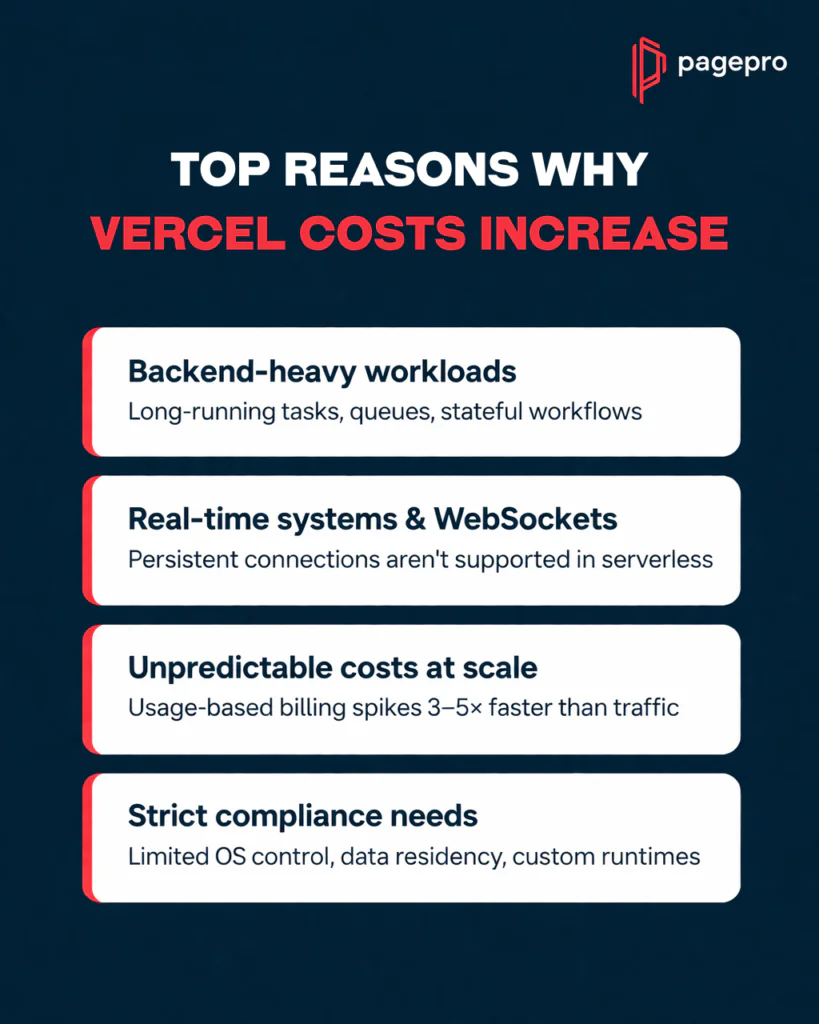
Summary of when Vercel fails in practice
| Failure Mode | Root Cause | Typical Business Impact |
| Costs Escalate at Scale | Usage-based billing + unpredictable patterns | Monthly bills become hard to forecast and control |
| Backend-Heavy Workloads | Stateless, short-lived functions | Forces hybrid architecture or external services |
| Real-Time Systems & WebSockets | No support for persistent connections | Adds complexity and third-party dependencies |
| Compliance & Infrastructure | Limited low-level control | Blocks enterprise-grade or specialized requirements |
Nevertheless, these limitations do not make Vercel a bad platform – they simply define its boundaries. The platform excels when the architecture stays within its intended scope. The moment backend complexity, cost predictability, or deep control become priorities, teams benefit from treating Vercel as a complementary frontend layer rather than the foundation of the entire stack. The next section breaks down Vercel pricing in detail so teams can model real costs before committing.
Vercel Pricing 2026 – Explained
The platform’s usage-based model can feel transparent and fair for efficient applications, but it frequently turns into one of the biggest sources of surprise once traffic grows or certain patterns emerge. In our experience auditing infrastructure for dozens of teams, the key is understanding exactly what drives the bill and how to model it realistically before committing.
How Vercel Pricing Actually Works
Vercel charges based on actual consumption rather than fixed monthly fees. The main cost drivers include:
- Bandwidth (data transferred to visitors)
- Serverless function invocations and execution duration
- Image optimization requests
- Build minutes (especially during preview deployments and large monorepos)
- Edge function executions
The model aligns well with variable traffic and efficient architectures, but it introduces unpredictability when usage patterns shift unexpectedly.
Real Vercel Cost Scenarios (with numbers)
Here are realistic scenarios we model with clients during infrastructure audits (based on typical 2026 usage patterns):
| Scenario | Monthly Traffic / Activity | Approximate Monthly Cost Range | Primary Cost Driver |
| Early-stage SaaS dashboard | 50k visitors, moderate API usage | $50 – $150 | Build minutes + invocations |
| Marketing site with ISR | 500k visitors, heavy image optimization | $200 – $450 | Bandwidth + image optimization |
| Growing e-commerce frontend | 2M visitors + frequent revalidations | $800 – $2,000+ | Bandwidth + invocations |
| High-traffic global app | 10M+ visitors with edge personalization | $3,000 – $8,000+ | Edge executions + bandwidth |
Costs can remain manageable with disciplined architecture but escalate quickly when revalidation logic is inefficient or preview builds run frequently.
Hidden Multipliers That Increase Costs
The factors that surprise teams most often in production include:
- Inefficient ISR revalidation causing excessive function invocations
- Large monorepo builds that consume build minutes on every branch
- Unoptimized images or heavy static assets driving bandwidth charges
- Frequent preview deployments during active development cycles
- Edge functions used for logic that could run at the origin
In several rescue projects we have led, these multipliers increased bills 3–5× faster than traffic growth.
Vercel Cost Optimization Tips
From our experience, to keep Vercel costs predictable, the most effective practices are:
- Implementing smart caching and revalidation strategies to minimize unnecessary function executions
- Using build caching and monorepo optimizations to reduce build minutes
- Compressing and optimize images aggressively before deployment
- Monitoring usage dashboards weekly and set budget alerts
- Splitting heavy backend logic to external services instead of forcing everything into serverless functions
Understanding these pricing mechanics early prevents painful surprises later. When the architecture stays within Vercel’s strengths, costs remain reasonable and predictable. The moment usage patterns change, teams benefit from the decision framework and alternatives covered in the following sections.
Vercel vs Other Platforms (Comparison Table)
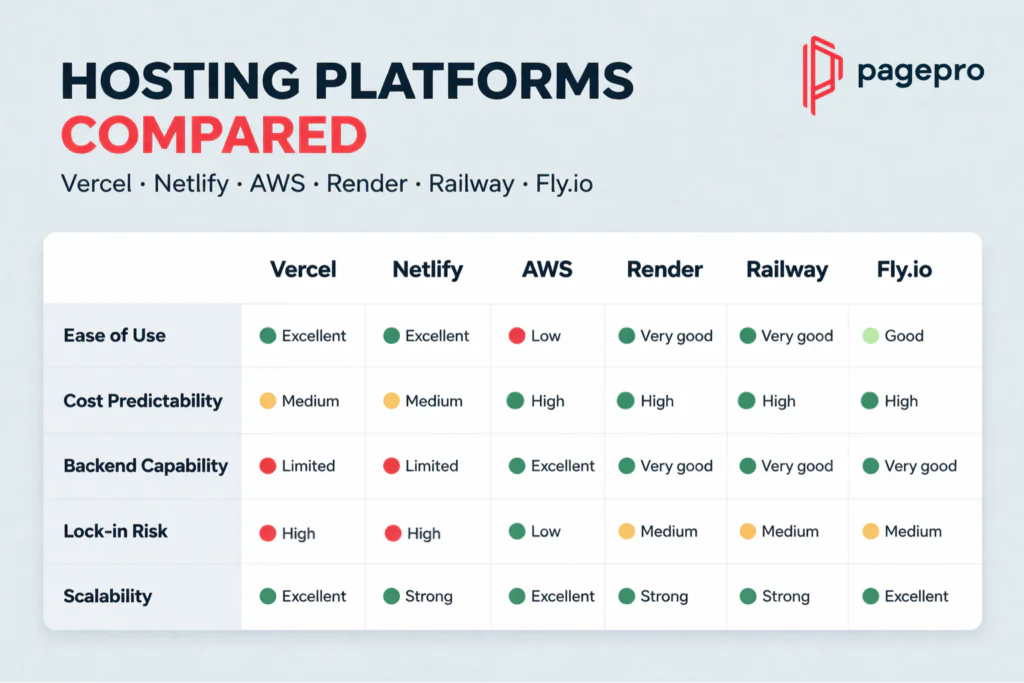
When teams are deciding between Vercel hosting and alternatives, the real differentiators are rarely just price or features – they are ease of use, cost predictability, backend capability, lock-in, and scalability under real production conditions. The table below reflects the patterns we see across client projects.
Vercel vs Netlify, AWS, Render, Railway, and Fly.io
| Platform | Ease of Use | Cost Predictability | Backend Capability | Lock-in | Scalability |
| Vercel | ExcellentGit-native deployments, instant preview URLs, zero-config Next.js integration | MediumUsage-based (bandwidth, invocations, build minutes); costs can spike unpredictably | LimitedStateless, short-lived functions only; no long-running processes or persistent connections | HighDeep Next.js optimizations and platform-specific abstractions | Excellent for frontend/edge workloadsAutomatic global distribution |
| Netlify | ExcellentVery similar Git workflow and preview system | MediumUsage-based with similar consumption risks | LimitedSimilar serverless constraints as Vercel | HighPlatform-specific features and build plugins | Strong for static & JAMstack sitesExcellent CDN performance |
| AWS | LowSteep learning curve, requires significant configuration | HighCan be optimized with Reserved Instances, Savings Plans, and careful architecture | ExcellentFull control over EC2, Lambda, ECS, EKS, databases, and custom networking | LowOpen standards and portable architectures | Excellent across all workloadsHandles any scale or complexity |
| Render | Very goodSimple full-stack PaaS with one-click services | HighPredictable plans + transparent usage metering | Very goodNative long-running services, background workers, cron jobs, and persistent storage | MediumSome platform-specific services but mostly standard | Strong for full-stack applicationsGood balance of simplicity and power |
| Railway | Very goodDeveloper-friendly dashboard and templates | HighUsage-based but highly transparent with clear breakdowns | Very goodContainers, databases, persistent processes, and easy environment variables | MediumMostly standard Docker-based workflows | Strong for full-stack and variable workloadsFast horizontal scaling |
| Fly.io | GoodGlobal edge deployment with simple CLI | HighPredictable per-region pricing and resource-based billing | Very goodContainers & lightweight VMs running close to users | MediumStandard container model with some platform extensions | Excellent for globally distributed appsTrue edge compute with minimal latency |
Teams that stay within frontend-heavy or Next.js-centric architectures almost always choose Vercel or Netlify for speed and simplicity. At the same time, teams with growing backend complexity, real-time needs, or strict cost-control requirements consistently move toward Render, Railway, Fly.io, or a hybrid model with AWS.
From our experience helping CTOs evaluate infrastructure, the right choice depends entirely on where the core complexity lives: frontend velocity versus backend depth and predictability. The next section outlines the best Vercel hosting alternatives by specific use case so teams can make a data-driven decision.
Best Vercel Alternatives (By Use Case)
This is the mapping you can use once you have reviewed the pros, cons, and pricing realities. Vercel is rarely “bad”, it just has clear boundaries. The right alternative depends on where the core complexity lives in the architecture. Below are the patterns we see most often in production environments.
Vercel Alternatives for Full Control: AWS, GCP, and Kubernetes
When teams need complete ownership over infrastructure, persistent processes, or specialized runtime environments, Vercel’s abstraction becomes too restrictive. In these cases we recommend AWS, Google Cloud, or Kubernetes-based setups.
Typical scenarios where we guide clients here:
- Backend-heavy systems with long-running tasks, background workers, or stateful services
- Applications requiring custom networking, GPU workloads, or deep OS-level configuration
- Strict compliance or data-residency requirements that demand full control
These platforms give teams the flexibility to design exactly what they need, even if it means investing more in DevOps capacity.
Vercel Alternatives for Simple Frontends: Netlify and Cloudflare
For purely frontend-driven applications or static/marketing sites, Netlify and Cloudflare often deliver similar or better simplicity than Vercel with fewer cost surprises.
We recommend these alternatives when:
- The project is primarily static or headless CMS-based
- Teams want Git-native workflows and instant previews without heavy Next.js-specific lock-in
- Cost predictability and global CDN performance are priorities without serverless complexity
Many of our clients who started on Vercel for marketing sites later migrated to Netlify or Cloudflare and reported lower operational overhead and more stable billing.
Vercel Alternatives for Full-Stack Apps: Render, Railway, and Fly.io
When applications combine frontend and backend logic but still want a developer-friendly PaaS experience, Render, Railway, and Fly.io frequently become the strongest alternatives.
These platforms perform best in situations where teams need:
- Native support for long-running services, background jobs, and persistent databases
- Containers or lightweight VMs without the stateless limitations of pure serverless
- Predictable pricing combined with fast global deployment
Vercel Alternatives for Enterprises: Custom Setups
For large-scale or highly regulated environments, the best alternative is often a custom or hybrid architecture rather than any single platform.
We most often recommend this choice when:
- Compliance, auditability, or specific security certifications are non-negotiable
- The organization already operates significant internal cloud infrastructure
- Teams require fine-grained control across the entire stack while still leveraging Vercel for the frontend edge layer
Usually, the goal is never to replace Vercel entirely – it is to place it where it delivers the highest leverage and pair it with the right complementary solution. The next section provides a practical decision framework to help teams make this choice quickly and confidently.
When Should You Use Vercel?
After auditing many production architectures, we’ve distilled the decision into three clear categories: when Vercel hosting is the right primary platform, when it should be avoided, and when the hybrid model makes the most sense.
Use Vercel If:
- The application is primarily frontend-driven and built around Next.js
- Speed of delivery and fast iteration are the top priorities
- Teams need instant stakeholder visibility through preview environments
- The project relies on external APIs or lightweight serverless logic
- Predictable simplicity at unpredictable scale matters more than deep backend control
Teams that meet most of these conditions consistently see the highest velocity and lowest operational overhead on Vercel.
Avoid Vercel If:
- The core complexity lives in backend-heavy workloads or long-running processes
- Real-time features, WebSockets, or persistent connections are required
- Strict cost predictability is non-negotiable at scale
- Teams need deep low-level infrastructure control, custom runtimes, or specialized compliance
- The architecture already includes significant containerized or stateful services
These are the exact situations where we have seen teams hit the limits we described earlier and begin exploring alternatives.
Use a Hybrid Model (Vercel + AWS)
A common pattern we implement with scaling companies is a hybrid architecture: Vercel for the frontend and edge layer, combined with AWS (or GCP) for backend services, databases, and anything that needs persistent or long-running compute.
In practice this means:
- Frontend, ISR, edge functions, and global CDN stay on Vercel for maximum performance and DX
- Backend APIs, background workers, queues, and stateful services run on containers or managed cloud infrastructure
- The two layers communicate via clean APIs, with Vercel handling the user-facing experience
This hybrid approach lets teams keep Vercel’s strengths where they matter most while removing the friction that appears when the platform is forced to handle workloads it was never designed for. It is often the most pragmatic and future-proof choice.
The final sections of this guide cover common mistakes and how we actually use Vercel in production at Pagepro – so teams can apply the framework with confidence.
Book a free consultation to choose the best hosting for your company
How Pagepro Uses Vercel in Production
At Pagepro we do not treat Vercel as a universal solution. Instead, we apply it exactly where it delivers the highest leverage and pair it with other tools when the architecture demands more.
Our Approach to Hosting platforms
In production we run a hybrid model on almost every project. The frontend and edge layer run on Vercel and backend is offloaded to more flexible environments. We’re not trying to compromise – it is a calculated architecture decision developed after years of production audits.
Main elements of our production setup include:
- Frontend layer — All Next.js applications, marketing sites, documentation portals, and edge personalization logic are hosted on Vercel. This delivers instant preview environments, automatic global CDN distribution, and zero-configuration optimizations that would otherwise require weeks of manual engineering.
- Backend layer — Databases, long-running services, background workers, real-time features, and any stateful logic run on AWS or a dedicated PaaS (Render or Railway). Communication between layers happens exclusively through clean, versioned APIs.
- Cost and performance governance — We monitor Vercel usage weekly, enforce strict caching and revalidation strategies, and maintain build-minute budgets. As soon as traffic or complexity exceeds early-stage thresholds, we proactively assess whether the frontend should remain on Vercel hosting or migrate to a more cost-predictable alternative.
This separation keeps Vercel’s speed and developer experience exactly where they matter most and eliminates the architectural limits and cost unpredictability we have discussed earlier in this guide.
Conclusions: Vercel Is Powerful, But Not Universal
Vercel is a really powerful platform that can speed up delivery significantly, but only when it fits the project.
We’ve worked with enough scaling teams to know it performs best in specific situations and hits limits in others. Here’s what we’ve learned in practice:
- It works best for frontend-heavy apps built with Next.js where speed of delivery and fast iteration are the top priorities
- It removes almost all infrastructure headaches and gives instant preview environments and global performance right out of the box
- It starts to constrain teams once they need long-running backend processes, real-time features, WebSockets, or strict cost predictability at scale
- The smartest teams run Vercel only for the frontend and edge layer inside a hybrid architecture, never as the entire stack
If you’re evaluating Vercel hosting for a real production application and want an honest, experience-based opinion on whether it’s the right fit, we can help.
Ready to get a clear answer for your specific hosting setup?
Book a free 30-minute Vercel architecture review with Pagepro
FAQ
Vercel is a managed cloud platform designed as the Frontend Cloud. Its primary use is to host, deploy, and globally distribute modern frontend and full-stack JavaScript applications – especially those built with Next.js – while removing almost all infrastructure management. It combines global CDN distribution, serverless execution, edge computing, automated CI/CD, and instant preview environments so teams can ship faster without dedicated DevOps resources.
Yes. Vercel is a fully managed hosting platform that handles the entire delivery pipeline: building, deploying, serving, and scaling applications worldwide from a single Git repository.
Vercel offers both a generous free Hobby tier and paid Pro/Enterprise plans. The free tier is suitable for personal projects and very early-stage experiments, while production applications at scale almost always require a paid plan.
Vercel uses usage-based pricing. For efficient, frontend-heavy applications the cost is often very reasonable. However, once traffic grows or certain patterns appear (high bandwidth, frequent serverless invocations, or large preview builds), monthly costs can increase rapidly and become difficult to forecast.
Vercel does not charge per user. Pricing is based on actual consumption: bandwidth transferred, function invocations, image optimization requests, build minutes, and edge executions. There is no seat-based or per-user fee.
Yes. Vercel is used in production by many large-scale companies and is considered a reliable, enterprise-grade platform. The company has a strong track record for uptime, security, and performance. As with any platform, trustworthiness also depends on whether the architecture fits Vercel’s strengths – something we evaluate carefully with every client.
Deployment and infrastructure management on Vercel require no manual coding or server configuration. Once the code is pushed to Git, Vercel handles builds, previews, and global deployment automatically. The application itself, of course, must be developed in code (typically Next.js or another modern JavaScript framework).