Headless CMS for SaaS: How to Choose the Right Platform (and Why We Default to Sanity)


The CMS decision for a SaaS company isn’t a blog-tool decision. It’s infrastructure. It touches your marketing site, your docs, your changelog, and your product content simultaneously.
Get it wrong and you’re either locked into a vendor whose pricing scales faster than your team, or maintaining your own CMS server when you should be building product. Get it right and your content team ships independently, your pages rank, and your engineers never think about the CMS at all.
After building content platforms for SaaS companies on this stack — including a 100,000-page migration that preserved every ranking — here’s how we’d make the decision.
What SaaS Companies Actually Need from a CMS
Most “how to choose a CMS” articles hand you the same generic checklist: ease of use, integrations, scalability. That describes every CMS on the market and helps you pick none of them.
Here’s what actually separates a CMS that works for a SaaS company from one that becomes a bottleneck within a year:
- Content reuse across surfaces. Your marketing site, docs, changelog, and in-app help center all pull from the same content. A CMS that can’t serve structured data to multiple frontends forces you to duplicate content across systems — and duplicated content drifts out of sync within weeks.
- Editorial independence from engineering. Marketing needs to ship landing pages, update pricing copy, and publish case studies without filing a dev ticket. Every CMS claims this. Few deliver it once the content model gets real.
- Structured content that feeds Next.js rendering strategies. SSG for docs. ISR for changelog. RSC for the marketing site. The CMS needs to expose typed, queryable data that maps cleanly onto these modes — not dump a blob of HTML and hope the frontend sorts it out.
- Preview and webhook-driven revalidation. Editors need to see what they’re publishing in the real layout. When they hit publish, only the affected page should update — not a full site rebuild that blocks every other change in the queue.
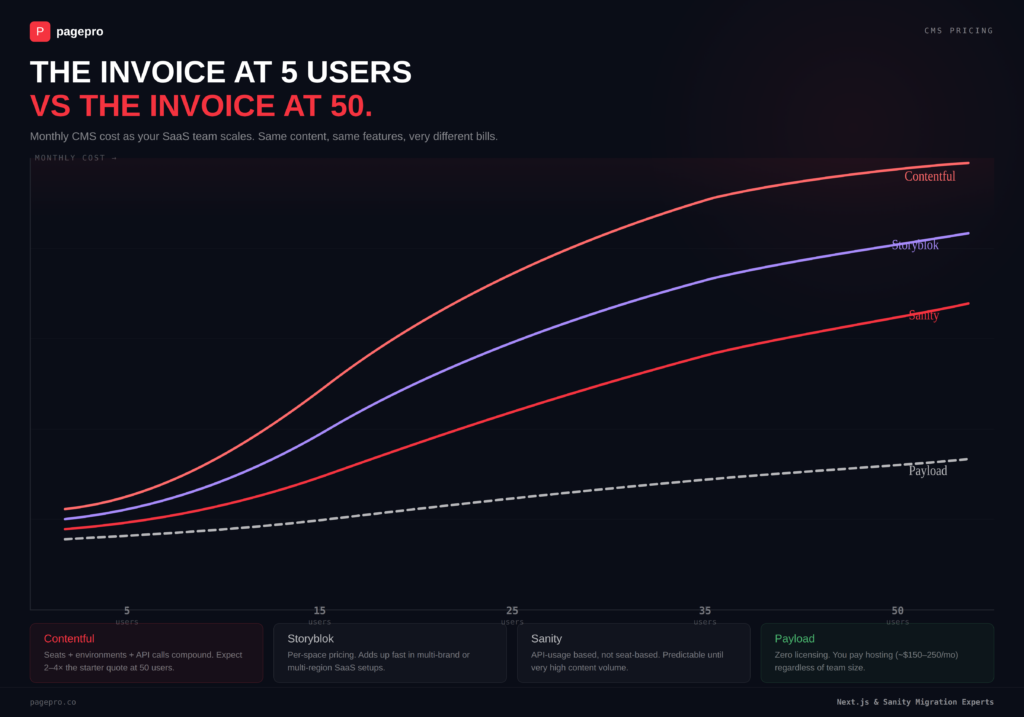
- Pricing that doesn’t spike with your team. Seat-based pricing looks fine at 5 users. At 30 editors, 10 developers, and 3 environments, the same CMS costs 4× what the original quote suggested.
If your marketing team files a dev ticket to fix a typo on the pricing page, your CMS is the bottleneck — not your engineering velocity.
The Headless CMS Landscape for SaaS in 2026
Five platforms worth evaluating. Not ten — half the options in most roundups are either monolithic CMS platforms dressed up as headless, or niche tools that solve one problem and create three others. These five cover the real decision space for a SaaS company building on Next.js.
| Platform | Content modeling | Editorial UX | Next.js integration | Pricing at 20–100 person scale | Self-host or managed |
| Sanity | Code-defined schemas, GROQ queries, TypeGen types | Customizable Studio, real-time collab, Presentation Tool | Deep — Draft Mode, webhook revalidation, Visual Editing, App Router native | Scales with API usage, not seats. Predictable until very high volume. | Managed (Content Lake) + self-hosted Studio |
| Payload | Code-first, TypeScript-native, lives inside your Next.js /app folder | Admin UI auto-generated from schema, less customizable than Sanity Studio | Native — it is a Next.js app. Same repo, same deploy. | Zero licensing. You pay for infrastructure (~$150–250/mo hosting). | Fully self-hosted |
| Storyblok | Visual, component-based blocks | Best-in-class visual editor for non-technical teams | Good — official Next.js SDK, visual preview. Less granular than Sanity’s GROQ. | Per-space pricing. Adds up in multi-brand or multi-region setups. | Managed SaaS |
| Contentful | Flexible but rigid editing UI | Mature, well-known, functional but uninspiring | Solid — REST + GraphQL, good SDK. Preview and revalidation require more setup. | Expensive at scale. Seats + environments + API calls compound fast. | Managed SaaS |
| Strapi | Fully customizable, self-hosted | Good admin panel, plugin ecosystem | Works but not native. Webhook revalidation is manual setup. | Free to self-host. You own the CVE patch cycle and infrastructure. | Fully self-hosted |
The table tells you what each platform does. The next two sections tell you which one to actually pick, and when.
Why We Default to Sanity for SaaS
Sanity isn’t the only headless CMS that works. It’s the one where the gap between “works in a demo” and “works in production at scale” is smallest, specifically for SaaS companies building on Next.js.
Three things earn that default status.
GROQ gives you exactly the data the page needs. Not a fixed REST shape. Not a GraphQL schema you have to maintain separately. GROQ projects exactly the fields each component requires, which means your Server Components fetch small, purpose-built payloads instead of over-fetching a document tree for three fields. Here’s what a SaaS changelog query actually looks like:
groq

*[_type == "changelog" && !(_id in path("drafts.**"))] | order(publishedAt desc)[0...10] {

  title,

  publishedAt,

  "slug": slug.current,

  summary,

  category->{ title, "slug": slug.current },

  content

}
TypeGen turns that schema into TypeScript types at build time. Rename a field in Sanity, and your Next.js build fails with a compiler error instead of silently rendering undefined on a live page your customers see.
Real-time collaboration that actually changes editorial velocity. Multiple editors working on the same document simultaneously, with presence indicators and no merge conflicts. For a SaaS content team pushing out release notes, docs updates, and landing pages in parallel, this is the difference between a sequential publishing queue and genuine parallel output.
Presentation Tool closes the preview gap. Editors see their changes in the real Next.js layout, live, as they type. Not a preview button that opens a separate tab. Not a sandbox that approximates the design. The actual production layout, rendered in real time, inside Sanity Studio.
When Sanity Isn’t the Right Call
Same principle as the previous article: being honest about the exceptions is what makes the recommendation credible.
Data sovereignty is non-negotiable. Sanity’s Content Lake is managed SaaS — your content lives on their infrastructure. For FinTech or HealthTech SaaS where regulatory compliance demands full data ownership, Payload is the stronger call. It lives inside your Next.js /app folder, deploys on your infrastructure, and has zero vendor dependency. The trade-off is real: your team owns the hosting, the backups, and the upgrades. That’s engineering capacity you’re committing permanently, not just at setup.
Marketing needs to build pages without any developer involvement. Sanity Studio is powerful but developer-configured. Storyblok’s visual editor lets a marketing manager drag components into a page layout and publish, no schema knowledge required. If your engineering team is small and your marketing team is large, that ratio matters more than content model flexibility.
You’re already deep in Contentful and the migration cost exceeds the benefit. Contentful’s editorial UX is uninspiring and its pricing compounds fast, but if your team has two years of content models, workflows, and integrations built on it, the cost of migrating may exceed the cost of staying. We’d run the numbers with you before recommending a move, not after.
None of these exceptions invalidate Sanity. They define the boundaries where a different trade-off wins — and knowing those boundaries upfront is cheaper than discovering them mid-project.
How a Headless CMS Connects to Your SaaS Frontend
Architecture diagrams are easy to draw. The part that actually determines whether this stack works in production is the connection layer: how content gets from the CMS to the page, and how fast that happens after an editor hits publish.
Three patterns matter for SaaS, and they map to different content types:
Marketing pages → React Server Components. The homepage, pricing page, feature pages — mostly static, rarely interactive. Server Components render them as HTML with zero client JS. The CMS delivers structured content via GROQ, the component renders it, nothing ships to the browser that doesn’t need to.
Docs and changelog → ISR with on-demand revalidation. Pre-rendered at build time via generateStaticParams, then updated page-by-page when content changes. An editor publishes a new changelog entry, Sanity fires a webhook, and only that page regenerates:
tsx

// app/api/revalidate/route.ts

import { revalidatePath } from "next/cache";

import { NextRequest, NextResponse } from "next/server";

export async function POST(req: NextRequest) {

  const secret = req.nextUrl.searchParams.get("secret");

  if (secret !== process.env.REVALIDATE_SECRET) {

    return NextResponse.json({ ok: false }, { status: 401 });

  }

  const { type, slug } = await req.json();

  if (type === "changelog") revalidatePath(`/changelog/${slug}`);

  if (type === "doc") revalidatePath(`/docs/${slug}`);

  return NextResponse.json({ revalidated: true });

}
No full rebuild. No deploy. No developer involved. The editor publishes, the reader sees the update within seconds.
Draft preview → Sanity Presentation Tool + Draft Mode. Editors see unpublished content in the real Next.js layout, live, as they type. draftMode() flips the route to fetch draft content from the API. The preview is the production layout, not a separate sandbox that approximates it.
This is the layer none of the competitor articles cover at all — and it’s the layer where CMS decisions actually succeed or fail in production.
Proof: What This Stack Looks Like in Production
Claims are cheap. Here’s what this stack — Next.js + Sanity, migrated and delivered through Nexity, our proprietary migration framework — actually produced on a real SaaS-scale project.
GPNotebook is a UK medical reference platform. Over 100,000 clinical pages, multiple sub-brands, editorial teams publishing daily, and a legacy CMS that had become the single biggest bottleneck to all of it.
| Metric | Result |
| Pages migrated | 100,000+ clinical reference pages |
| Traffic handled | 1M+ monthly users, 100,000+ daily page views |
| SEO impact | 0 ranking drops — full URL parity + 301 redirect mapping |
| Performance | ~70% improvement over the legacy platform |
| Editorial workflow | Content team fully independent of engineering |
| Localization | Multiple sub-brands unified, DeepL-powered translation |
That’s one project. The pattern holds across 20+ Next.js + Sanity migrations delivered through Nexity, with zero SEO ranking drops on record across all of them.
A second data point from a different angle: Learn Squared moved from Drupal 7 onto this stack and shipped a 24% revenue increase within 26 days of launch, alongside a 35% cut in hosting costs.
The 4-week Nexity engagement covers discovery, content migration, core build, and stabilization — scoped and priced before any code is written.
Common Mistakes SaaS Teams Make When Choosing a CMS
Every one of these shows up in takeover audits we run before a migration. They’re predictable, expensive, and avoidable if you know what to look for upfront.
- Picking a CMS by trend instead of content model requirements. The CMS that looked exciting at a conference still needs to answer: can it model a changelog, a docs hierarchy, a marketing page builder, and a pricing table as separate structured types? Most trend picks were never tested against that complexity.
- Mixing monolithic and headless in the same evaluation. WordPress and Sanity don’t belong in the same comparison table. One owns your rendering layer. The other doesn’t. Evaluating them side-by-side confuses the architectural decision with the vendor decision, and you end up choosing neither well.
- Ignoring preview and publishing workflows until editors complain. The first six months are engineering-driven, so nobody notices. Then marketing starts publishing, discovers they can’t preview in the real layout, and routes around the CMS entirely — pasting content into Notion docs and asking developers to copy it over.
- Underestimating seat-based pricing at scale. A CMS that costs $300/month at launch costs $2,000/month eighteen months later once you add editors, environments, and locales. The pricing page showed you the starter tier. The invoice shows you the real one.
- Treating the CMS as a blog tool instead of content infrastructure. Your SaaS CMS serves docs, changelogs, marketing pages, help center content, and potentially in-app messaging. Choosing it like you’re choosing a blogging platform is how you end up migrating again in two years.
Choosing Well
The CMS decision is one of the few infrastructure choices that touches every team in a SaaS company simultaneously. Engineering builds on it. Marketing publishes through it. Product documents inside it. Pick wrong and you’re either migrating again in two years or building workarounds that cost more than the migration would have.
If you’re evaluating this decision right now, here’s the shortest version of this entire article:
Sanity + Next.js if you want managed infrastructure, structured content, and the deepest frontend integration available. Payload if you need full data ownership and have the engineering team to back it. Storyblok if marketing autonomy is the constraint, not content model flexibility.
Everything else — the rendering strategies, the revalidation patterns, the content modeling, the editorial workflows — follows from getting that first decision right.
We’ve made this decision 20+ times with SaaS companies, built the migration framework to execute it, and shipped every one with zero SEO ranking drops. If you want to pressure-test your CMS choice against a team that’s done it before, talk to us about your project.