• Next.js is a popular framework for building modern web applications using React with built-in tools for routing, rendering, and performance optimization.
• The framework supports multiple rendering methods such as server-side rendering, static site generation, and hybrid approaches to improve performance and SEO.
• Next.js simplifies application architecture by providing file-based routing, API routes, and integrated tooling for building full-stack web applications.
• Developers often choose Next.js to build scalable websites, SaaS platforms, and high-performance web applications.
• The framework integrates easily with headless CMS platforms, APIs, and modern deployment platforms to support flexible development workflows.
• Understanding how Next.js works helps teams decide when it is the right framework for building modern React-based web projects.
What is Next.js?
Developed by Vercel, Next.js is built on top of React. It’s a full-stack framework, meaning it can handle both frontend and backend development tasks in a single project. It has become one of the most recommended frameworks for React-based web applications.
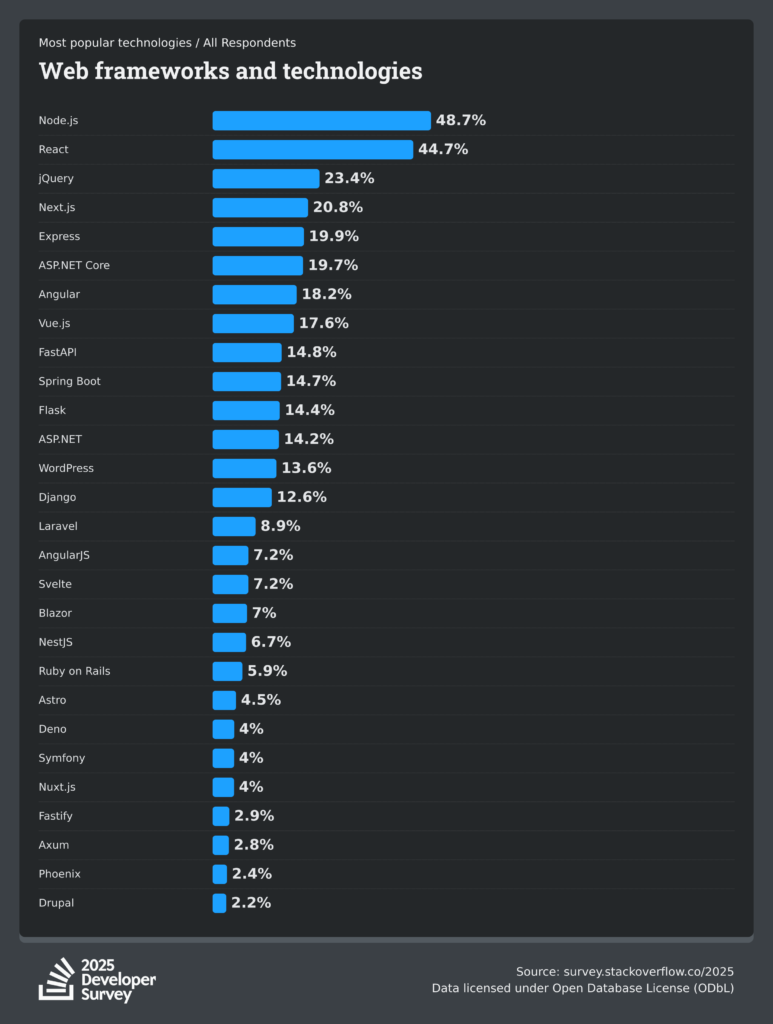
The 2025 Stack Overflow survey listed it as the fourth most popular among web frameworks and technologies.
Versatile features, like server-side rendering (SSR), incremental static regeneration (ISR), and integrated API routes, offer flexibility for React developers and NextJS teams.
How Next.js Works
Next.js provides a set of features (like SSR, SSG, file-based routing, and API routes) that make it easier and faster to build modern web applications with React. You can read more about it in the official Next.js docs.
What’s New in Next.js 15
The Next.js 15 introduced a series of transformative updates that reshaped both dev experience and production performance. Across its minor releases, the framework refined React 19 support, redefined caching behavior, stabilized experimental features, and began preparing for version 16.
React 19 Integration: Started with RC support in 15.0, reaching full stable support in both App and Pages Router by 15.1. It improved hydration error handling and introduced the experimental React Compiler.
New API and Caching Semantics: Request APIs (cookies, headers, params, searchParams) became asynchronous in 15.0, requiring codemod-assisted migration. Caching behavior changed as well. GET route handlers and client router cache are now uncached by default, making caching an explicit choice. The after() API moved from experimental (15.0) to stable (15.1), allowing tasks to run after responses.
Developer Experience: Error handling was improved by redesigning error UI and stack traces in 15.2, highlighting actual error sources and integrating React’s owner stacks. Improved debugging, new Auth utilities, navigation hooks, and better observability further elevated the DevEx in NextJS
Turbopack Maturity: Turbopack builds have achieved full compatibility (8,298 tests passed) and now power production sites like vercel.com.
Version 15 also includes plenty of experimental features:
Streaming Metadata (15.2): Enables faster initial UI rendering while metadata streams in.
React View Transitions API (15.2): Smooth page-to-page animations under a feature flag.
Node.js Middleware Runtime: Experimental in 15.2, stable by 15.5
Rspack Support (15.3): A Webpack-compatible alternative build system via plugin.
CacheComponents (15.4 preview of Next.js 16): A unified caching layer that brings together existing cache features, use cache, and partial prerendering.
Next.js 15 feels like a turning point. React 19 is fully supported, caching became more predictable, and Turbopack achieved full maturiy. For us, that means less time fighting performance bottlenecks and more confidence in how apps behave at scale. Next.js is a stable tool, that still pushes innovation and creativity.
Rafal Dabrowski, Next.js Expert at Pagepro
Why Choose Next.js for Web Development?
In 2026, we have plenty of tools to choose from for React application development. Small startups and global brands like Spotify and Nike, more teams are choosing Next.js to power their web apps. But what is Next.js, and what makes it stand out?
Since it’s a JavaScript framework, Next.js supports building performant JS web apps, providing developers a familiar foundation. To show why it’s a framework worth considering for your project, I’ll discuss its core features and explore the most common use cases.
Before we do that, however, we should start with the basics.
NextJS is currently one of the most popular frameworks for web applications. Its advanced features made it the favorite of developers and companies alike.
Hybrid Rendering
The ability to mix Server-Side Rendering and Static Site Generation, with Client-Side Rendering (CSR) within a single application is a major perk. Developers can choose whether to pre-render content at build time or handle it at runtime, optimizing performance, SEO, and user experience. For example, using SSG for blog posts, SSR for dynamic user dashboards, and CSR for interactive components.
Serverless and Edge Functions
The framework supports serverless deployment and edge functions, allowing devs to run code closer to users for faster response times, and limiting the need for complex server management.
Incremental Static Regeneration (ISR)
ISR allows static pages to be updated without a full rebuild, making it possible to serve up-to-date content while maintaining the speed of static generation.
File-Based Routing
Next.js uses file-system based routing, meaning you can use folders and files to define routes. There is no router configuration file to maintain — the URL structure of your application mirrors your folder structure directly.
How it works in practice:
Create a file inside the app/ directory (App Router) or pages/ directory (Pages Router), and it becomes a route automatically:
app/
├── page.js → /
├── about/
│ └── page.js → /about
└── blog/
└── page.js → /blog
Each page.js file exports a React component that renders at that route:
Dynamic routes work the same way — wrap the folder name in square brackets to capture a variable segment:
app/
└── blog/
└── [slug]/
└── page.js → /blog/hello-world
/blog/nextjs-guide
/blog/any-slug
Next.js supports pages with dynamic routes. For example, if you create a file called pages/posts/[id].js, then it will be accessible at posts/1, posts/2, etc.
You can access the dynamic segment inside the component through params:
Co-location — loading states, error boundaries, and page components all live in the same folder
API Routes
The ability to create backend API endpoints directly within a NextJS project supports full-stack development without the need for separate server infrastructure. You can build complex applications much easier, thanks to simplified data fetching, processing, and handling.
Built-In Image Optimization
The Image component automatically optimizes images, resizing them and serving modern formats, which boosts page load. This feature saves developers from handling image optimization and unifies UX across different devices.
Get the CTO’s Ultimate Guide to Next.js
Discover the full potential of Next.js. Gain insights into advanced methodologies and real-world applications tailored for technology pioneers.
PDF
Thank you for signing up. Check your e-mail for the guide.
How Does Next.js Compare to Other Frameworks?
Choosing the right framework depends on your project’s requirements. Here’s how Next.js stacks up against the most common alternatives.
Next.js vs React
React is a UI library, not a framework. It handles component rendering but leaves routing, data fetching, and performance optimizations entirely to you. Next.js is built on top of React and adds everything React doesn’t include out of the box.
React only handles the “view” layer, meaning you’ll need to integrate additional tools for routing, data management, and more. This can add complexity to your project. Next.js removes that overhead by providing sensible defaults for both.
The rendering difference is the most practically significant one. Plain React ships an empty HTML shell to the browser. The JavaScript bundle downloads, executes, and renders the UI on the client — the user sees a blank screen or loading spinner until JavaScript finishes. Slow networks mean slow first paints, and search engine crawlers may not execute JavaScript, which means invisible content.
Next.js solves this with SSR, SSG, and ISR, meaning pages arrive pre-rendered and ready to index. If you’re building a production application that needs SEO, fast load times, and a scalable architecture, Next.js is the more practical choice. If you’re building an internal tool or a SPA where SEO is irrelevant, plain React gives you that flexibility without the framework overhead.
Next.js
React
Routing
File-based, built-in
Manual (React Router or similar)
Rendering
SSR, SSG, ISR, CSR
CSR only (by default)
SEO
Strong out of the box
Requires additional setup
Full-stack
Yes (API routes)
No
Learning curve
Moderate
Lower initially
Next.js vs Gatsby
Gatsby is a static site generator also built on React. It excels at content-heavy sites with data pulled from multiple sources at build time. The key practical difference comes down to how each framework handles content updates at scale.
According to the official Next.js docs, Incremental Static Regeneration (ISR) enables you to use static-generation on a per-page basis, without needing to rebuild the entire site. With ISR, you can retain the benefits of static while scaling to millions of pages.
Gatsby’s equivalent is Deferred Static Generation (DSG), but it works differently. A deferred page, upon first request, will result in a cache miss within Gatsby Hosting. Upon cache miss, Gatsby Hosting will then ask for that page to be generated by a Gatsby Cloud worker. Once that page is generated, it’s then cached at the CDN so that subsequent requests operate like any other static page.
With Next.js ISR, by contrast, users always receive a cached response immediately while regeneration happens silently in the background — no cache miss on first visit. For large content sites where freshness and speed both matter, this is a meaningful architectural difference.
For pure content/marketing sites with stable content, Gatsby remains a valid choice. For anything that mixes dynamic and static content at scale, Next.js handles it more gracefully.
Next.js
Gatsby
Primary approach
Hybrid (SSR + SSG + ISR)
Static-first (SSG)
Content updates
ISR — background regen, users always get cache
DSG — deferred to first user request, cache miss on first visit
Dynamic content
Strong native support
Requires workarounds
Full-stack
Yes (API routes)
No native backend
Best for
Apps + content sites
Pure content/marketing sites
Next.js vs Nuxt.js
Nuxt.js is the closest direct equivalent to Next.js — but built for Vue instead of React. Both frameworks offer file-based routing, SSR, SSG, and full-stack capabilities. One significant recent development: in July 2025, Vercel announced the acquisition of NuxtLabs, the team behind Nuxt and Nitro. Nuxt remains MIT-licensed and open source, with existing leadership remaining at the helm. This move could accelerate Nuxt’s growth while blurring the gap with Next.
The decision between the two rarely comes down to framework capabilities. Migrating between frameworks requires significant codebase changes — moving from Nuxt to Next.js involves approximately 40% code rewrite, primarily due to converting Vue single-file components to JSX. So the most important factor is your team’s existing expertise.
Community size affects problem-solving speed. React’s massive footprint means Stack Overflow answers appear quickly, becoming a productivity booster for real-world development. Nuxt’s resources grow fast, but niche problems take longer to solve.
If your team works in React, Next.js is the natural choice. If your team works in Vue, Nuxt is.
Next.js
Nuxt.js
UI library
React
Vue
Rendering
SSR, SSG, ISR, CSR
SSR, SSG, CSR, universal rendering
Backend
API routes
Nitro server runtime
Hosting
Optimised for Vercel
Vercel, Netlify, Cloudflare Workers, Node
Community
Larger (React ecosystem)
Smaller, growing fast post-Vercel acquisition
Next.js Performance and SEO
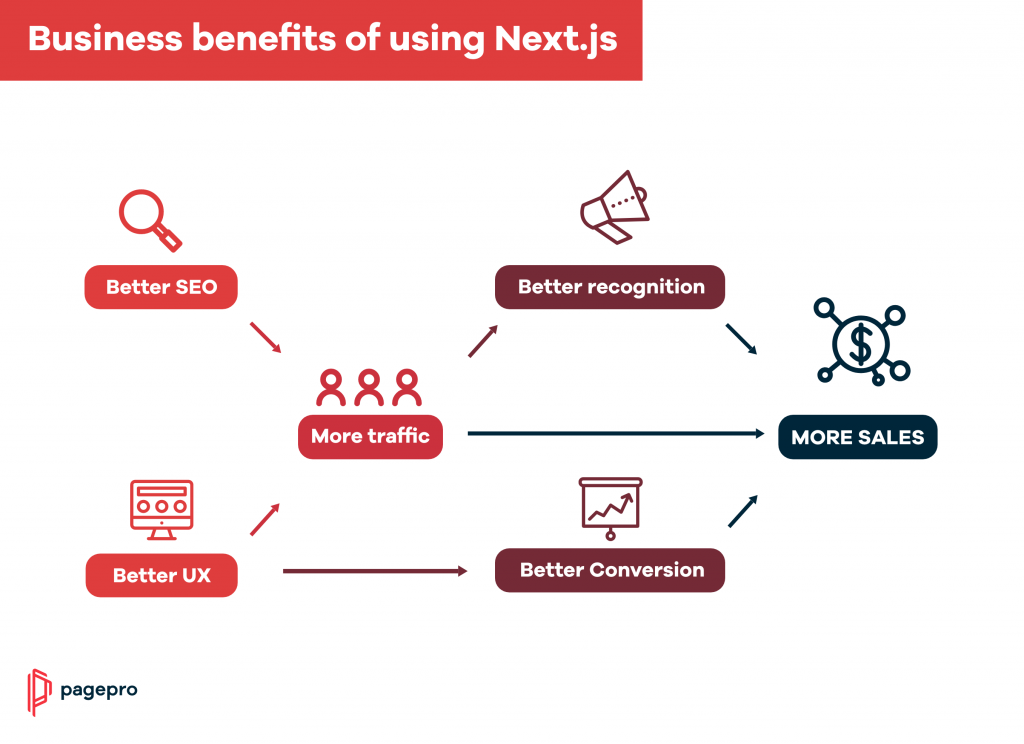
This framework provides features that impact both UX and SEO. Its support for SSG and SSR improves page load times, an important factor for user retention and search engine rankings.
Built-in functions like image optimization and lazy loading improve performance across devices, contributing to better UXs and reduced bounce rates.
Moreover, the pre-rendered content from SSR improves visibility on search engines, potentially attracting organic traffic. These capabilities allow developers to build responsive, efficient, and search-friendly applications.
What is Next.js Used For?
Next.js can be used to build many different types of projects, such as:
Its capability to manage high-traffic websites has made Next.js a trusted choice for some of the largest companies on the market, so here are 3 examples of web applications built in Next.js:
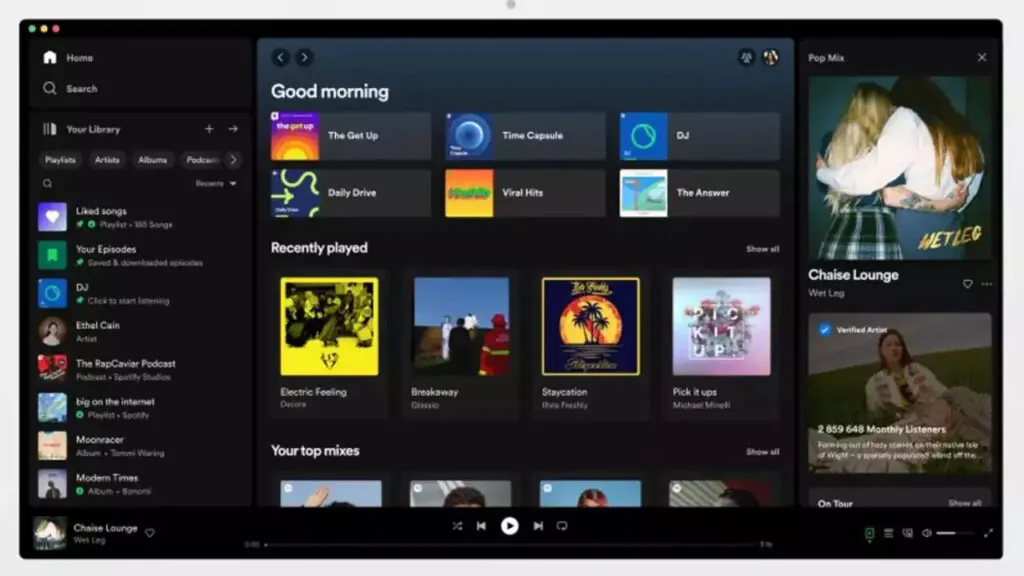
Spotify
Source: Spotify
A top music streaming service in the world, Spotify allows fans to enjoy their favourite artists anywhere they go.
Proofed
Source: Proofed
A professional editing and proofreading service helping individuals and businesses improve their written content. Their team includes experts who can provide quick turnaround times while maintaining high-quality standards.
Proofed
MVP Development for the Leading Professional Proofreading and Editing Services Company
An AI model by Anthropic, Claude generates text for tasks like answering questions and engaging in conversations. It’s one of the AI models prioritising safety and ethics.
Nike
Source: Nike
Known for its iconic products and innovative designs, Nike is a global leader in sportswear. The company designs, manufactures, and markets athletic footwear, apparel, and accessories appreciated by athletes from all walks of life and levels of skill.
EXPERT INSIGHTS, FRICTIONLESSLY DELIVERED!
Curated tech news delivered straight to your inbox every month.
Why We Chose Next.js for Our Web Page
The decision to use Next.js for our website was both strategic and practical. Search engine optimization was an important consideration since we rely on organic traffic and invest heavily in SEO. This framework provides the technical foundation to support those efforts.
Page speed is another priority. The framework’s ability to deliver fast loading times enhances the UX while reinforcing our SEO strategy. In terms of content management, using a modern decoupled architecture with Next.js offers us free reign over the frontend, letting our marketing team integrate tools like Storybook for dynamic content management.
And let’s not forget our developers. They appreciate the framework for its efficiency, scalability, and active community support.
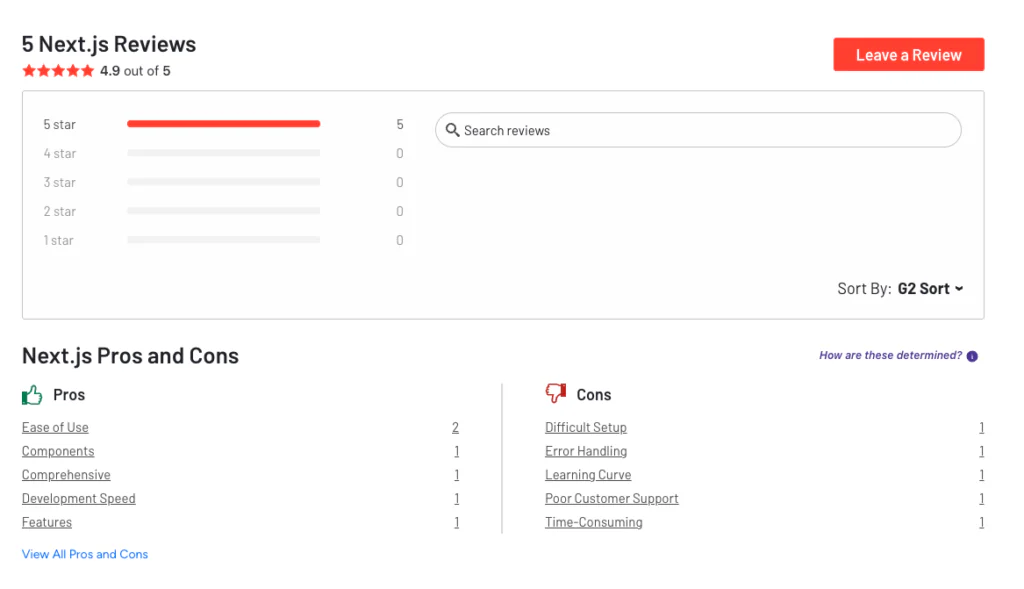
Pros and Cons of Next.js
Next.js is a great framework for building websites and apps. While it boasts many powerful features, it does have a few disadvantages. Have a look at the Next.js pros and cons:
Advantages of Next.js for Business
Scalability and Security
Since this framework is built to handle complex, high-traffic websites and applications, it’s great for businesses that require scalable and highly customizable solutions. It also addresses key security concerns, such as authentication and data validation, ensuring user trust and data integrity.
Performance Optimization
Next.js boosts performance with features like lazy loading, image optimization, automatic code splitting, and route prefetching, ensuring faster load times and a better UX.
One of our clients, an e-learning platform, migrated from an outdated Drupal tech stack to Next.js and Sanity with our help. This transition resulted in significant performance improvements and enhanced security.
Learn Squared
Boosting the Performance of e-Learning Platform with Next.js
The framework speeds up development with pre-built components. It’s ideal for building MVPs quickly and efficiently, reducing time and cost to market.
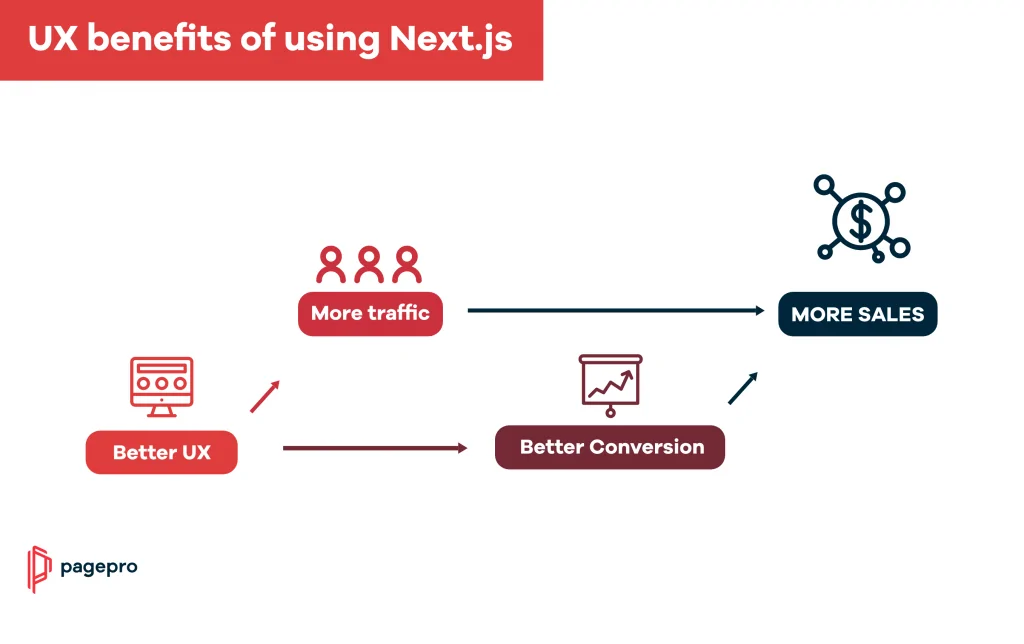
Improved User Experience and Increased Traffic
This React framework allows businesses to create customized, fast, and lightweight static sites that align with their design vision and goals. As these sites are SEO-friendly, they improve search rankings and drive organic traffic.
Omnichannel Presence
Next.js also ensures accessibility across all devices, resulting in an omnichannel presence. Fast load times and an enhanced UX contribute to higher conversion rates, as satisfied users are more likely to return and engage.
The universal compatibility of Next.js ensures modern web solutions function flawlessly across all devices, broadening customer reach and accessibility. We’ve seen improvements in conversion rates and performance since adopting Next.js
Jakub Dakowicz, CTO at Pagepro
Cost Efficiency
Hosting on Vercel not only helps your apps and websites keep stellar performance but also lowers costs. It’s all due to the integration between Next.js and the hosting environment.
Get Next.js Vercel Cost Optimization Guide
Learn real-life techniques to optimize the hosting costs of your Next.js apps.
Thank you for signing up. Check your e-mail for the guide.
AI Integration
Next.js allows devs to incorporate advanced AI technologies into their applications through built-in support for the Vercel AI SDK.
Unified Full-Stack Development
This technology offers comprehensive full-stack capabilities, streamlining development by building entire applications with a single, unified framework. It reduces the need for multiple tools, which improves efficiency and developer experience.
Rich Ecosystem
This framework benefits from a strong ecosystem, supported by companies like Vercel and Meta, with a large, active community. Developers can easily access resources, plugins, and a vast talent pool, making it easier to recruit and share knowledge.
While very versatile and performance-friendly, building with NextJS comes with a few roadblocks. Here are some of the potential issues to consider before implementing it in your tech stack.
Development and Management
The flexibility offered by Next has its cost – continuous management. To make all desired changes properly, you will need a dedicated person, familiar with the system, to manage it. The good news is that this person doesn’t have to be a developer!
Ongoing Cost
Since Next.js does not provide many built-in front pages, you have to create one yourself. The frontend will require changes or updates from time to time, meaning you’ll have to hire a dedicated dev to get the job done.
No Built-In State Management
Like many frameworks, it does not include built-in state management. Developers can integrate popular solutions like Redux, MobX, or React’s Context API to handle state the way they want.
Enterprise Considerations for Next.js
Next.js is production-ready for enterprise deployments, but teams making a long-term commitment to the framework should understand three areas before architecting their stack: deployment flexibility, vendor dynamics, and security patch management.
Deployment Flexibility
Next.js can be deployed as a Node.js server, Docker container, static export, or adapted to run on different platforms — including any provider that supports Node.js. Since Next.js supports static exports, it can also be deployed and hosted on any web server that serves HTML/CSS/JS static assets, including AWS S3, Nginx, or Apache.
That said, there are practical trade-offs when deploying outside Vercel. Key ones to plan for:
ISR at scale: When self-hosting, ISR is limited to a single region workload. Statically generated pages are not distributed closer to visitors by default, without additional configuration or a CDN.
Reverse proxy: For enterprise teams self-hosting at scale, the official Next.js docs recommend running a reverse proxy like Nginx in front of the Next.js server. A reverse proxy can handle malformed requests, slow connection attacks, payload size limits, rate limiting, and other security concerns — offloading these tasks from the Next.js server and allowing it to dedicate its resources to rendering.
Multi-region and data residency: Teams with strict geographic data requirements will need to configure CDN and caching layers manually. This is achievable but adds infrastructure overhead that Vercel handles automatically.
Vendor Dynamics
Next.js is open source under the MIT licence and governed by Vercel. For most organisations this is a non-issue — the framework is mature, widely adopted, and has an enormous community. Three things worth knowing before committing:
Roadmap ownership: Next.js feature prioritisation is driven by Vercel as a company. Some features are optimised specifically for Vercel’s own platform.
OpenNext: A community-driven open-source initiative working to ensure full Next.js feature parity across all deployment targets. Verified adapters are open source, run the full Next.js compatibility test suite, and are hosted under the Next.js GitHub organisation. The Next.js team coordinates testing with these platforms before major releases. Cloudflare and Netlify are currently building verified adapters on this foundation.
Exit path: The framework is MIT-licensed, self-hostable on any Node.js infrastructure, and has a large enough ecosystem that migration — while significant — is not a lock-in trap. The real switching cost is institutional knowledge, not licensing.
Security Patching
Like any widely adopted open-source framework, Next.js has had critical security vulnerabilities. The most significant recent example: in March 2025, CVE-2025-29927 — a middleware authorisation bypass — was disclosed and patched. Next.js published an advisory detailing a vulnerability that could allow a remote attacker to bypass security checks, including many forms of authentication. Self-hosted Next.js applications using middleware were affected.
Patches were released across multiple supported versions: 12.3.5, 13.5.9, 14.2.25, and 15.2.3. Three security practices every enterprise Next.js team should have in place:
Stay current: Subscribe to nextjs.org/blog for official security advisories and treat Next.js version updates as part of your regular release cycle, not a one-off task.
Layer your auth: Treat middleware as one layer of authentication — not the only one. Critical auth checks should also be validated at the data access layer.
Self-hosting ownership: If you are not on Vercel, security patch management falls entirely on your own team. Build an explicit process for tracking and applying Next.js security updates before you go to production.
Get Started with Next.JS Framework
Next.js is a versatile framework that balances flexibility and scalability. Its features make the framework ideal for a variety of projects, from simple static sites to complex web applications.
It simplifies development with easy setup, great performance optimizations, like React compatibility, and integrated tools, all while ensuring excellent SEO benefits.
Next.js applications and websites are a great investment into future of your project. Established companies like Spotify, Anthropic, Nike, and Proofed have leveraged NextJS’ capabilities, proving its value for developers and businesses both.
Next.js is a React framework that adds features like server-side rendering, static site generation, and file-based routing. It helps developers build fast, SEO-friendly, and scalable applications.
Is Next.js Better than React?
React is a library for building UI components, while Next.js is a framework built on top of it. Next.js is often better for production apps because it includes routing, rendering options, and performance optimizations out of the box.
Our article Next.js vs React talks more about choosing between the two solutions.
When Should Next.js Be Used?
Next.js is best for projects where speed, scalability, and SEO matter. It’s also worth considering for e-commerce, SaaS products, content-heavy sites, and dashboards.
Is Next.js a Coding Language?
No, Next.js is not a coding language. It’s a framework built on top of JavaScript (and optionally TypeScript). You still write code in JavaScript/TypeScript, but Next.js provides structure and performance features.
Is Next.js Frontend or Backend?
Next.js is mainly a frontend framework, but it also supports backend tasks like API routes and server-side rendering. It can function like a full-stack framework in many projects.
Does Next.js Require a Backend?
Not always. You can build static sites in Next.js without a backend, or add one if your app needs dynamic data, authentication, or database connections.
Is Next.js Worth Learning in 2026?
Yes, Next.js remains one of the most popular React frameworks, widely used by startups and enterprises. Its strong community, frequent updates, and demand in the job market make it a valuable asset in 2026.
How does Next.js compare to Gatsby?
Both are React-based frameworks, but they solve different problems. Next.js supports multiple rendering strategies — SSR, SSG, ISR, and CSR — making it suitable for applications that mix dynamic and static content. Gatsby is static-first and excels at content-heavy sites where all data can be fetched at build time. The practical difference at scale: Next.js uses ISR to update individual pages in the background without a full rebuild, while Gatsby generates pages at build time and requires its own Deferred Static Generation workaround for large sites. If your project is a marketing site or blog with stable content, Gatsby is a solid choice. If it combines dynamic features with content, Next.js handles it more naturally.
Is Next.js better than vanilla React?
They serve different purposes, so “better” depends on what you are building. React is a UI library — it handles component rendering but leaves routing, data fetching, and performance optimisations entirely to you. Next.js is a framework built on top of React that adds all of those things out of the box. For production applications where SEO, page speed, and scalable architecture matter, Next.js is the more practical choice. For internal tools, admin dashboards, or SPAs where SEO is irrelevant, plain React gives you full architectural control without the framework overhead. A useful rule of thumb: if your app needs to be found on Google, use Next.js. If it lives behind a login, React alone may be sufficient.
How does Next.js compare to Nuxt.js?
Next.js and Nuxt.js are the closest direct equivalents in their respective ecosystems — Next.js for React, Nuxt.js for Vue. Both support file-based routing, SSR, SSG, and full-stack development. The choice between them almost always comes down to your team’s existing expertise: if your team works in React, Next.js is the natural fit; if your team works in Vue, Nuxt is. One notable recent development: in July 2025, Vercel acquired NuxtLabs, the company behind Nuxt, meaning both frameworks now share the same parent organisation. Nuxt remains MIT-licensed and open source with its existing leadership in place.